
pankajauengg
Associate II
February 26, 2021
Question

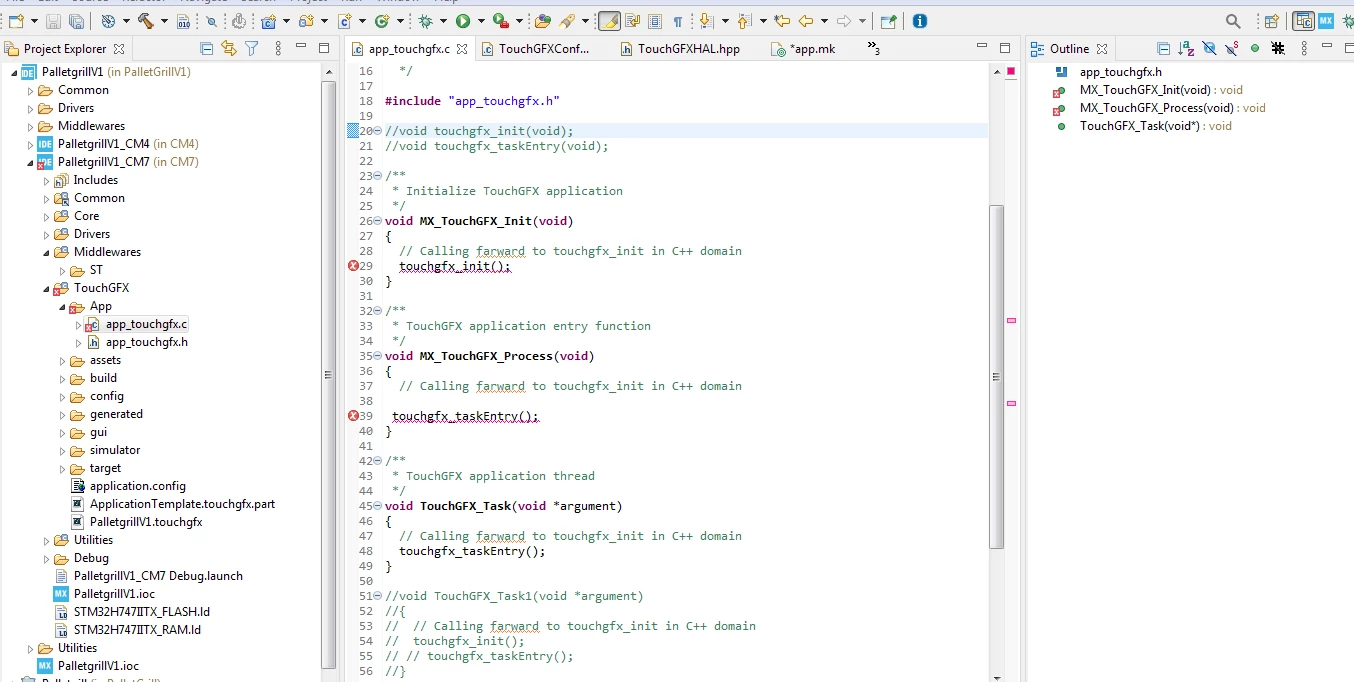
STM32H747IITx undefined reference to `touchgfx_init' its STM32 Cube MX generated code and giving this error.
  • February 26, 2021
  • 3 replies
  • 8802 views

0693W000007ZXNzQAO.pngI can navigate to that from right click and go to declaration. On converting to C++ it starts to give other issues.

This topic has been closed for replies.

3 replies

Khouloud ZEMMELI
ST Employee
February 26, 2021

Hello @Community member​ 

Could you please share your ioc file to check your case?

Thanks,Khouloud

pankajauengg
Associate II
February 26, 2021
Khouloud ZEMMELI
ST Employee
March 1, 2021

Hello @Community member​ 

You're right, issue reproduced and it will be fixed.

Thank you for raising this problem to our attention :)

Khouloud

Ajoub.1
Associate II
July 27, 2021

any solution please, I'm facing the same problem.

Mecanix
Associate III
August 26, 2021

Same bug here. Here's my notes for the workaround which works great at least until this gets resolved.

Steps needs to be followed in the order below... I've numbered them to help with that.

Step 1: Create a New STM32CubeIDE Project

1) In STM32CubeIDE > File > New > Select Part Number > Next > Set ProjectName > Click Finish

2) Enable SYS > Serial Wire (other configs can be made later)

3) Save and close ProjectName.IOC

4) Build Project (Compiling should be successful!)

Step 2: Add TouchGFX 4.17 to the Project

5) Open ProjectName.IOC > Enable CRC > Software Packs > Select Component > TouchGFX 4.17

6) Expand Software Packs > Enable Graphic Application > *LEAVE ALL TouchGFX SETTINGS TO DEFAULT*

7) Save and close IOC *DO NOT BUILD THE PROJECT *

Step 3: Generate TouchGFX 4.17 Templates

8) Double-click on \TouchGFX\ApplicationTemplate.touchgfx.part

9) Select "Blank UI" > Click red Import button > Click Generate Code > Close Designer using the X

Step 4: Clean & Compile Project

10) Right-click ProjectName > Select "Clean Project"

11) Right-click ProjectName > Select "Build Project" (Compiling should be successful at this stage!)

Step 5: ToughGFX Configurations and Code generation

12) Open ProjectName.IOC > Software Packs > TouchGFX > Set Screen Resolution e.g. 240x240, etc

13) Double-click on \TouchGFX\ApplicationTemplate.touchgfx.part, Click Generate Code > Close Designer using the X

14) Right-click ProjectName > Select "Clean Project"

15) Right-click ProjectName > Select "Build Project" (Compiling should be successful at this stage!)

done!

Note: If Partial Buffer is required and selected in the TouchGFX configs:

16) Move attached "TouchGFX_DataTransfer.h" and "TouchGFX_DataTransfer.c" into the \TouchGFX\target\ folder

17) CLEAN PROJECT and Build Project

Karim
Associate III
September 15, 2021

Hi, thank you for sharing your idea.

Have you tested this method? I did step by step many times. but in step 11 still I have same problem..

Mecanix
Associate III
September 15, 2021

Hi. You are correct. Well, half-correct rather! You had me doubting and so I've tried those steps to find out it does not work for every parts. For instance the built failed for a STM32F412RGT6 however it did worked perfectly fine for a STM32H743VIT6.

I'm attaching the successful built (STM32H743VIT6) following the steps above. I've cleaned the project, see if you can build it.

ps. For the record; the STM32F412RGT6 failed build I'm getting the following errors:

1) undefined reference to `touchgfx_init'

2) undefined reference to `touchgfx_taskEntry'

Environment:

  • STM32CubeIDE Version: 1.7.0 Build: 10852_20210715_0634 (UTC)
  • TouchGFX 4.17.0
  • Windows 10
