


yuri CH
Senior
November 24, 2021
Question

STm32H745 M4 Clock limitation problem

  • November 24, 2021
  • 13 replies
  • 5110 views

Hi! I am working with the dual core STM32H745 nucleo board, currently on the M4 core.

I am having trouble with configuring my wanted system clock frequency.

I want the clock to be 200 MHz and accordingally i try to set it in the CubeMX clock config interface (a snapshot added) 0693W00000GYfaCQAT.png 
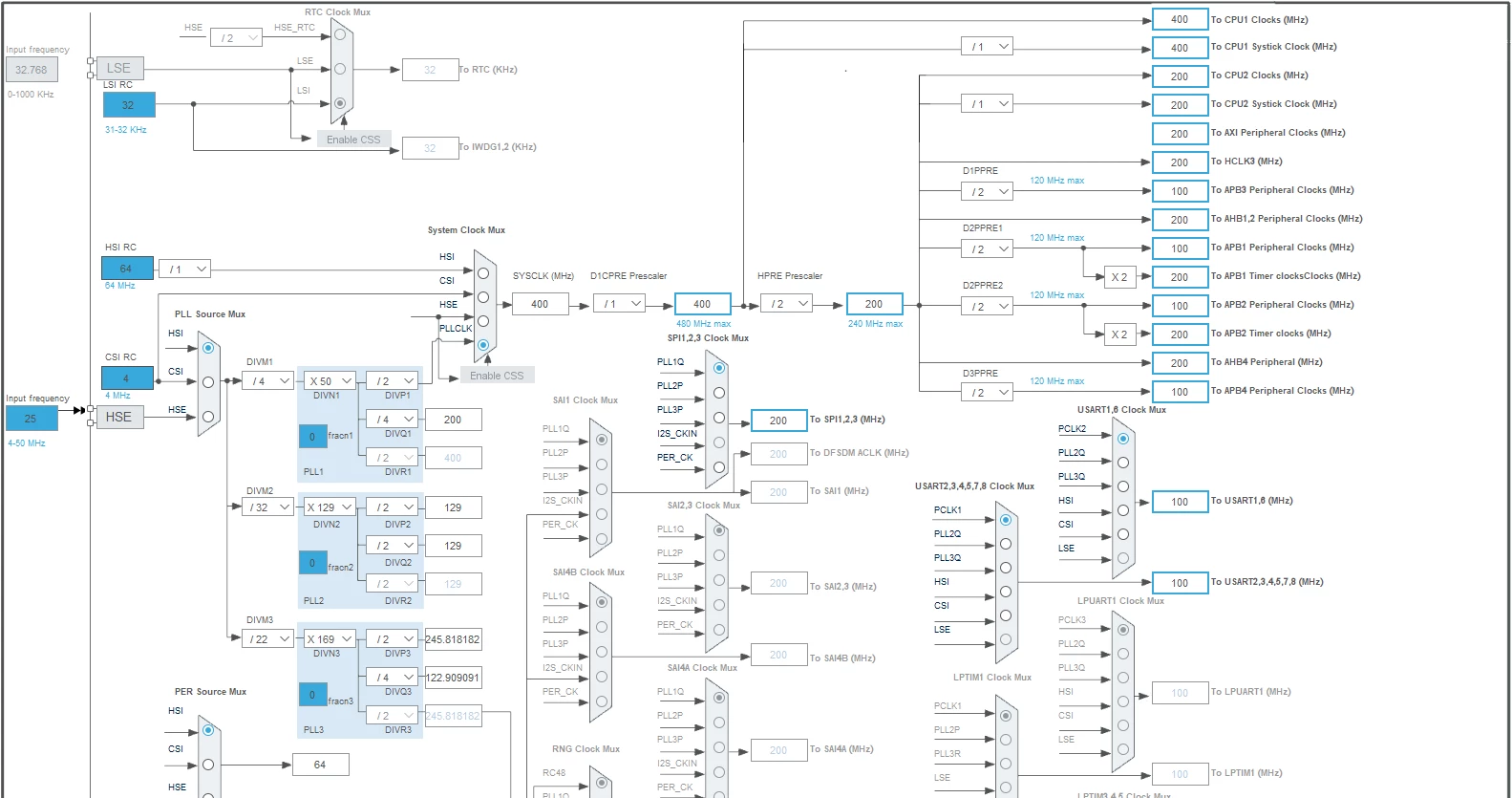
also i use the following power configurations:
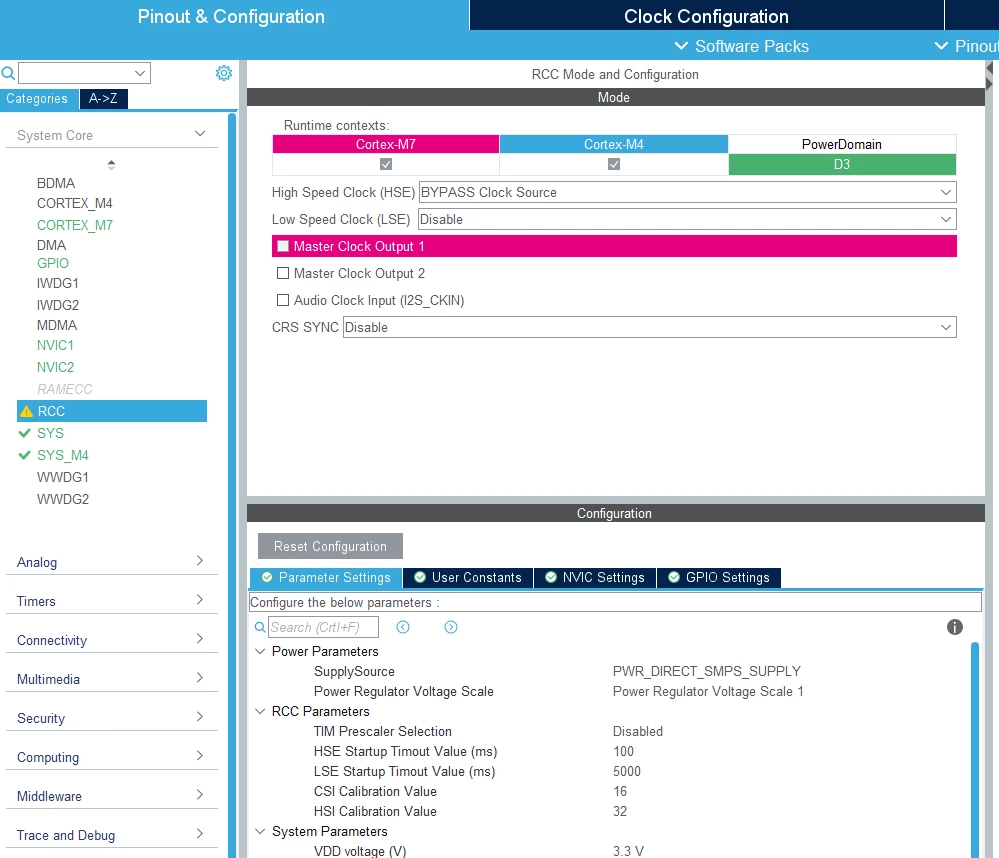
0693W00000GYfdQQAT.png 

After the code is generated the system clock is 64Mhz.

(checked with scope and HAL_RCC_GetHCLKFreq() function).

Please help me understand how can i increase the sysclock frequency and what am i doing wrong in my configurations?

thanks alot!

This topic has been closed for replies.

13 replies

Mike_ST
ST Technical Moderator
November 24, 2021

Hello,

I see you are using the bypass mode for High Speed Clock in the RCC configuration.

Maybe you'll want to use HSE source in the clock tree, for the PLL source MUX. and enter 8MHz instead of 25.

Or if you want to use HSI, try to disable High Speed Clock in RCC configuration.

Anyways, in case of failure, you should restart your project, click on "acces to board selector" and select the nucleo H745.

And answer "yes" when you are asked "Initialize all peripherals with their default mode".

Then, it should start with a correct configuration.

In order to give better visibility on the answered topics, please click on 'Best answer' on the reply which solved your issue or answered your question. 
yuri CH
yuri CHAuthor
Senior
November 24, 2021

Hi! Thanks for the quick response!

i have generated a new project with the default defenitions as suggested, here is the clock config interface:

0693W00000GYgwsQAD.pngwhen i generate the code i still see that the system core clock is 64MHZ,.

0693W00000GYgq7QAD.png i excpect the clock to be as i defined in the cubeMX, am i looking on the wrong thing?

Mike_ST
ST Technical Moderator
November 24, 2021

If you're just looking at these variables, I think they are just init values.

What value HAL_RCC_GetHCLKFreq() is returning ?

You can use MCO output and a scope to check the frequency as well.

In order to give better visibility on the answered topics, please click on 'Best answer' on the reply which solved your issue or answered your question. 
yuri CH
yuri CHAuthor
Senior
November 24, 2021

After all proper initializations i try to call the HAL_RCC_GetSysClockFreq(), the returned value is 64Mhz (64000000)..

Mike_ST
ST Technical Moderator
November 24, 2021

I have tried the project as well.

HAL_RCC_GetSysClockFreq() in the CM7 context sends back a values of 240Mhz

But in CM4 context always send back 64MHz.

In order to give better visibility on the answered topics, please click on 'Best answer' on the reply which solved your issue or answered your question. 
Sara BEN HADJ YAHYA
ST Technical Moderator
January 5, 2022

Hello @Mike_ST​ ,

Did you get 240Mhz in CM7 context when your SYSCLK is set to 240MHz or 400MHz ?

Thanks,

Sara.

In order to give better visibility on the answered topics, please click on 'Best answer' on the reply which solved your issue or answered your question.
Mike_ST
ST Technical Moderator
January 5, 2022

Hello Sara

I got that when SYSCLK is set to 480Mhz in the CubeMX clock configuration.

In order to give better visibility on the answered topics, please click on 'Best answer' on the reply which solved your issue or answered your question. 
yuri CH
yuri CHAuthor
Senior
November 29, 2021

So from what i understand this is the maximal clk frequency for the M4?

Mike_ST
ST Technical Moderator
November 30, 2021

No, the H745 datasheet says up to 240Mhz for the M4.

+ check the RM0399 reference manual page 378:

https://www.st.com/en/microcontrollers-microprocessors/stm32h745-755.html#documentation

CM4 clock is derived from the CM7 one.

So I'm not sure whether this is an HAL problem that reports wrong frequency or CubeMX generated code that makes HAL to return incorrect frequency.

In order to give better visibility on the answered topics, please click on 'Best answer' on the reply which solved your issue or answered your question. 
Sara BEN HADJ YAHYA
ST Technical Moderator
January 5, 2022

Hello,

I reproduced the issue on my side and I didn't see any issue, the SYSCLK is set to 400 MHz in my case. when I test the HAL_RCC_GetSysClockFreq() and HAL_RCC_GetHCLKFreq() I get respectively 400MHz and 200MHz. The 400MHz correspond to SYSCLK and the 200MHz correspond to HCLK which is correct.

The test is done on both CM7 and CM4 context and the result is the same.

Could you please share your project with us to see the issue.

Regards,

Sara.

In order to give better visibility on the answered topics, please click on 'Best answer' on the reply which solved your issue or answered your question.
Mike_ST
ST Technical Moderator
January 5, 2022

Ok, I think I my code was wrong and I was not doing proper sync between the cores, resulting in reading the CM4 frequency before clock configuration.

In order to give better visibility on the answered topics, please click on 'Best answer' on the reply which solved your issue or answered your question.