


STM32H7 SDMMC STMCubeMX firmware 1.6.0 FATFS
Hello,
I am total new to this field and need your help please.
I have an application in which I measure data and collect in a matrix on ram. after the measurement is finished, I write the data on SD card and USART.
I had a code that worked perfectly on STM32F407. But I now have to use STM32H7.
I have configured the H7 SDMMC like the SDIO and also the FATFS the same as the config on STM32F4.
However, the writing on the SD card stops after one time of writing, meaning that data can only be written once on the SD card.
I am attaching the sd card function and my STMCubeMX settings here for your view.
Any help would be greatly appreciated.
void writeToSd8Ch()
{
	free(SDFatFs);
	retSD = FATFS_LinkDriver(&SD_Driver, SDPath);
	SDFatFs = malloc(sizeof (FATFS));
	res = f_mount(SDFatFs, "", 0); //changed way of the function
	if (res == FR_OK){
		// Append a line
		for (int i = 0; (i < totalNoOfMeasurements) ; ++i) {
			res = open_append(&myFile, "oil_sensor_01.txt");
			f_sync(&myFile);
			if(res == FR_OK){
				f_printf(&myFile, "%u,%u,%u,%u,%u,%u,%u,%u,%u,%u,%u,%u\n",
 sdWriteMatrix[i][0], sdWriteMatrix[i][1], sdWriteMatrix[i][2],
						sdWriteMatrix[i][3], sdWriteMatrix[i][4],sdWriteMatrix[i][5],
 sdWriteMatrix[i][6],sdWriteMatrix[i][7],
						sdWriteMatrix[i][8], sdWriteMatrix[i][9],sdWriteMatrix[i][10],
 sdWriteMatrix[i][11]);
				f_sync(&myFile);
			}
			//diskStatus = disk_status(0);
			// Close the file
			f_close(&myFile);
		}
		diskStatus = disk_status(0);
		//Close the file
		f_close(&myFile);
		res = f_mount(0, "", 0);
		retSD = FATFS_UnLinkDriver(SDPath);//comment
		retSD = FATFS_LinkDriver(&SD_Driver, SDPath); //comment
		retSD = FATFS_UnLinkDriver(SDPath); //comment
		free(SDFatFs);
	}
	if(res != FR_OK){
		f_close(&myFile);
		res = f_mount(0, "", 0);
		retSD = FATFS_UnLinkDriver(SDPath);
		retSD = FATFS_LinkDriver(&SD_Driver, SDPath);
		free(SDFatFs);
		SDFatFs = malloc(sizeof (FATFS));
		res = f_mount(SDFatFs, "", 1);
	}
}
when running the function for second time, I either get FR_DISK_NOT_READY, FR_DISK_ERROR.
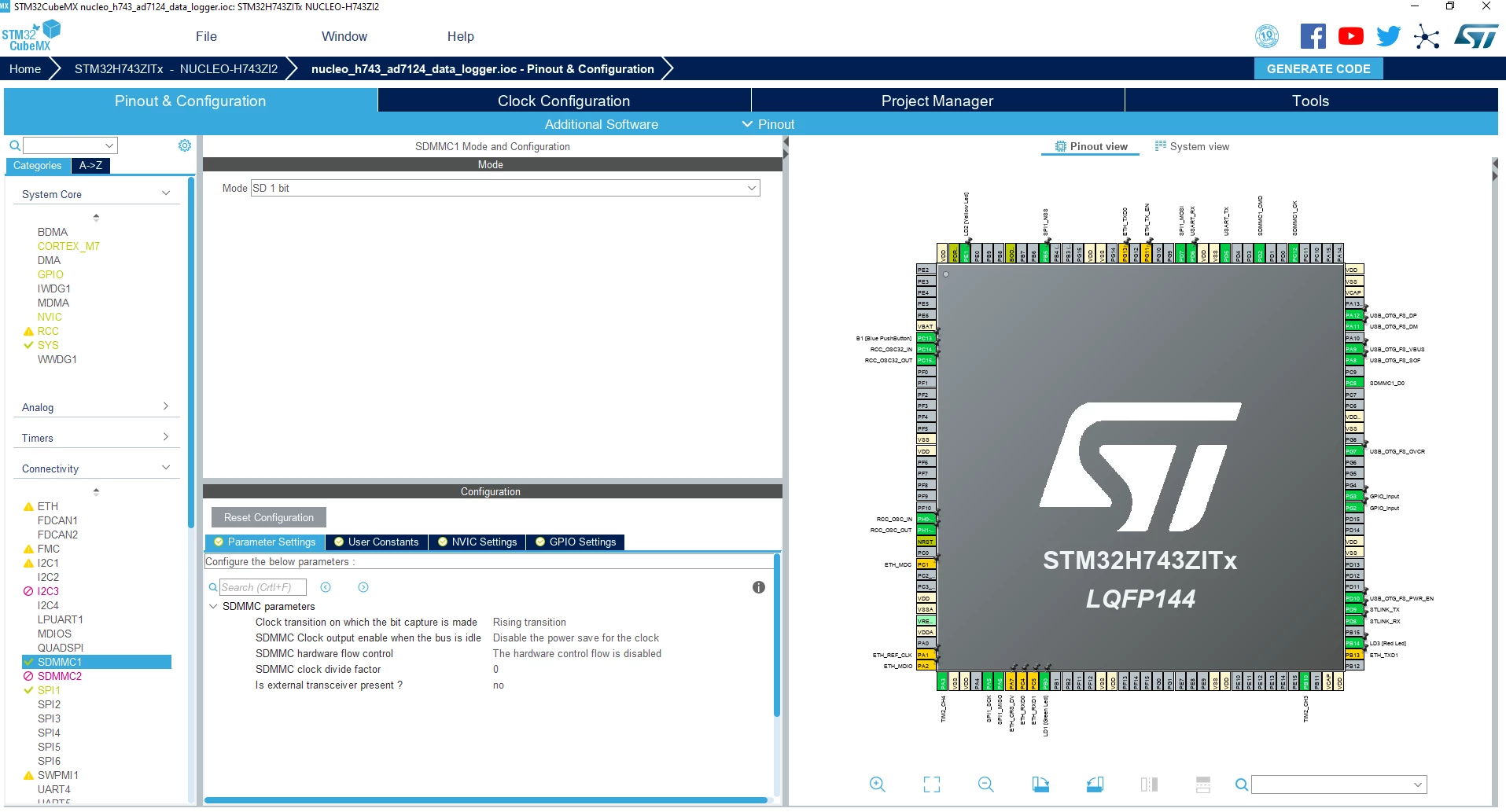
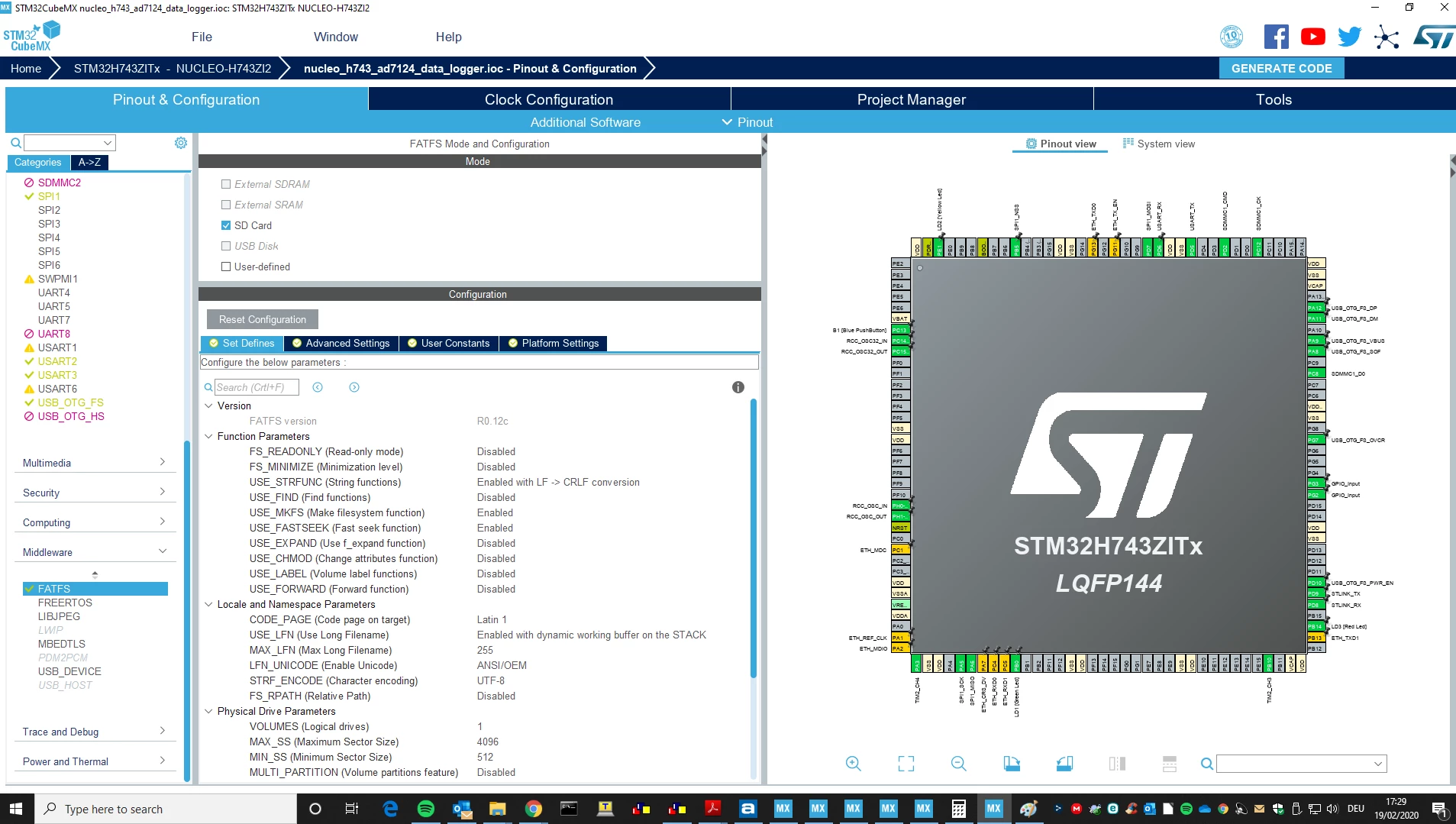
and this is my init function
static void MX_SDMMC1_SD_Init(void)
{

 /* USER CODE BEGIN SDMMC1_Init 0 */

 /* USER CODE END SDMMC1_Init 0 */

 /* USER CODE BEGIN SDMMC1_Init 1 */

 /* USER CODE END SDMMC1_Init 1 */
 hsd1.Instance = SDMMC1;
 hsd1.Init.ClockEdge = SDMMC_CLOCK_EDGE_RISING;
 hsd1.Init.ClockPowerSave = SDMMC_CLOCK_POWER_SAVE_DISABLE;
 hsd1.Init.BusWide = SDMMC_BUS_WIDE_1B;
 hsd1.Init.HardwareFlowControl = SDMMC_HARDWARE_FLOW_CONTROL_DISABLE;
 hsd1.Init.ClockDiv = 0;
 hsd1.Init.TranceiverPresent = SDMMC_TRANSCEIVER_NOT_PRESENT;
 /* USER CODE BEGIN SDMMC1_Init 2 */

 /* USER CODE END SDMMC1_Init 2 */

}
void MX_FATFS_Init(void)
{
/*## FatFS: Link the SD driver ###########################*/
retSD = FATFS_LinkDriver(&SD_Driver, SDPath);
/* USER CODE BEGIN Init */
/* additional user code for init */
/* USER CODE END Init */
}Thank you in advance for your time and your help
