David Martins
Senior
October 21, 2019
Solved

STM32CUBEMX aspect is getting worse and worse

  • October 21, 2019
  • 7 replies
  • 4924 views

Can someone explain to me how I can do to be able to view all the settings? The cursor is on the edge and there are still too many settings to list that I can't see.

Since they released version 5, CubeMX has become increasingly confusing and difficult to use ...
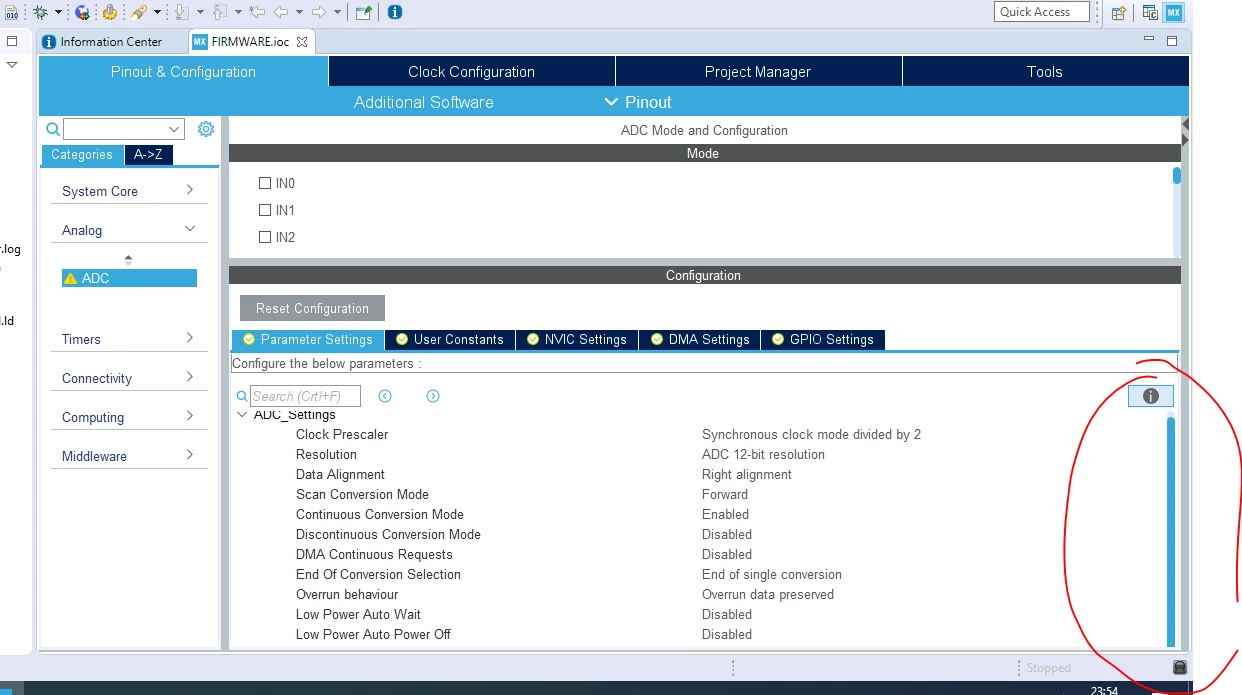
0690X00000Aqem9QAB.png

This topic has been closed for replies.
Best answer by David Martins

ST really needs to improve CubeMX's graphics!

It's crazy, forum posts with several months of users reporting problems, and ST seems to do very little to improve.

For now my solution follows:

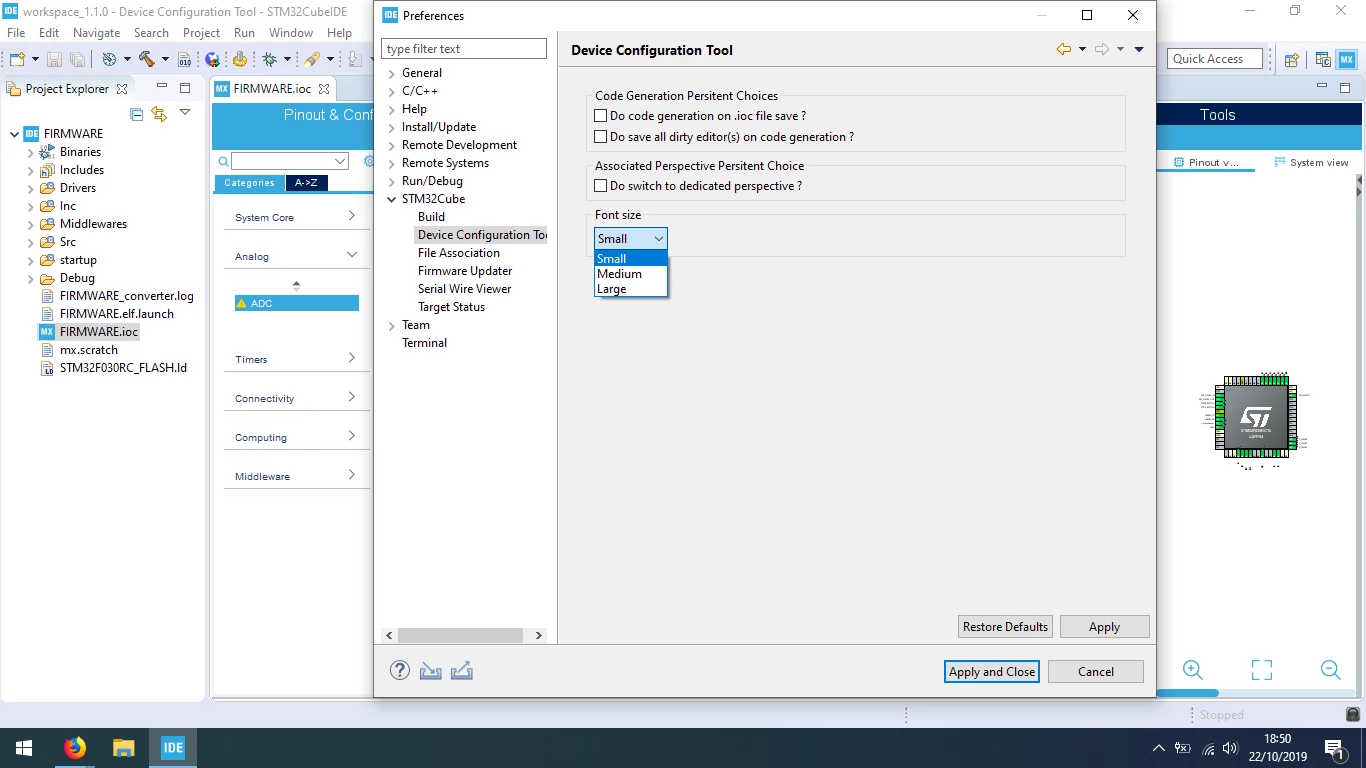
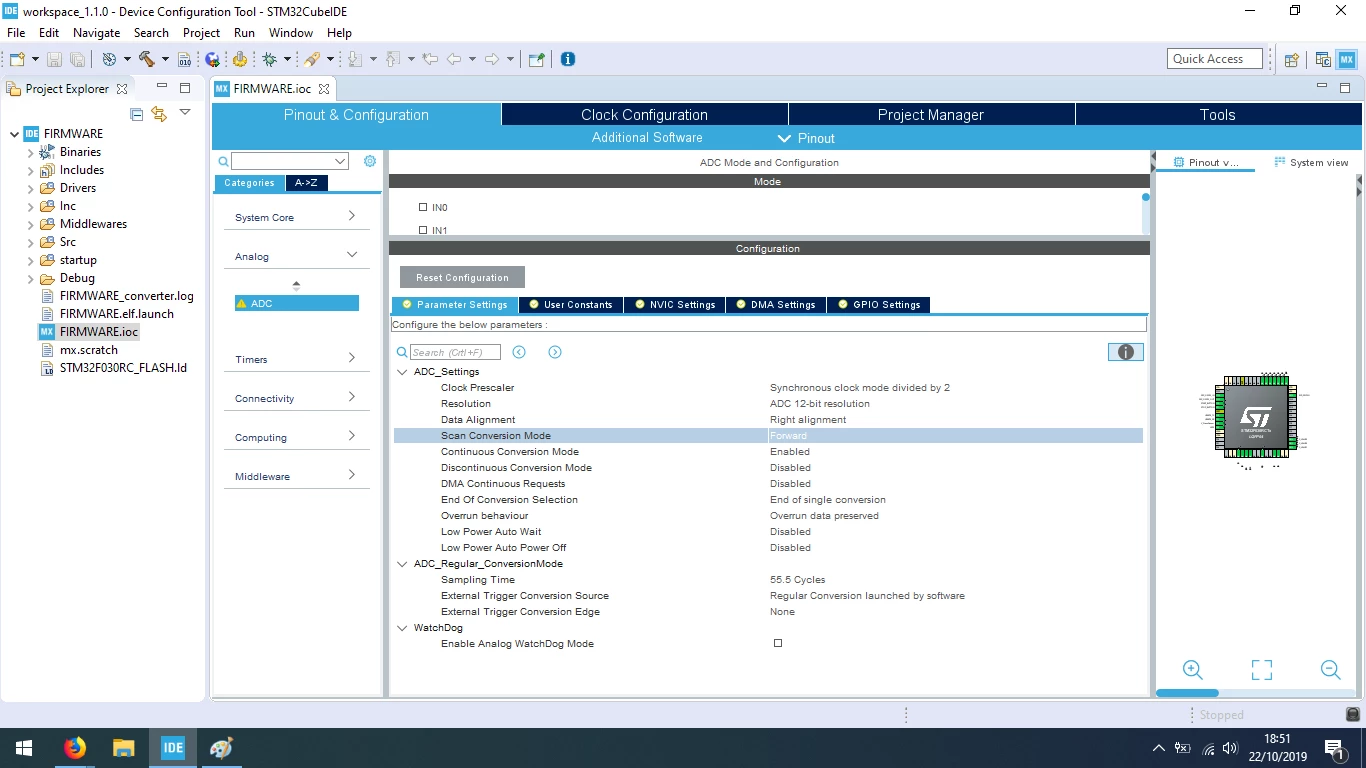
Preferences -> STM32CUBE -> Device Configuration Tool -> Font Size -> Small

0690X00000AqjiCQAR.png0690X00000AqjiHQAR.png

7 replies

TDK
October 21, 2019

Open it directly in STM32CubeMX outside of the IDE.

"If you feel a post has answered your question, please click ""Accept as Solution""."
David Martins
Senior
October 22, 2019

Hi. Thanks for the reply.

I have already done this, but the problem is the same. The window do not resize to screen.

I cannot work with the CubeMX because I can't see a lot of stuff...

David Martins
Senior
October 22, 2019

Any idea or sugestion from ST to solve this problem?

Khouloud ZEMMELI
ST Employee
October 22, 2019

​Hello @DMart.19s​ ,

Thanks for the feedback, it will be internally checked.

Best Regards,

Khouloud.

Khouloud ZEMMELI
ST Employee
October 22, 2019

@DMart.19s​  ​Could you please share your project file ?

Thanks,

Khouloud

David Martins
Senior
October 22, 2019

Hello @Khouloud ZEMMELI​ , this happens with any project file I open. Basically CubeMX does not format the window for the correct aspect ratio. This makes me unable to use the configurator ...

I think sharing the project file won't help ...

Ask me any important information I can provide to resolve the situation.

Thanks.

David Martins
David MartinsAuthorBest answer
Senior
October 22, 2019

ST really needs to improve CubeMX's graphics!

It's crazy, forum posts with several months of users reporting problems, and ST seems to do very little to improve.

For now my solution follows:

Preferences -> STM32CUBE -> Device Configuration Tool -> Font Size -> Small

0690X00000AqjiCQAR.png0690X00000AqjiHQAR.png

turboscrew
Senior III
October 22, 2019

It feels like the CUBE (MX and libraries) are mainly targeted for STM's own demo SW purposes. They just let others to use it too.

Pavel A.
Super User
October 23, 2019

> It feels like the CUBE (MX and libraries) are mainly targeted for STM's own demo SW purposes. 

Of course they are. Demos help to sell the chips.

-- pa

d4_it
Associate II
October 23, 2019

can cubemx just look nice please? some day. removing the fat top bar with the social media graphics for a start, would be worthwhile.

Cartu38 OpenDev
Graduate II
October 28, 2019

By the way relying on STM32CubeIDE you can get rid already of fat top bar with the social media graphics. Thanks Eclipse native capability. Let's open .ioc editor within STM32CubeIDE. Then doing right click on such editor tab you can detach it. Let's play with standalone Windows you're just getting ...