


NEdom.1
Associate III
Apr 20, 2026 06:27 UTC
Solved

STM32CubeMX 6.17.0 generated project lost


I have tried using STM32CubeMX 6.17.0 to generate an STM32F429 DISC1 project.

The generated project opened in STM32CubeIDE could not be compiled unless I add <root folder> in Project -> Properties -> C/C++ General -> Path and Symbols, the source location tab.

I don't know how this happen. It's disturbing to modify project settings each time after modifying the CubeMX and generating the project.

It's probably that should happened after I add some source folders to the projects.
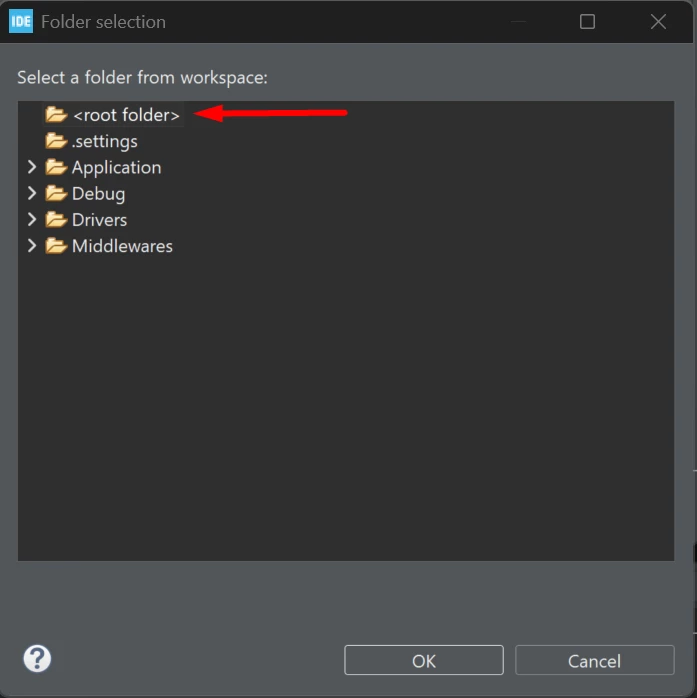
NEdom1_0-1776665960643.png


ST Technical Moderator
Apr 21, 2026 08:30 UTC

Hello @NEdom.1 

While generating the code with STM32CubeMX 6.17, I did not get build errors.

Thanks.

Mahmoud


To give better visibility on the answered topics, please click on Accept as Solution on the reply which solved your issue or answered your question.

4 replies

ST Technical Moderator
Apr 20, 2026 07:13 UTC

Hello @NEdom.1 

Let me thank you for posting.

The behavior described was not reproduced by my side.

The compilation completed without errors.

For more investigation, I recommend that you provide your Ioc.File.

MahmoudBenRomdhane_0-1776674088941.png

MahmoudBenRomdhane_1-1776674381157.png

Thanks.

Mahmoud

To give better visibility on the answered topics, please click on Accept as Solution on the reply which solved your issue or answered your question.
NEdom.1
NEdom.1Author
Associate III
Apr 21, 2026 04:55 UTC

Thank you for your reply , @Mahmoud Ben Romdhane.

Here is the .ioc file from STM32F429 Discovery board template.

ST Technical Moderator
Apr 21, 2026 08:30 UTC

Hello @NEdom.1 

While generating the code with STM32CubeMX 6.17, I did not get build errors.

Thanks.

Mahmoud


To give better visibility on the answered topics, please click on Accept as Solution on the reply which solved your issue or answered your question.