


Kristof Mulier
Associate III
November 25, 2018
Solved

Some CubeMX commands don't work anymore.

  • November 25, 2018
  • 5 replies
  • 2975 views

I use the CubeMX command-line interface. Normally I put my script in a file, and run it like this:

java -jar "C:\path\to\STM32CubeMX.exe" -q "C:\path\to\myscript.txt"

But before doing that, I test the script commands one-by-one in the interactive mode. That means, I start up CubeMX with the command line interface and I can see visually what happens upon each command I enter:

java -jar "C:\path\to\STM32CubeMX.exe" -i

The first command I usually issue then is to load an existing `ioc-file`:

config load "C:\path\to\my_cubemx_proj.ioc"

Then I issue the following command:

set mode FREERTOS Enabled

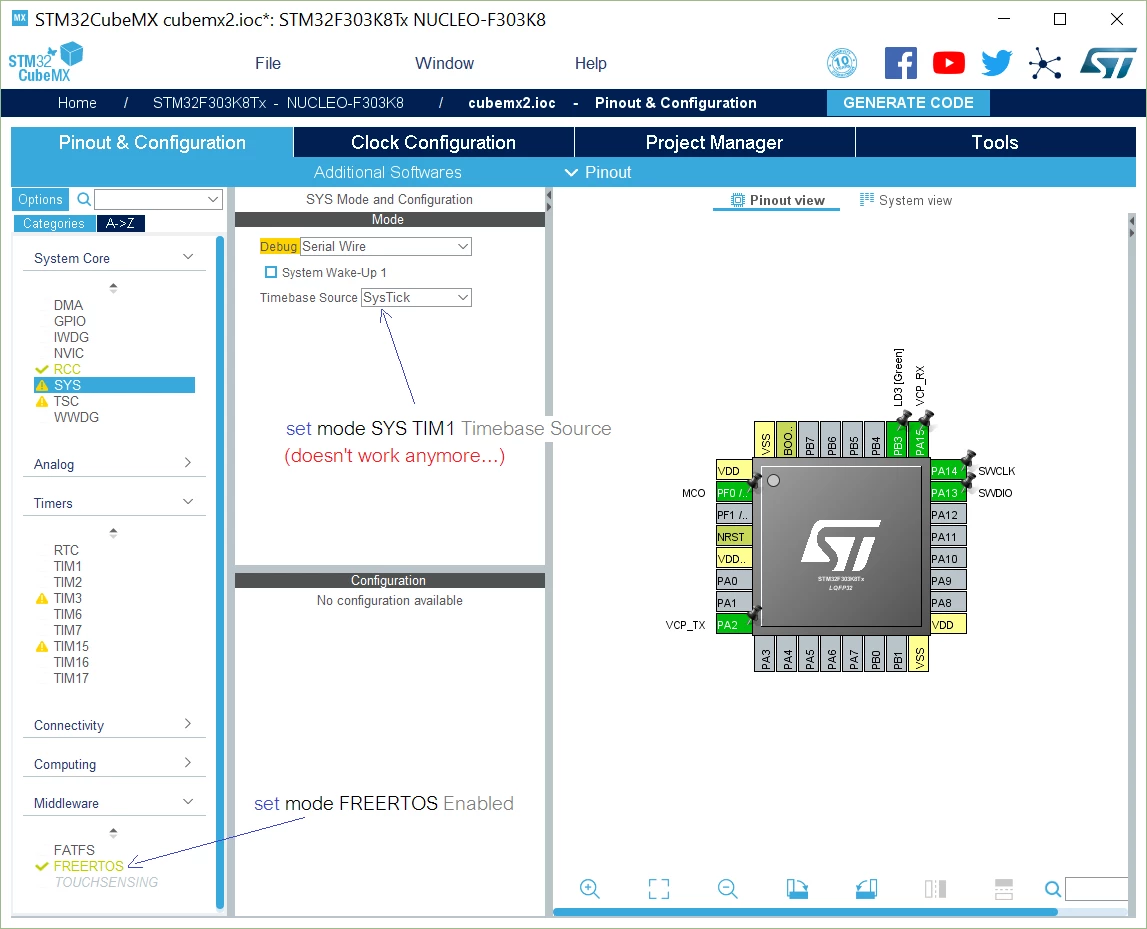
This works. I can see immediately the green checkmark appearing next to `FREERTOS` in the Middleware section. The next thing I do is changing the Timebase Source in SYS from `SysTick` to `TIM1`:

set mode SYS TIM1 Timebase Source

This used to work in the previous CubeMX version. But in CubeMX5 it doesn't have any effect. The following image illustrates what happens:
0690X000006CTOAQA4.png

This topic has been closed for replies.
Best answer by Kristof Mulier

Hi,

I discovered the answer (through trial and error).

set mode FREERTOS CMSIS_V1
set mode SYS TIM1

The main problem is this:

The CubeMX documentation explains how the `set mode` command works:

set mode <Periph> <Mode Name>

but nowhere can I find the values I should fill in for the placeholders.

5 replies

Houda GHABRI
ST Employee
November 28, 2018

Hi @Kristof Mulier​ ,

Thanks for rising this issue.

It will be fixed next CubeMX release.

Best regards,

Houda

Kristof Mulier
Associate III
November 28, 2018

Thank you @Houda GHABRI​ 

I look forward to the new release. I've noticed that not only he `SYS` settings, but many other settings in CubeMX cannot be adapted anymore using the command line interface. Hopefully they'll get fixed as well.

I'm happy STMicro provides the CubeMX tool as a standalone application with both a Graphical User Interface and a command line interface. This one of the reasons I prefer using STMicro chips compared to other manufacturers. Nowadays, many manufacturers create their code generator tools as a mere plugin for Eclipse, without standalone version. That's really awful, because it forces people to use Eclipse.

Thumbs up for STMicro :)

Houda GHABRI
ST Employee
November 29, 2018

Hi @Kristof Mulier​ ,

Thanks for being faithful TO ST products and appreciate them.

We try to improve continually CubeMX.

Please do not hesitate to rise any issue or remarks.

Best regards,

Houda

Kristof Mulier
Associate III
November 29, 2018

Hi @Houda GHABRI​ ,

Thank you for your reply.

I like the new "look and feel" of CubeMX V5. It is refreshing :)

Kristof Mulier
Associate III
January 27, 2019

Hi @Houda GHABRI​ ,

Can you please contact the development team of CubeMX for this issue? Our startup is creating a new product - based on STM32 microcontrollers - to be announced on the Nuremberg Embedded World conference (we rent a stand in the startup area). The issue described above is blocking our development. Please, please help...

Kristof Mulier
Kristof MulierAuthorBest answer
Associate III
October 24, 2019

Hi,

I discovered the answer (through trial and error).

set mode FREERTOS CMSIS_V1
set mode SYS TIM1

The main problem is this:

The CubeMX documentation explains how the `set mode` command works:

set mode <Periph> <Mode Name>

but nowhere can I find the values I should fill in for the placeholders.