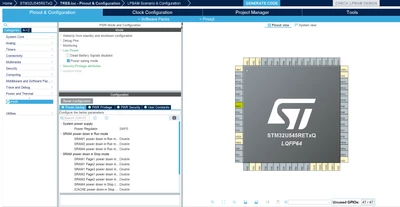
To configure the SMPS you need to go to: Power and Thermal>PWR>Low Power and check the box Power Saving mode. After that, on the configuration tab go to Power Saving>System power supply and you can configure the Power Regulator to LDO or SMPS:
PS: Make sure to use the last version of the STM32CubeMX (V6.13.0).
Best Regards.
STTwo-32
To give better visibility on the answered topics, please click on Accept as Solution on the reply which solved your issue or answered your question.
To configure the SMPS you need to go to: Power and Thermal>PWR>Low Power and check the box Power Saving mode. After that, on the configuration tab go to Power Saving>System power supply and you can configure the Power Regulator to LDO or SMPS:
PS: Make sure to use the last version of the STM32CubeMX (V6.13.0).
Best Regards.
STTwo-32
To give better visibility on the answered topics, please click on Accept as Solution on the reply which solved your issue or answered your question.