


As.51
Associate III
Jun 1, 2020 8:57 AM UTC
Question

Problem with clock configuration after importing the CubeMX project to Visual Studio

I have a project using a STM32f107VC which I am trying to update and I run into some problem configuring the clock in the updated environment

So I tried to create a simple project using Stm32CubeMX and I still can't configure the clock properly.

I added code to my main application that blinks a led with delay of 1000 ms but the LED actually blinks every 2000ms (checked with a scope)

I generate an Other Toolchains (GPDSC) project in the CubeMX and then import it to Visual GDB 5.4r12

the project information is :

Stm32CubeMX: version 5.3.0

MCU:  STM32F107VCTx 

Firmware: STM32Cube FW_F1 V1.8.0

This is the clock configuration:
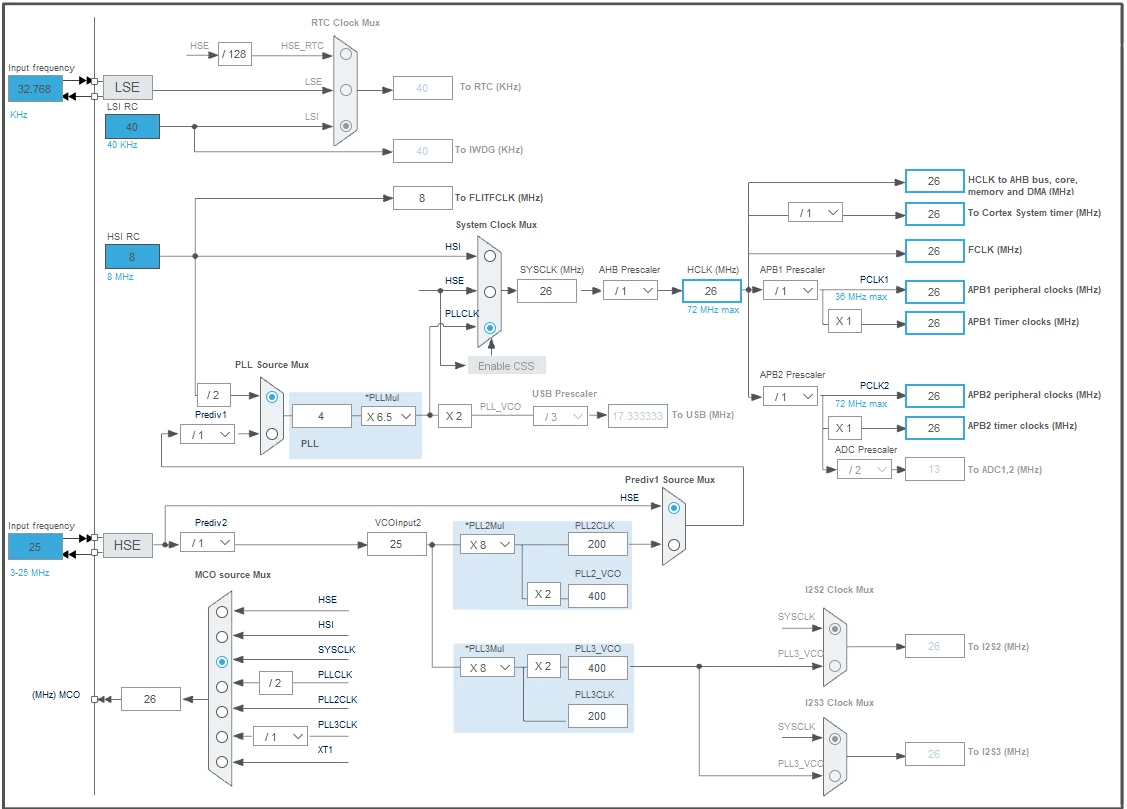
0693W000001pmVcQAI.png

int main(void)
{
 /* USER CODE BEGIN 1 */
 
 /* USER CODE END 1 */
 
 
 /* MCU Configuration--------------------------------------------------------*/
 
 /* Reset of all peripherals, Initializes the Flash interface and the Systick. */
 HAL_Init();
 
 /* USER CODE BEGIN Init */
 
 /* USER CODE END Init */
 
 /* Configure the system clock */
 SystemClock_Config();
 
 /* USER CODE BEGIN SysInit */
 
 /* USER CODE END SysInit */
 
 /* Initialize all configured peripherals */
 MX_GPIO_Init();
 //MX_USART1_UART_Init();
 //MX_USART2_UART_Init();
 //MX_USART3_UART_Init();
 //MX_LWIP_Init();
 /* USER CODE BEGIN 2 */
 
 /* USER CODE END 2 */
 
 /* Infinite loop */
 /* USER CODE BEGIN WHILE */
 while (1)
 {
 HAL_GPIO_WritePin(GPIOE, RED_LED_Pin | GREEN_LED_Pin, GPIO_PIN_RESET);
 HAL_Delay(1000);
 HAL_GPIO_WritePin(GPIOE, RED_LED_Pin | GREEN_LED_Pin, GPIO_PIN_SET);
 HAL_Delay(1000);
 
 /* USER CODE END WHILE */
 
 /* USER CODE BEGIN 3 */
 }
 /* USER CODE END 3 */
}
 

This topic has been closed for replies.

8 replies

TDK
Jun 1, 2020 12:37 PM UTC

Post your clock initialization code. How are you generating the delay? If timer, post that code as well.

"If you feel a post has answered your question, please click ""Accept as Solution""."
As.51
As.51Author
Associate III
Jun 3, 2020 6:19 AM UTC

Hi, thank you for your response.

Please see the code in the question. I edited it.

waclawek.jan
Super User
Jun 3, 2020 8:05 AM UTC

HAL_Delay(1000);

What is the source the 1ms tic, SYSTICK? How is that set up? Read out the relevant registers' content and check.

JW

As.51
As.51Author
Associate III
Jun 3, 2020 10:11 AM UTC

I didn't understand what registers to check? I exported the cube mx code, this is the default project. I added only the code inside the while true

TDK
Jun 3, 2020 12:49 PM UTC
while (1)
 {
 HAL_GPIO_WritePin(GPIOE, RED_LED_Pin | GREEN_LED_Pin, GPIO_PIN_RESET);
 HAL_Delay(1000);
 HAL_GPIO_WritePin(GPIOE, RED_LED_Pin | GREEN_LED_Pin, GPIO_PIN_SET);
 HAL_Delay(1000);
 
 /* USER CODE END WHILE */
 
 /* USER CODE BEGIN 3 */
 }

This is going to blink at a period of 2000ms. On for 1s, off for 1s. So one blink per 2s. Is that not what you're seeing?

"If you feel a post has answered your question, please click ""Accept as Solution""."
As.51
As.51Author
Associate III
Jun 4, 2020 6:21 AM UTC

No, what I'm seeing is 2s ON, 2s OFF.

As.51
As.51Author
Associate III
Jun 4, 2020 6:21 AM UTC

No, what I'm seeing is 2s ON, 2s OFF.

As.51
As.51Author
Associate III
Jun 4, 2020 11:00 AM UTC

seems to be a problem in HAL_RCC_GetSysClockFreq() 

in file VisualGDB\EmbeddedBSPs\arm-eabi\com.sysprogs.arm.stm32\2020.01\STM32F1xxxx\STM32F1xx_HAL_Driver\Src\stm32f1xx_hal_rcc.c

there is special handling of the case where *PLLMUL=6.5 where the code multiplies by 13 & later divides by 2 using this code:

    if (pllmul == aPLLMULFactorTable[(uint32_t)(RCC_CFGR_PLLMULL6_5) >> RCC_CFGR_PLLMULL_Pos])

    {

     pllclk = pllclk / 2;

    }

the problem is that this is NOT done if the PLL source is RCC_PLLSOURCE_HSI_DIV2

so the calculated SystemCoreClock is wrong 

this is a bug in the visual gdb library, not STM cube!