


MBudz.1
Associate
August 16, 2020
Solved

Problem installing on Mac Best Answer
  • August 16, 2020
  • 12 replies
  • 4798 views

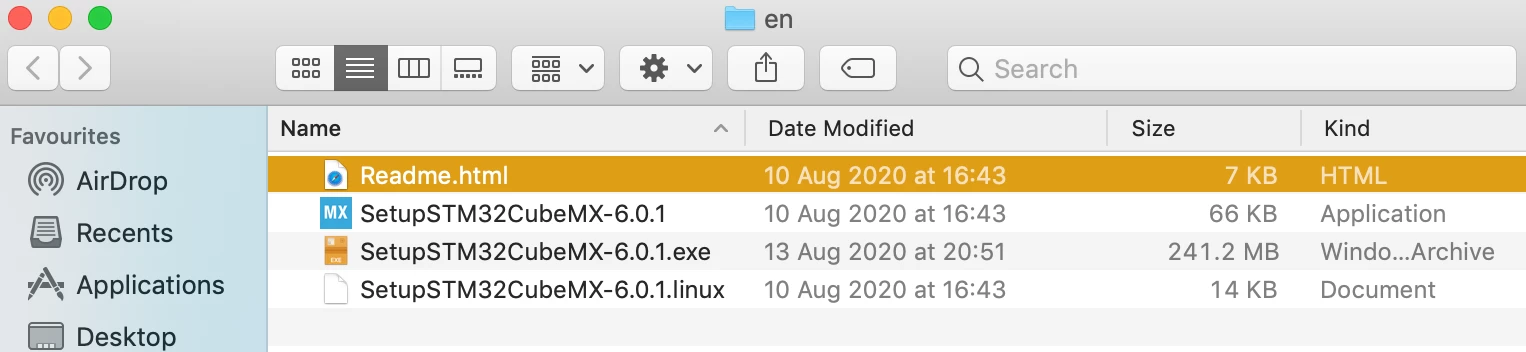
0693W000003PPG6QAO.pngDownloaded and installed the latest Java development kit. Tried installing SetupSTM32CubeMX-6.0.1 via: sudo java -jar SetupSTM32CubeMX-6.0.1.exe but get this error message: Error: Unable to access jarfile SetupSTM32CubeMX-6.0.1.exe .

Any ideas?

This topic has been closed for replies.
Best answer by Aymen CHAKROUN

Hi @MBudz.1​ ,

Good news !

Can you make the solution as Best Answer to help others community members if facing the same issue?

Regards,

Aymen.

12 replies

Aymen CHAKROUN
ST Employee
September 2, 2020

Hi @MBudz.1​ ,

Can you please give us:

  • The exact version of your JDK and provider ? [Oracle, OpenJDK, AdoptOpenJDK...]
  • Your macOS version

Are you facing issue when you double click the SetupSTM32CubeMX-6.0.1.app ?

Regards,

Aymen.

MBudz.1
MBudz.1Author
Associate
September 2, 2020

0693W000003QYuvQAG.pngHello,

Thanks for replying. I'm running Mac OS 10.14.6 and downloaded the latest Java:

Bit doesn't recognise the .exe file and says the the data is corrupted:0693W000003QYz7QAG.png

Aymen CHAKROUN
ST Employee
September 2, 2020

Hi @MBudz.1​ ,

I tried with the same macOS verison 10.14.6 (Mojave), but I can't reproduce your issue.

0693W000003Qb7IQAS.png

Can you try installing Oracle JDK and not JRE ?

Because STM32CubeMX works fine only with JDK and not JRE in macOS environment.

Regards,

Aymen.

MBudz.1
MBudz.1Author
Associate
September 2, 2020

That's interesting I downloaded and installed this:0693W000003QbPIQA0.png

Once again I double click on the app:

0693W000003QbY4QAK.png

and nothing happens

This is my operating system etc.

0693W000003QbYTQA0.png

Do you have any other solutions as I can't get it to work in any way?

Aymen CHAKROUN
ST Employee
September 3, 2020

Hi @MBudz.1​ ,

Can you apply this command [to bypass Gatekeeper]:

Extract from STM32CubeMX User Manual:

0693W000003Qd5JQAS.jpg

Just one clarification, you need to double click the .app file and not .exe file to start STM32CubeMX

The .exe file is only used with command line 'java -jar'

Regards,

Aymen.

MBudz.1
MBudz.1Author
Associate
September 3, 2020

I did double click the ,app files and it won't open when I double click it.

I tried using this and it gave me an error message:

0693W000003QdpMQAS.png

Then I tried this:

0693W000003Qdp2QAC.png

Still can't open it.

Any other ideas?

Aymen CHAKROUN
ST Employee
September 3, 2020

Hi @MBudz.1​ ,

My Screenshots was for any MX VERSION, you need to change the VERSION by the correct one.

So in your case:

sudo xattr -cr ~/SetupSTM32CubeMX-6.0.1

Also, try doing the java -jar without sudo:

java -jar SetupSTM32CubeMX-6.0.0.exe

Regards,

Aymen.

MBudz.1
MBudz.1Author
Associate
September 3, 2020

Got it to work. Thanks for all of your help.

Cheers

Aymen CHAKROUN
Aymen CHAKROUNBest answer
ST Employee
September 3, 2020

Hi @MBudz.1​ ,

Good news !

Can you make the solution as Best Answer to help others community members if facing the same issue?

Regards,

Aymen.

MBudz.1
MBudz.1Author
Associate
September 3, 2020

Not sure how to do that? If you tell me I can sort it asap.

Cheers

MBudz.1
MBudz.1Author
Associate
September 3, 2020

Done it