
Associate II
July 2, 2024
Solved

PLLP can't be turned on

  • July 2, 2024
  • 3 replies
  • 2586 views

I'm working on page 30 of the STM tutorial for the B-G474E-DPOW discovery kit at this link

https://www.st.com/resource/en/application_note/dm00706304-buck-current-mode-with-the-bg474edpow1-discovery-kit-stmicroelectronics.pdf


I get this warning when I try to follow the directions
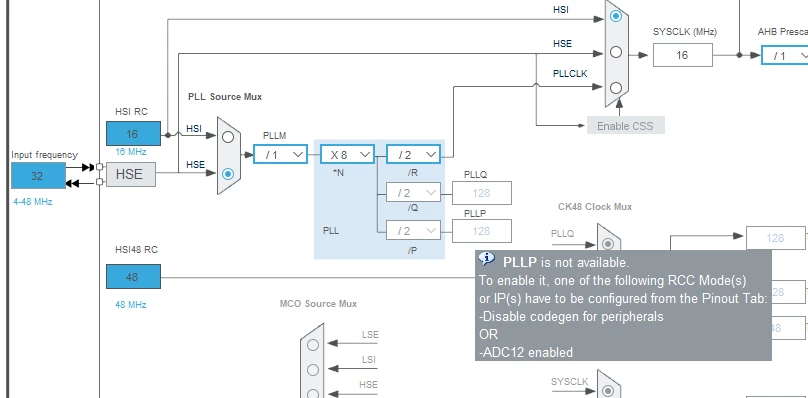
 

decook1110_0-1719895881441.png


Can someone explain how to fix this so I can move to the next step in the tutorial.

I've tried looking up codegen in the reference manual and also how to manipulate ADC12.

Thanks

Dave

 

This topic has been closed for replies.
Best answer by STTwo-32

Hello @decook1110 

In order to set the [PLLP Clock] or [SYSCLK] as source Clock for the ADC12 or ADC345, just change the clock Prescaler to Asynchronous clock mode in the ADC_Settings.

Best Regards.

STTwo-32

3 replies

Associate II
July 3, 2024
STTwo-32
STTwo-32Best answer
ST Technical Moderator
July 4, 2024

Hello @decook1110 

In order to set the [PLLP Clock] or [SYSCLK] as source Clock for the ADC12 or ADC345, just change the clock Prescaler to Asynchronous clock mode in the ADC_Settings.

Best Regards.

STTwo-32

To give better visibility on the answered topics, please click on Accept as Solution on the reply which solved your issue or answered your question.
Associate II
July 5, 2024

STTwo-32

Thanks for the work around, that fixed the clock so I can move past that,

Dave
