


GoEk
Associate III
May 30, 2022
Solved

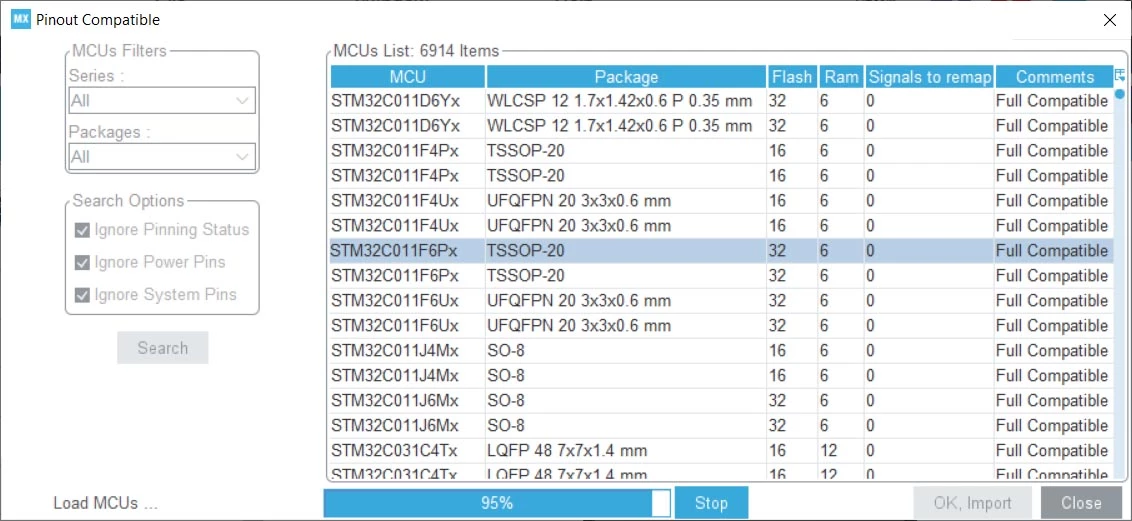
MX6.5.0 Pinout->List Pinout Compatible MCUs never finishes

  • May 30, 2022
  • 7 replies
  • 3696 views

It stops at 95% on two different machines, the Windows Task Manager runs the MX task at 95-100% up until 95% and then goes to 0 "forever". Windows 10 Pro 64bit, all service packs, Intel Core2 and i7, 12GB RAM. Processors used in IOC file STM32F767BIT6 and STM32H750XBH6. EDIT: 6.4.0 seem to behave differently, when i open the List tool it lists a small selection that finishes OK. I can then select another filter, in my case STM32H7, all packages and it then again almost slowes to a halt, giving me a Low Memory warning at about 4M of my 12M total. 6.5.0 defaults to load ALL MCUs and packages which seems to max out java(?) memory at about 3.5MB and then just gives up.

0693W00000NqsYIQAZ.jpg

This topic has been closed for replies.
Best answer by Sara BEN HADJ YAHYA

Hello @GoEk​ ,

Thanks for your feedback,

This is a known issue and it will be fixed soon. I will keep you posted.

If your issue is solved, please close this post by clicking the "Select as Best" button. This will help other members of the community find this response more quickly :)

Thanks for your contribution,

Sara.

7 replies

Sara BEN HADJ YAHYA
ST Technical Moderator
May 31, 2022

Hello @GoEk​ ,

Thanks for your feedback,

This is a known issue and it will be fixed soon. I will keep you posted.

If your issue is solved, please close this post by clicking the "Select as Best" button. This will help other members of the community find this response more quickly :)

Thanks for your contribution,

Sara.

In order to give better visibility on the answered topics, please click on 'Best answer' on the reply which solved your issue or answered your question.
GoEk
GoEkAuthor
Associate III
May 31, 2022

Thank's for your reply and noted.

Regards

Goran

GLASS
Visitor II
June 1, 2022

Hello @Sara BEN HADJ YAHYA​ 

You targeted a known issue about bad HSE speed after choosing new MCU.

I understand that @GoEk​  related​ bug is about Cube MX get hanged searching pin compatible CPU...

Best regards ​

Sara BEN HADJ YAHYA
ST Technical Moderator
June 1, 2022

hello @GLASS​ ,

You are right, the thread I referred to is mainly about the HSE issue, but from that thread we discovered the misbehavior of the list pinout compatible (indicated in the last phrase).

""

The same problem exists in CubeMX 6.1.0. I couldn't test in CubeMX 6.5.0 because the list of pinout compatible MCUs never stops loading in that version.

""

Sara.

In order to give better visibility on the answered topics, please click on 'Best answer' on the reply which solved your issue or answered your question.
BGerb.2
Visitor II
June 25, 2022

0693W00000NskL5QAJ.jpgAfter a month it is still not fixed.

The processors are extremely difficult to obtain and then this feature fails. The tool finds just over half a million chips in one day. I'm seriously wondering if ST is actually interested in the whole thing.

Sara BEN HADJ YAHYA
ST Technical Moderator
June 29, 2022

Hello @GoEk​ , @GLASS​ , @Community member​ ,

This issue is fixed in STM32CubeMX latest release.

V6.6.0 is now available under this Link.

Thanks for your contribution.

Sara.

In order to give better visibility on the answered topics, please click on 'Best answer' on the reply which solved your issue or answered your question.
BGerb.2
Visitor II
July 7, 2022

Hello.

Now the search function is running quite fast.

Thank you for the release.

Maybe there is a new bug in that release.

After i have migrated my project to that release version, some includes dont find the resources.

I have to include one file by hand now on a lot files: #include "stm32f0xx_hal_conf.h .

That is made normaly by #include "main.h" -> #include "stm32f0xx_hal.h" -> #include "stm32f0xx_hal_conf.h" but the IDE dont find that file correctly.

Dont know why exactly...