

XHan.1
Associate
December 15, 2021
Question

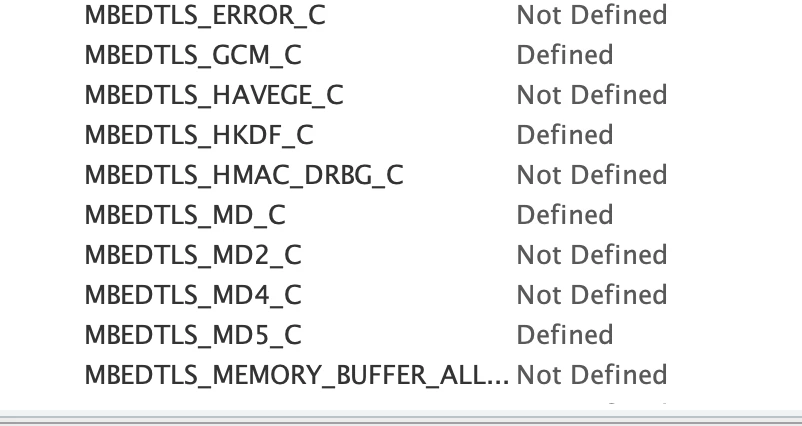
md5.c file is not copy to my project directory when I am using mbedtls middleware.
  • December 15, 2021
  • 2 replies
  • 2549 views

0693W00000HohuFQAR.png 

Version:

STM32CubeIDE

Version: 1.8.0

Build: 11526_20211125_0815 (UTC)

STM32Cube FW_F4 V1.26.2

Problem:

    md5.c file is not copy to my project directory (Middlewares/Third_Party/mbedTLS/library), so link the target fail.

This topic has been closed for replies.

2 replies

XHan.1
XHan.1Author
Associate
December 15, 2021

here is my .ioc file

Khouloud OTHMAN
Associate
December 23, 2021

Hello @XHan.1​ ,

First let me thank you for bringing this point to our attention.

You're right, md5.c file is missing even after defining MBEDTLS_MD5_C module through CubeMX interface. This is reported internally to be fixed. I'll keep you posted with the updates.

Sorry for any inconvenience that this may cause.

Meanwhile, you can choose Copy all used libraries into the project folder through Project Manager view> Code Generator tab.

0693W00000HpfZvQAJ.pngIn fact, Checking Copy all used libraries into the project folder option results a generated project containing all the source and header files of the selected middleware and drivers without taking account whether those drivers libraries are relevant or not to the user configuration in CubeMX.

Thus, md5.c file will be correctly generated in the project directory.

Thanks for your feedback.

Khouloud.

XHan.1
XHan.1Author
Associate
December 24, 2021

Hello @Khouloud OTHMAN 

Thank you for your reply. The solution you provide has solved my problem temporarily. It's my pleasure to help you to improve the software quality. That will be beneficial to the entire community. I hope everyone can get help here.

Thanks for you help

Xhan