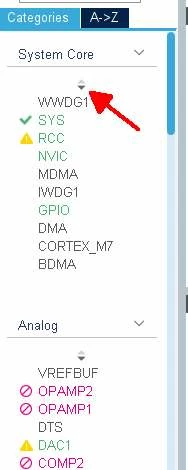
Is there a way to get rid of the double 'scrolling' needed to see all components in cubemx UI ?
Hi,
currently cubemx uses some sort of double list for listing all the components, meaning you get a scrollbar on the side over all the categories (so far OK), and then within each category, after expanding it, there is another list you can scroll with tiny arrows. The amount of visible elements in each category seems arbitrary.
In my experience, this second tiny arrows is very user unfriendly: it is impossible to get a quick overview of all available/enabled components since some of them will always be hidden, and the arrows are hard to select and make the list jump by some unclear amount of elements.
Is there a way to fully expand all categories, maybe edit some config file so that the amount of elements in each category can be set big enough to show them all once expanded so I do not have to deal with the arrows anymore?
Image showing the tiny arrow I really like to get rid of in attachment.
Regards
Bram