


one V
Associate III
January 7, 2020
Question

How to set I2C's TIMING?

  • January 7, 2020
  • 4 replies
  • 3777 views

For example, using CubeMX to set the I2C, 400K rate, the TIMING parameter is automatically generated, but it is not 400K in actual operation. The timing value of the program in ST DEMO is different from that in CubeMX, so how can I use CubeMX to set the correct I2C timing?

D:\STMicroelectronics\STM32Cube\Repository\STM32Cube_FW_G0_V1.3.0\Projects\NUCLEO-G070RB\Examples\I2C\I2C_TwoBoards_ComDMA:
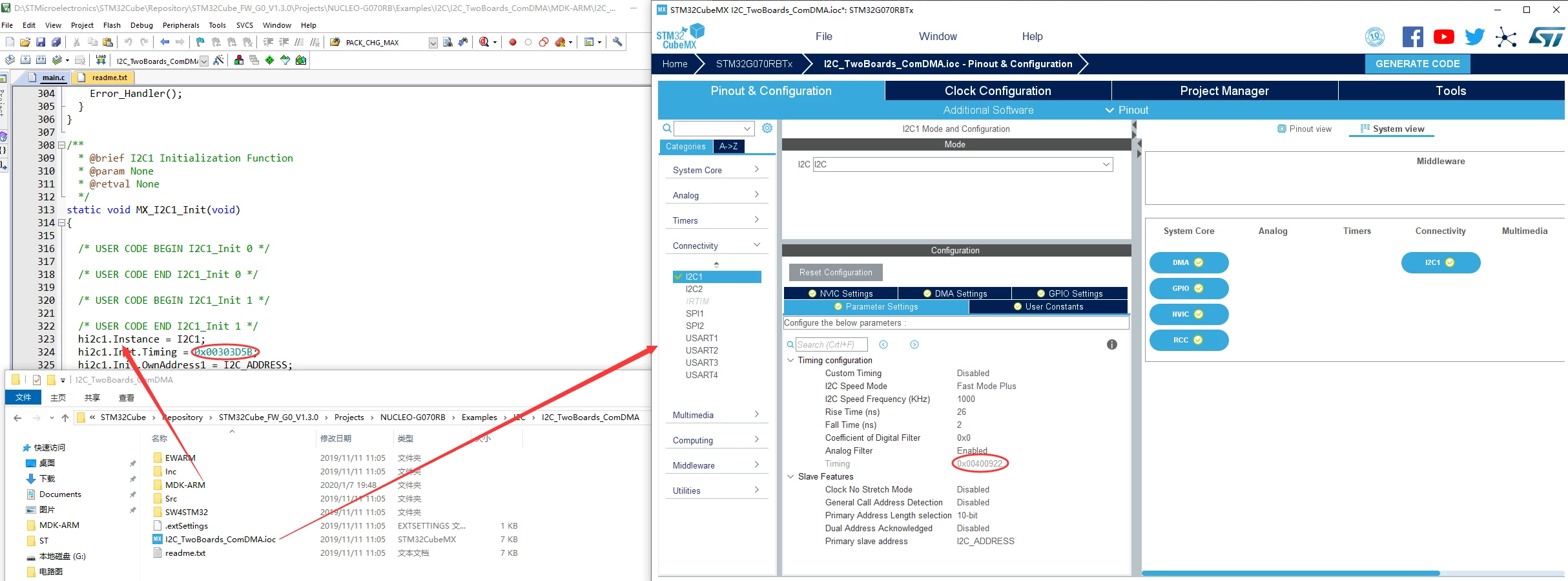
0690X00000BvfnMQAR.png

This topic has been closed for replies.

4 replies

Mike_ST
ST Technical Moderator
January 7, 2020

Please have a look to RM0444 / 31.4.10 and 31.7.5.

In order to give better visibility on the answered topics, please click on 'Best answer' on the reply which solved your issue or answered your question. 
one V
one VAuthor
Associate III
January 8, 2020

Thank you for your reply, but the manual here still says tha STM32CubeMX must be used to configure parameters.0690X00000BviFwQAJ.png

Mike_ST
ST Technical Moderator
January 8, 2020

Yes you are right, I saw that as well.

After reading such a sentence I would expect something better than filling a 32 bits value in the CubeMx.

In order to give better visibility on the answered topics, please click on 'Best answer' on the reply which solved your issue or answered your question. 
Senior III
January 8, 2020

Hi,

I agree that the .ioc file should reflect the generated code in the example, but this won't be the first time the example are not an exact match.

Regarding your question, use the fields I2C speed mode, I2C speed frequency, Rise time, Fall time, Coefficient of digital filter and Analog filter to generate the right I2C timing value. It is simple as that. There is no need to generate the corresponding code, you can just copy the result in your code.