


Solved
How to set ADC regular channels in CubeMX?
Hello!
I use CubeMx 5.0.1, my project based on STM32F413 cpu and was migrated from previous version of Cube. I need to set ADC1 to perform multiple regular conversions. This is what Cube shows me:
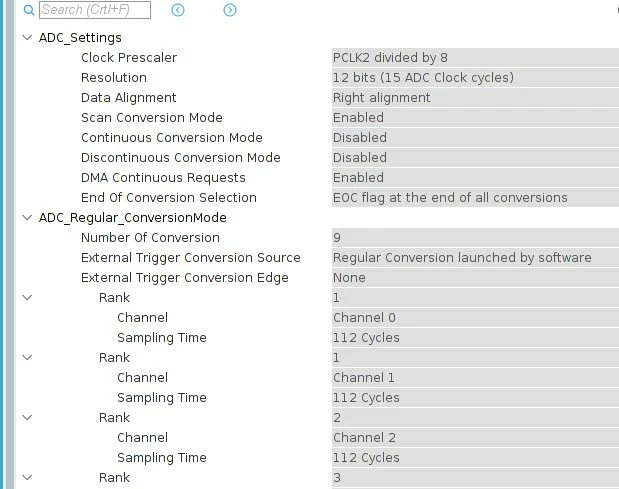
You can see two entries marked Rank1. How can it be?
And if I generate the code, this is a fragment of code what I get:
 hadc1.Instance = ADC1;
 hadc1.Init.ClockPrescaler = ADC_CLOCK_SYNC_PCLK_DIV8;
 hadc1.Init.Resolution = ADC_RESOLUTION_12B;
 hadc1.Init.ScanConvMode = ENABLE;
 hadc1.Init.ContinuousConvMode = DISABLE;
 hadc1.Init.DiscontinuousConvMode = DISABLE;
 hadc1.Init.ExternalTrigConvEdge = ADC_EXTERNALTRIGCONVEDGE_NONE;
 hadc1.Init.ExternalTrigConv = ADC_SOFTWARE_START;
 hadc1.Init.DataAlign = ADC_DATAALIGN_RIGHT;
 hadc1.Init.NbrOfConversion = 9;
 hadc1.Init.DMAContinuousRequests = ENABLE;
 hadc1.Init.EOCSelection = ADC_EOC_SEQ_CONV;
 if (HAL_ADC_Init(&hadc1) != HAL_OK)
 {
 Error_Handler();
 }
 /**Configure for the selected ADC regular channel its corresponding rank in the sequencer and its sample time.
 */
 sConfig.Channel = ADC_CHANNEL_1;
 sConfig.Rank = 1;
 sConfig.SamplingTime = ADC_SAMPLETIME_112CYCLES;
 if (HAL_ADC_ConfigChannel(&hadc1, &sConfig) != HAL_OK)
 {
 Error_Handler();
 }
 /**Configure for the selected ADC regular channel its corresponding rank in the sequencer and its sample time.
 */
 sConfig.Channel = ADC_CHANNEL_0;
 if (HAL_ADC_ConfigChannel(&hadc1, &sConfig) != HAL_OK)
 {
 Error_Handler();
 }
 /**Configure for the selected ADC regular channel its corresponding rank in the sequencer and its sample time.
 */
 sConfig.Channel = ADC_CHANNEL_2;
 sConfig.Rank = 2;
 if (HAL_ADC_ConfigChannel(&hadc1, &sConfig) != HAL_OK)
 {
You can see that Rank 1 is configured twice. So, I suppose that only channel 0 will be converted.
Previous Cube version functioned the same way, so I suspected a bug and updated my Cube, but new version yields the same result.
Is it a bug in Cube or I'm doing something wrong?
Thanks!
Michael