Associate
July 21, 2026
Solved

how to generate cpp project from stm32cube Mx

  • July 21, 2026
  • 3 replies
  • 108 views

after selecting the pins from cube MX, it will generate code in c but i want that in cpp

Best answer by Ghofrane GSOURI

Hello ​@siva_28 

First make sure STM32CubeIDE is selected as the toolchain


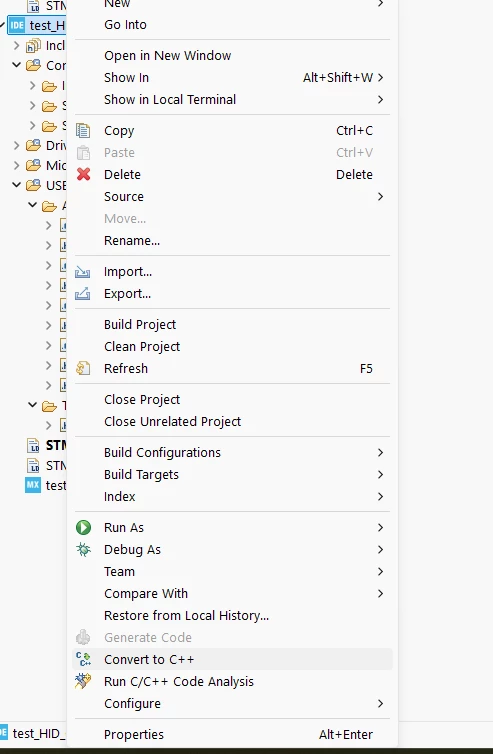
After generating the code with STM32CubeMX , then open the project in STM32CubeIDE, right-click the project, and choose Convert to C++.


3 replies

ST Technical Moderator
July 21, 2026

Hello ​@siva_28 

STM32CubeMX mainly generates C code, but you can still use it very easily in a C++ project by generating the hardware initialization code with CubeMX, keeping those generated files unchanged as much as possible, and then adding your own .cpp and .hpp files for the application logic.

BR, Souhaib

To give better visibility on the answered topics, please click on 'Best answer' on the reply which solved your issue or answered your question.
Ghofrane GSOURI
Ghofrane GSOURIBest answer
ST Technical Moderator
July 21, 2026

Hello ​@siva_28 

First make sure STM32CubeIDE is selected as the toolchain


After generating the code with STM32CubeMX , then open the project in STM32CubeIDE, right-click the project, and choose Convert to C++.


To give better visibility on the answered topics, please click on Accept as Solution on the reply which solved your issue or answered your question.
siva_28Author
Associate
July 24, 2026

Thank You for the reply, Now I can use in cpp