

TBrow.3
Associate
November 25, 2020
Solved

How to fix STM32CubeMX Code generation failing for Keil uVision since STM32CubeMX version >5.3?

  • November 25, 2020
  • 2 replies
  • 3000 views

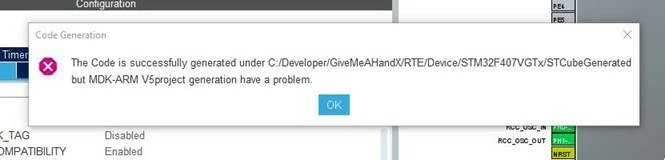
Code generation is failing when using STM32CubeMX 6.1.0 with a Keil uVision project. 
0693W000005CZqaQAG.jpg 

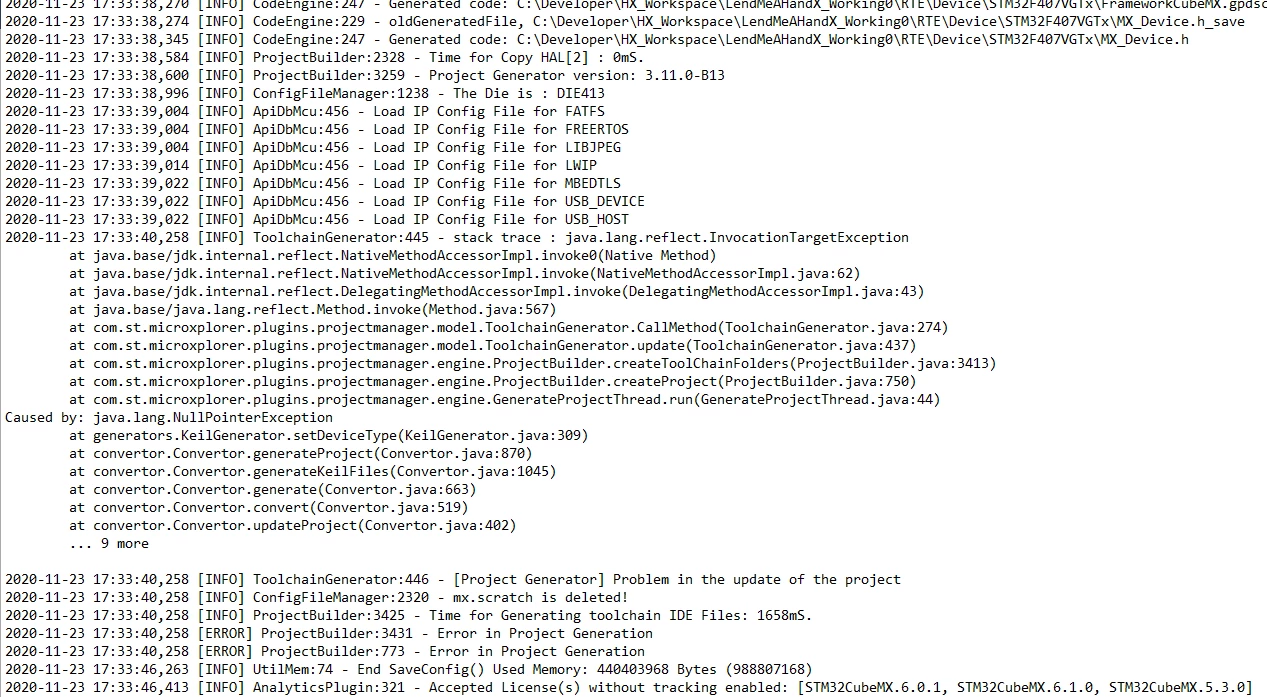
Code generation for a uVision project is working for STM32CubeMX Version 5.3.0, with any uVision version. After STM32CubeMX Version 5.3.0 code generation fails. The log file looks like it can't find the generator:
0693W000005CZrYQAW.png 

My sytem:

Windows 10 Pro (Ver. 20H2, Build 19042.572)

Keil uVision V5.29.0.0

STM32CubeMX Version 6.1.0

I have tried reinstalling different versions of uVision and STM32CubeMX.

I have tried changing Java versions.

Any ideas? I would really like to use some of the features in the newer version.

This topic has been closed for replies.
Best answer by Khouloud OTHMAN

Hi TBrow.3,

Backing to your .log file you are using Java Version 13.0.1:

0693W000005CkAGQA0.png 

In fact The use of Java Runtime Environment (JRE) 64-bits is mandatory. JRE 32-bits is no more supported. The JRE minimal version is 1.8_45. The version 1.8_251 must not be used (known Java™ issue). Java™ 11 is supported. Java™ 7, Java™ 9, Java™ 10, Java™ 12 and upper are not supported.

For more details about CubeMX software requirements, please refer to the User Manual.

Uninstalling Java in your machine and installing a supported version will absolutely resolve your issue.

Regards,

Khouloud.

2 replies

Khouloud OTHMAN
Associate
November 26, 2020

Hello TBrow.3,

Can you please indicate what version of Java are you using ?

It will be more helpful that you attach the .log file in order to detect the problem.

Regards,

Khouloud.

TBrow.3
TBrow.3Author
Associate
November 26, 2020

Hi Khouloud,

I've attached the log file from STM32CubeMX version 6.1.0

I was originally using this Java version: jre1.8.0_271

After seeing someone else solve their issue using openJDK I switched to this:

openjdk version "11.0.9" 2020-10-20

OpenJDK Runtime Environment AdoptOpenJDK (build 11.0.9+11)

OpenJDK 64-Bit Server VM AdoptOpenJDK (build 11.0.9+11, mixed mode)

Regards,

Tal.

Khouloud OTHMAN
Khouloud OTHMANBest answer
Associate
November 26, 2020

Hi TBrow.3,

Backing to your .log file you are using Java Version 13.0.1:

0693W000005CkAGQA0.png 

In fact The use of Java Runtime Environment (JRE) 64-bits is mandatory. JRE 32-bits is no more supported. The JRE minimal version is 1.8_45. The version 1.8_251 must not be used (known Java™ issue). Java™ 11 is supported. Java™ 7, Java™ 9, Java™ 10, Java™ 12 and upper are not supported.

For more details about CubeMX software requirements, please refer to the User Manual.

Uninstalling Java in your machine and installing a supported version will absolutely resolve your issue.

Regards,

Khouloud.

TBrow.3
TBrow.3Author
Associate
November 26, 2020

Thanks. Now using Java 11, all working. Got to read the fine print.

Khouloud OTHMAN
Associate
November 26, 2020

Glad that this solves your problem. You are always welcome.
