Senior
March 5, 2024
Solved

How to enable LWIP_SOCKET on Nucleo-F767ZI board in CubeIDE

  • March 5, 2024
  • 1 reply
  • 2559 views

Hi,

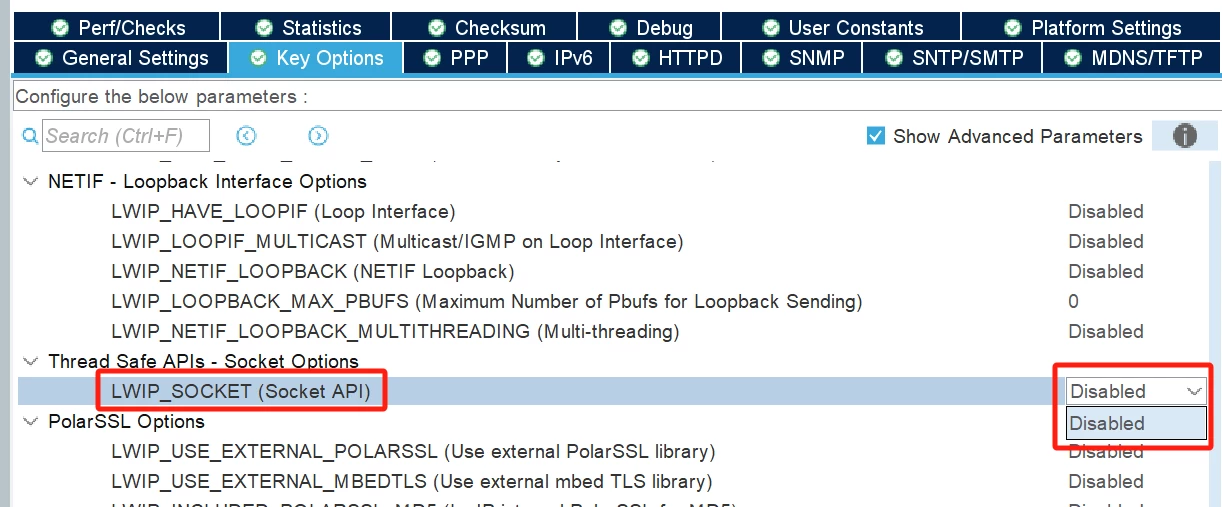
I have a Nucleo-F767ZI board, and am trying to configure it to use its LEDs, USART3 which is the virtual com port of the ST-Link on the board, and eth, I added LWIP, but I am unable to enable the LWIP_SOCKET as it requres to enable LWIP_NETCONN, by looking through the "General Settings" and "Key Options" with "Show Advanced Parameters" checkbox checked, I did not get a clue on how to do it.
 

Chao_1-1709634060539.png


Regards

Chao

This topic has been closed for replies.
Best answer by STTwo-32

Hello @Chao 

To be able to enable the LWIP_SOCKET API, you should enable an operating system (FREERTOS for example).

 Best Regards.

STTwo-32

1 reply

STTwo-32
STTwo-32Best answer
ST Technical Moderator
March 5, 2024

Hello @Chao 

To be able to enable the LWIP_SOCKET API, you should enable an operating system (FREERTOS for example).

 Best Regards.

STTwo-32

To give better visibility on the answered topics, please click on Accept as Solution on the reply which solved your issue or answered your question.
ChaoAuthor
Senior
March 11, 2024

Thank you!

I decide to use RAW API, and have seen that LWIP contains debug code, do you know how to switch on its debug functionality? I  enabled all debug options for TCP, but found LWIP_DEBUG is not defined, I tried to do the define in lwipopts.h, but I found I still did not get it properly defined, at the moment I tempararily define it in debug.h and it works, but you know this is not the correct way to do it, debug.h is generated by CubeMX and I have to manually define it every time I change the .ioc file.

Regards

Chao

STTwo-32
ST Technical Moderator
March 11, 2024

I'm not an expert on this. I suggest you close this topic by choosing a "best answer" since the original question is answered. Then, ask this question with more details in a new post to have better chance to have answer.

Best Regards.

STTwo-32

To give better visibility on the answered topics, please click on Accept as Solution on the reply which solved your issue or answered your question.