

Darcy1
Associate
August 22, 2022
Solved

How do we update CubeMx from 6.3.0 to the current version.

  • August 22, 2022
  • 2 replies
  • 5434 views

We need to update CubeMx from 6.3.0 to the latest version. When updated before, we were told to completly remove CubeMx and start again. This caused all sorts of issues.

There must be an easy way to update these days. We can't see any options on the CubeMx menu for updating CubeMx..

This topic has been closed for replies.
Best answer by Aymen CHAKROUN

Hi @Bob S​ ,

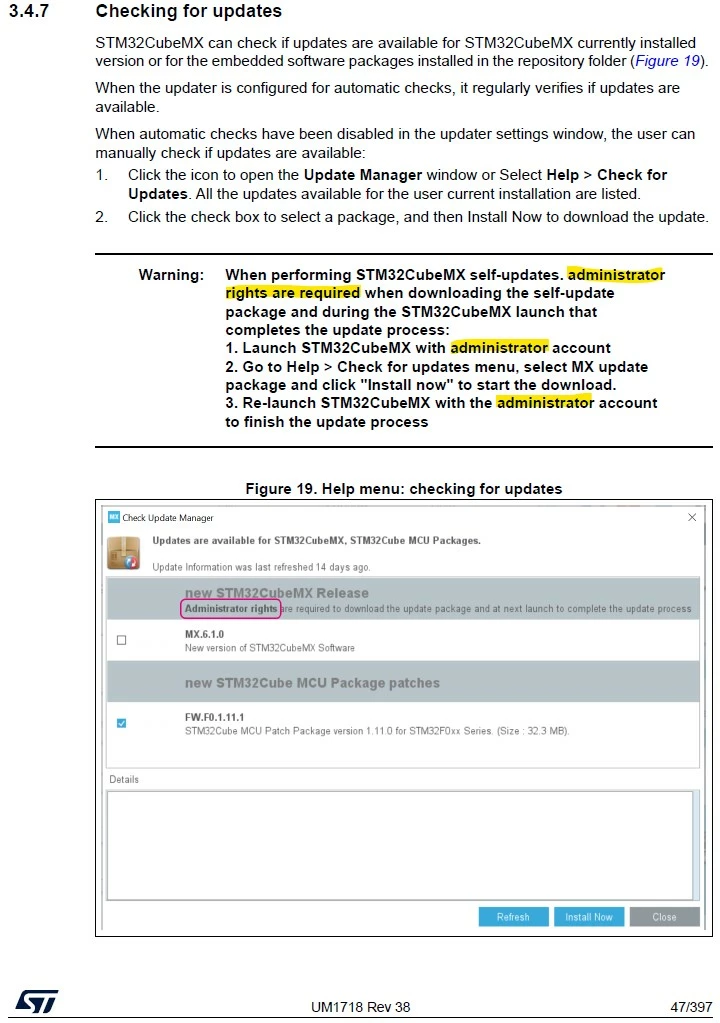
Can you please refers to the CubeMX User Manual UM1718.pdf or follow these instruction [Extracted from CubeMX UM]:

Main attention:

1- You need to start CubeMX as Admin (right mouse click > 'Run as administrator')

2- Perform the CubeMX upgrade

3- Close CubeMX

4- Re-start again the CubeMX as Admin to finish the upgrade process

0693W00000QOHRaQAP.jpg 

Regards,

Aymen.

2 replies

Bob S
Super User
August 22, 2022

Install the newer version into a separate directory. I've got 3 or 4 versions installed to support various projects. It appears to default to (in Windows) install in "C:\Program Files\STMicroelectronics\STM32CubeMX". I just change that last "CubeMX" part to, for example, "CubeMX_6_6_0". Then manually create desktop shortcuts.

Aymen CHAKROUN
Aymen CHAKROUNBest answer
ST Employee
August 23, 2022

Hi @Bob S​ ,

Can you please refers to the CubeMX User Manual UM1718.pdf or follow these instruction [Extracted from CubeMX UM]:

Main attention:

1- You need to start CubeMX as Admin (right mouse click > 'Run as administrator')

2- Perform the CubeMX upgrade

3- Close CubeMX

4- Re-start again the CubeMX as Admin to finish the upgrade process

0693W00000QOHRaQAP.jpg 

Regards,

Aymen.