
YBuch.1
Associate II
May 4, 2020
Question

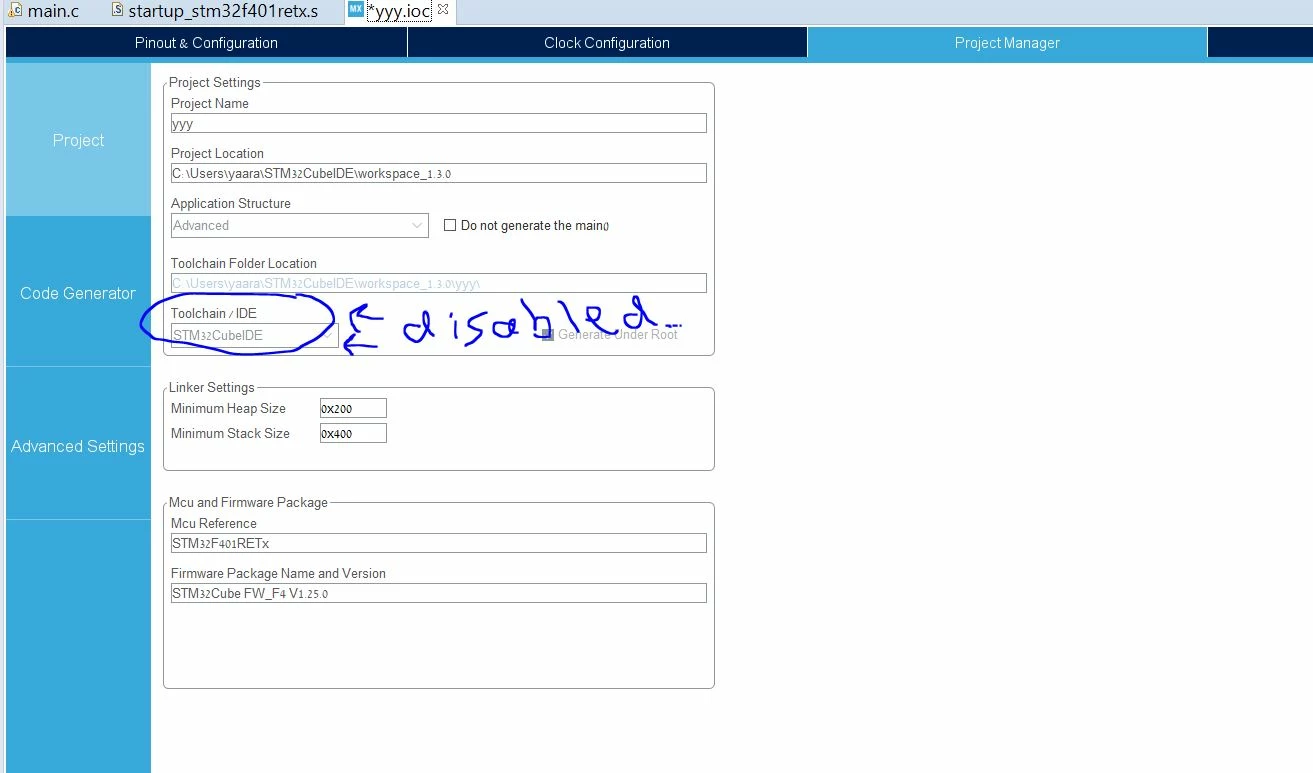
hi the "toolchain/ide" category under project manager options is disabled in stm32cube, someone knows how to solve it? i want to change the toolchain to MDK-ARM and i can not now becuse it is disabled.

  • May 4, 2020
  • 9 replies
  • 8145 views

0693W000000WsoxQAC.jpg

This topic has been closed for replies.

9 replies

TDK
Super User
May 4, 2020

It looks like you're opening an .IOC file within STM32CubeIDE, so the choice is locked to STM32CubeIDE.

Open the IOC in standalone STM32CubeMX.

Side note: That has to be the worst font for readability I've seen in quite a while. Are you on Linux?

"If you feel a post has answered your question, please click ""Accept as Solution""."
YBuch.1
YBuch.1Author
Associate II
May 4, 2020

Hi,

Thanks for the answer.

Can you please detail me step by step what i need to do ?

I didnt understand what you mean by "Open the IOC in standalone STM32CubeMX", how do i open it standalone?

TDK
Super User
May 5, 2020

Download and install STM32CubeMX from here:

https://www.st.com/en/development-tools/stm32cubemx.html

Run it.

Open your IOC file.

Probably save-as to another folder location.

Change Toolchain/IDE as desired.

"If you feel a post has answered your question, please click ""Accept as Solution""."
YBuch.1
YBuch.1Author
Associate II
May 5, 2020

Hi,

thanks for your answer.

The file is not open at all in another folder location.

it is opening only from the original project folder.

I am getting the error i attached.

Is there any other way to unlock the "toolchain/ide" category?

thanks a lot

Nesrine.JLASSI
Visitor II
May 5, 2020

​Hello @YBuch.1​ 

When you create an STM32 project from the CubeIDE you can only use STM32CubeIDE as Toolchain/IDE (you will notice that only CubeIDE exists and that it is greyed out).

0693W000000VqlzQAC.png

Otherwise, if you create a new .ioc from STM32CubeMX you can choose the IDE that suits your needs.

0693W000000Vqm9QAC.png

Best regards,

Nesrine

YBuch.1
YBuch.1Author
Associate II
May 5, 2020

hi Nasrine,

thanks for the answer.

I tryed it. it is still disabled..

I did not managed to create another a new .ioc from STM32CubeMX like in the second example,

can you please send me a step by step instructions /screenshots of the stages that I need to do?..

Nesrine.JLASSI
Visitor II
May 5, 2020

Hi @YBuch.1​ 

Download and install STM32CubeMX from here:

https://www.st.com/content/st_com/en/products/development-tools/software-development-tools/stm32-software-development-tools/stm32-configurators-and-code-generators/stm32cubemx.html

Create an .ioc from STM32CubeMX then, you can choose the IDE that suits your needs.

Best regards,

Nesrine

YBuch.1
YBuch.1Author
Associate II
May 5, 2020

thanks !

Nesrine.JLASSI
Visitor II
May 5, 2020

​welcome any time !

joachim
Associate
February 24, 2021

Hello,

It also seems that some board are not compatible with all toolchain.

For example, if you create a new project with the NUCLEO H745 board, some toolchains are greyed out.

Any idea when other toolchains will be available for those boards?

Thanks
