

FBiri.1
Associate
May 7, 2020
Question

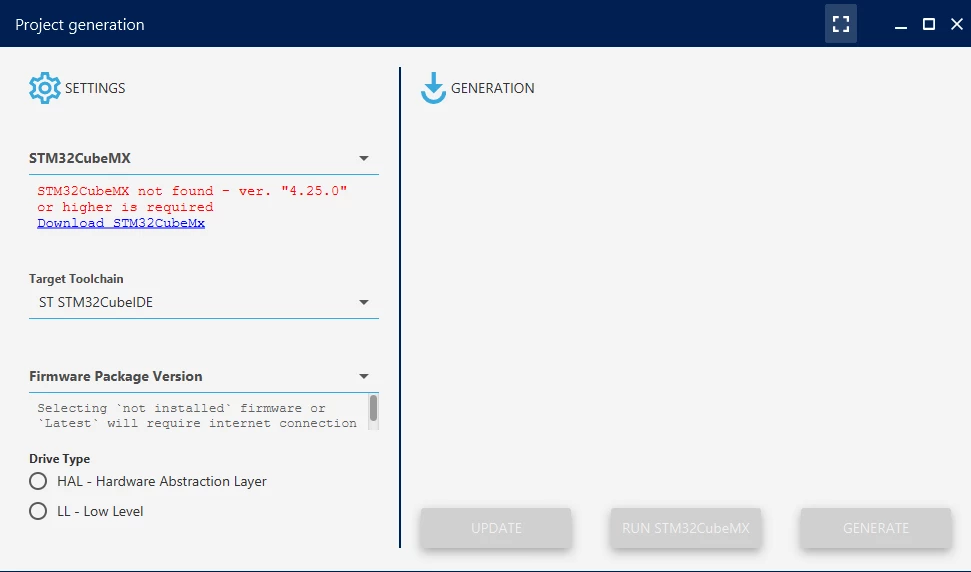
Hi, I am trying to use motor control work bench with STM32cubemx. I have cubemx in my computer but i cant use with work bench and i am receiving errror which is ' STM32Cubemx not found'. Also i tried with all STMCubemx versions. How can i fix this?

  • May 7, 2020
  • 6 replies
  • 2083 views

0693W000000X2QRQA0.png

This topic has been closed for replies.

6 replies

Nesrine.JLASSI
Visitor II
May 7, 2020

Hi @Fırat Biricik​ 

Which STM32cubeMX version do you use ?

I tried it now, i had no problem.

0693W000000X2plQAC.png

Best regards,

Nesrine

Nesrine.JLASSI
Visitor II
May 7, 2020

Please try with this steps:

You already need a well-named directory in the STM32Cube repository :

0693W000000WhmHQAS.png

Generally speaking: MCSDK_vX.Y.Z..

In this directory, you will have to copy the MotorControl directory found in the MCSDK installation:

0693W000000WhmRQAS.png

and have the following content in the tree structure:

0693W000000WhmbQAC.png

Best regards,

Nesrine

FBiri.1
FBiri.1Author
Associate
May 7, 2020

Hi @Nesrine.JLASSI​ , First of all thank you for attention. I am using CubeMx version 5.6. And i tried this steps but probably i have problem about XML file.0693W000000X2xLQAS.png

FBiri.1
FBiri.1Author
Associate
May 7, 2020

And I dont have MCSDKv5.4.3 file in repository file.0693W000000X3YHQA0.png

chaaalyy
Senior II
May 7, 2020

As nesrine already stated: You NEED that directory (as described), then you have to copy the MotorControl directory found in the MCSDK installation. Inside you should have the described content then… Read the instructions again (and carefully ;) )

FBiri.1
FBiri.1Author
Associate
May 8, 2020

Thank you for attention i fixed my problem. My problem derives from the my computer language. When i changed my computer language Turkish to English problem solved to. ;)