


MFred.2
Associate III
September 14, 2026
Question

Embedded software packages manager (offline)

  • September 14, 2026
  • 3 replies
  • 37 views

Hi,

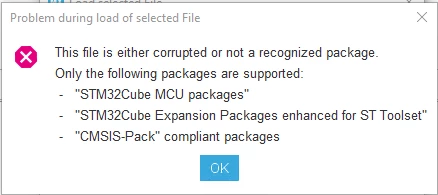
When attempting to install a package "From local" on a development PC that is offline, CubeMX rejects the package with the error message "package not recognized."

How can the package dictionary (XML file) be updated? This would be the offline equivalent of the "Refresh" button.
 

Thanks

3 replies

Ghofrane GSOURI
ST Technical Moderator
September 15, 2026

Hello ​@MFred.2 

The package appears to be not compatible with STM32CubeMX. The “package not recognized” message  means the file is not in one of the formats CubeMX can install, such as an STM32Cube MCU package, an STM32Cube Expansion Package for ST tools, or a CMSIS-Pack compliant package. In this case, updating the local package dictionary would not resolve the issue, because the limitation is the package format itself rather than missing package information. If needed, the package may still be usable through manual integration into the project instead of installation through CubeMX.

THX

Ghofrane

To give better visibility on the answered topics, please click on Accept as Solution on the reply which solved your issue or answered your question.
MFred.2
MFred.2Author
Associate III
September 15, 2026

Hello,

To be precise, the package in question is this one:

  • https://www.st.com/en/embedded-software/x-cube-cryptolib.html#section-get-software-table

I am therefore surprised that this package is not supported by CubeMX.


thanks for your reply

Andrew Neil
Super User
September 15, 2026

Is it similar to I-CUBE-LRWAN, which is not a proper Cube “package” - just a collection of files/examples … ?

https://www.st.com/en/embedded-software/i-cube-lrwan.html


A complex system that works is invariably found to have evolved from a simple system that worked.A complex system designed from scratch never works and cannot be patched up to make it work.