

etheory
Senior
August 10, 2021
Solved

Disable Resolve Clock Issues

  • August 10, 2021
  • 1 reply
  • 2115 views

Hi there!

Is there a way to permanently disable the resolve clock issues feature of STM32CubeIDE-1.7.0? I've tried saying "No" and remember my options, but the interface just completely ignores me and does it anyway. It's utterly infuriating. Is there a preferences option somewhere I can set?

Is there a setting somewhere to disable this feature? It's frustrating as it keeps trashing my settings before I can fix them manually.

As it stands, it basically makes the .ioc view editor unusable. Since sometimes it just gets stuck updating clock frequencies even when you explicitly ask it not to, and it can very quickly ruin a configuration.

Regards,

Luke
This topic has been closed for replies.
Best answer by Mouadh JERIDI

Same for me ! I couldn't reproduce your reported issue.

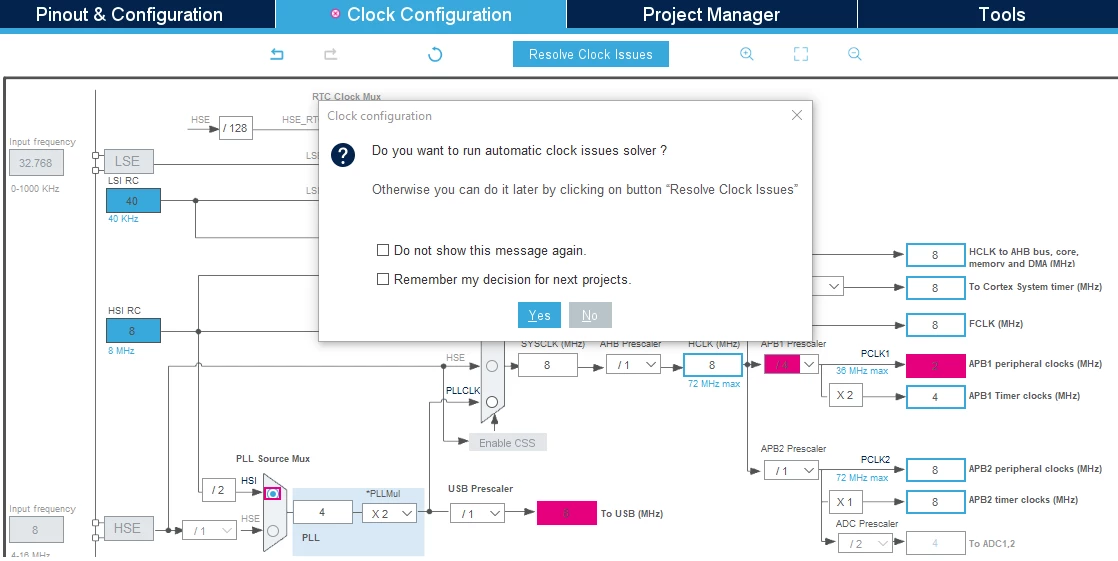
The only possible way to disable automatic clock issues solver is by clicking on "No" when this window pop up.

You can also check "Remember my decision for next projects" if you don't want CubeMX to solve your clock issues anymore.

0693W00000DlpwWQAR.png 

If you don't have any other related questions, please make this one as "resolved".

Thank you for your contribution @etheory​  !

Mouadh.

1 reply

Mouadh JERIDI
Visitor II
August 30, 2021

Hello @etheory​ 

Thank you for your post.

Could you please share your ioc file with me ?

Thanks,

Mouadh.

etheory
etheoryAuthor
Senior
August 30, 2021

Hi @Mouadh JERIDI​ thank you for the response.

I just tried to reproduce the issue but am having difficulty doing so.

I will try a few more times over the next few days and send through a repro when I find one.

Thank you.

Mouadh JERIDI
Visitor II
August 30, 2021

I will be here for you.

Thank you for helping to improve our products @etheory​  !

Mouadh.
