


vml
Associate II
November 27, 2018
Question

CubeMX5 seems totally useless for developers with high DPI monitors :(

  • November 27, 2018
  • 17 replies
  • 7118 views

Currently text all over the GUI is VERY small!

Is it possible to make text of CubeMX 5 to be bigger for 4K monitors as it was in CubeMX4?

Who can easy read any text from such interface I wonder (see screenshot). The only advantage of CubeMX5 seems to be GUI (I did not found in explanations about v5 any other big changes) but GUI was made really worse because of total ignorance of high DPI :(

If this is a bug and not a design decision then how such things are reported to ST? Is there somewhere bugreporting service for CubeMX?0690X000006CUIrQAO.png?
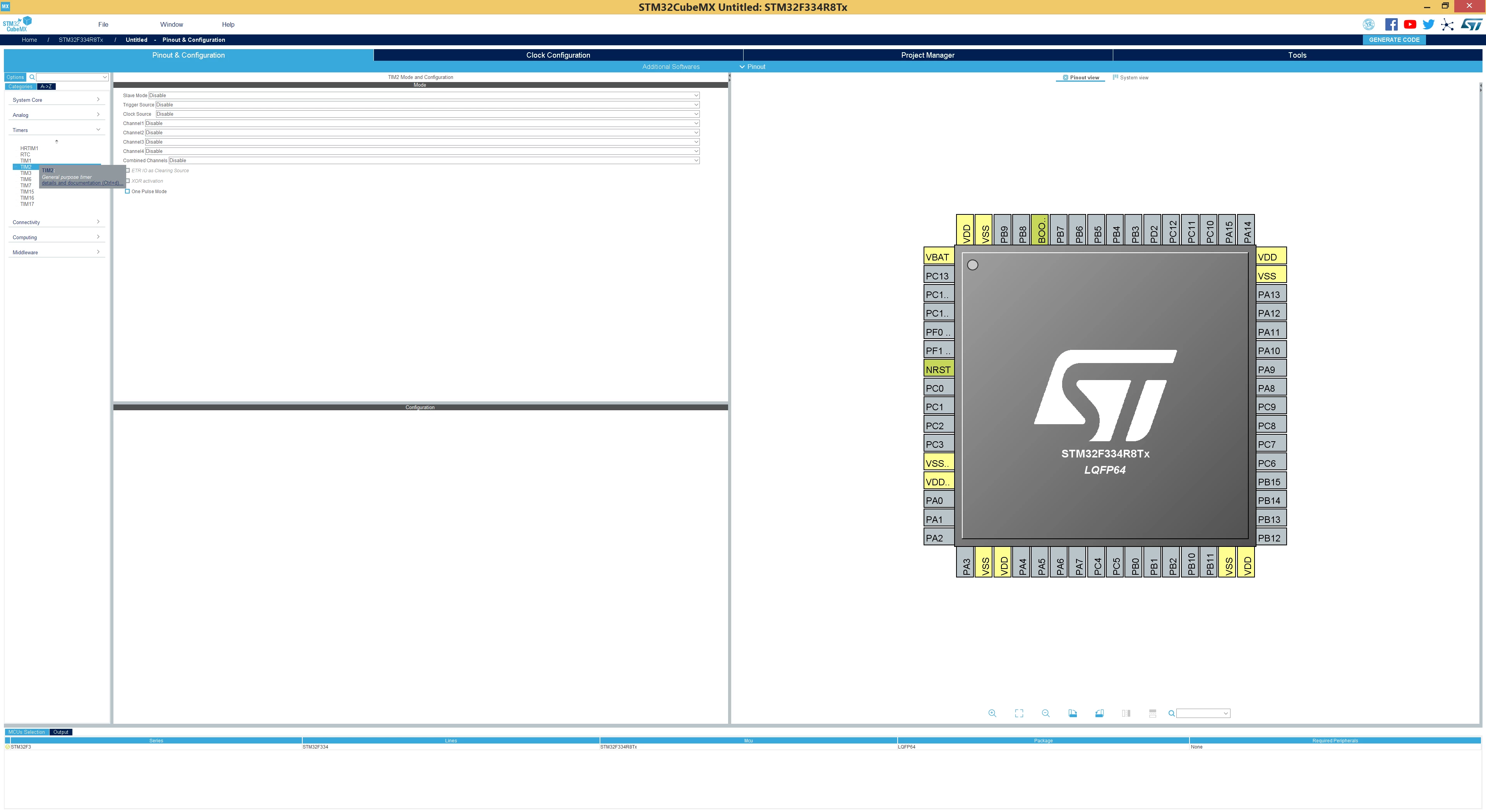
This topic has been closed for replies.

17 replies

ST Technical Moderator
November 27, 2018

Hello,

I raised your issue internally to CubeMx team for check and we will come back to you soon.

Kind Regards,

Imen

In order to give better visibility on the answered topics, please click on 'Best answer' on the reply which solved your issue or answered your question. Thanks
vml
vmlAuthor
Associate II
November 27, 2018

So you are saying that this is not a design decision. Is there any bugtracking place for ST's software? Or ST does not need clear feedback management from people?

Because in issue

https://community.st.com/s/question/0D50X00009XkfPjSAJ/stm32cubemx-on-uhd-4k-display-clock-configuration-diagram-too-small-to-see

Imen DAHMEN (YOU) have said to community

"I will reportyour issue to our CubeMx teamfor checking and will come back to you as soon as possible."

And community have not seen you on that question since you have said that (November 7 2017) ;)

This question will be treated the same way I wonder!?

I am asking this not with balming background but from practical point of view in mind ... If next time we can discuss this problem will be with CubeMXv6 in 1 year then we need a way to downgrade to CubeMXv4 right now! Because this issue with CubeMXv5 make this version useless for developing with good monitors and I can not find action in CubeMXv5 to downgrade to CubeMXv4 :(

Can ST give us a link to last CubeMXv4 for the time while highDPI is not supported by CubeMXv5?

P.S.

More money developers put in good professional development process ... less developing comfort we have as a result ;). I mean buying good monitor for professional development gave us much less usability with CubeMXv5.

I think it sould not be so and this is clearly a problem of developed CubeMX v5.0.0. I am basing my thoughts on fact that ST puts resourses in better GUI usability for users of CubeMX. Or I am wrong?

Tesla DeLorean
Guru
November 27, 2018
Tips, Buy me a coffee, or three.. PayPal Venmo (See Profile) Up vote any posts that you find helpful, it shows what's working..
vml
vmlAuthor
Associate II
November 27, 2018

>please get someone in UI QA a 4K monitor

It would be better to allow users to set scaling factor for text. Why UI designers frequently think that they know how good different people can see the same size text?! This is rediculously strange assumption!

VYare
Associate II
December 2, 2018

CubeMX is the only piece of software i'm using now that isn't scaled properly for UHD screen. Starting with version 5 you can choose between unreadable text or blurry mess (using W10 compatibility settings). Either way it is not only painful to use but even look at.

Nawres GHARBI
ST Technical Moderator
December 6, 2018

Hi @JH.1ike​ ,

We are currently updating the GUI to fill well on small UHD screens.

It will be helpful if you can give your screen size and resolution.

Please try also to put a bigger text setting 125 or 150% it may help you

VYare
Associate II
December 6, 2018

I'm experiencing same problems as the topic starter. Systemwide UI scale factor does absolutely nothing - it doesn't change the text size, it keeps same physical size on the screen. The only way around is per application compatibility mode, but the text gets blurry and it is hard to read it whatsoever.

Resolution: 3840x2160 (recommended), diag: 27", scale: 150% (recommended).

300% scaling, 1.5mm text height:0690X000006ClFBQA0.jpg

150% scaling, 1.5mm text height:0690X000006ClFGQA0.jpg

Nawres GHARBI
ST Technical Moderator
December 7, 2018

Hi @VYare​ 

Fonts size settings will be available in a coming release and we are fixing the GUI to fit well the UHD screens

VGold
Associate
December 18, 2018

Ahahahaaaa! It's useles for LOW-DPI monitores too. In every window I can see one-two fileds.

Yes, I can resize ONE window using SPACE OF ANOTHER window while I cannot DRAG it to other place and to overview two windows in the same time! Best of the best UI

0690X000006Crr6QAC.jpg0690X000006CrrBQAS.jpg

vml
vmlAuthor
Associate II
January 6, 2019

Probably CubeMX5 is designed only for monitors of developers of CubeMX5 :)

CubeMX6 will probably will name us the model of this standard monitor ST bought for CubeMX team and we would need to find this exact model.

After I have seen zero improvements in GUI in CubeMX 5.0.1 I decided to return to latest CubeMX4:

https://www.st.com/resource/en/library2/stm32cube_mx_v4270.zip

or

https://dropmefiles.com/vDnG4

CubeMX5 new GUI was not tested on real users before stopping development of CubeMX4 (with time-proven GUI). This big problem in project management of CubeMX team is the source of unusability of CubeMX5 for many users. CubeMX team is too much confident in the new things they do :(

P.S.

CubeMX developers probably never seen docking windows in their lifes and are not aware of adjustable windows thems so that users can specify there and that windows is needed for specific tasks and not like now: this window can be only on the left and that window only under it :(

Instead of making interface adjustable by user the only difference in CubeMX5 GUI was to change it from one way of showing same windows to another way. Here is how Matlab IDE designed also on Java BUT 12 YEARS AGO is looking on high-dpi monitors in 2019:

0690X000006CyL7QAK.png

All windows here are dockable and can be attached to any edge OR be merged with other windows in tabs-like way (like on left lower corner).

CubeMX5 developers are childs compared to developers of 12 years old software (we are speaking about development on same programming language ... so comparison is totally valid)

VYare
Associate II
January 3, 2019

So, the new version is out, but where is the option to change font size?

vml
vmlAuthor
Associate II
January 6, 2019

Hello Nawres GHARBI (ST Employee)!

You have said that there will be changes in GUI for High-dpi monitors in next release and I can not see ANY improvements in arived CubeMX5.0.1. Please see sreenshot below

0690X000006CyKsQAK.png

and compare it with sreenshot of 5.0.0 in a header!

Known limitation for 5.0.1 does not have a word about unusability with high-dpi monitors:

0690X000006CyL2QAK.png

One should be true ... there is a problem and it is clearly stated in Release notes known issues OR problem is fixed in the release. Or what?!

>Fonts size settings will be available in a coming release and

>we are fixing the GUI to fit well the UHD screens

There is ZERO improvements in GUI for High-DPI monitors ... not speaking about implementation of this promised great option :(

P.S.

Why things are so wrong with CubeMX5!?

For example please check font size of menu in screenshot of CubeMX5.0.1 and what ST already achived in CubeMX4:

0690X000006CyKxQAK.png

ST already programed good font size for menus in CubeMX. Why CubeMX5 version is a regression in GUI (while GUI seems to be the only big change compared to CubeMX4)?

EPrem.1
Visitor II
October 6, 2020

Well here we are 2 years later (4 years after the initial complaints on this topic), with CubeMX V6.0.1 inside CubeIDE and the problem is just as bad as ever. In fact, its worse, because CubeIDE scales BEAUTIFULLY on large monitors, until you open the MX configuration. It throws that into an editor window, and the terrible flaws of the MX UI are so blatantly obvious. 0693W000004IjpaQAC.png

hint text is the worst:

0693W000004IjpkQAC.png

It looks huge here.. but on my monitor its less than 2mm tall text. (yes. I measured!).

Developers dont really care about "new, slick, modern" UI. They just want to get their work done. Squinting or putting their noses to the monitor to is not productive. Neither is WIDE mouse movements from one button to the next, and then carefully positioning and hovering the mouse over those very tiny buttons in order to execute the action.

In tools for example, the plots are HUGE, but the controls for them are tiny.

and check out this ratio of utilized screen space in the project manager tab:

0693W000004IjqEQAS.png

The lack of attention to this issue is incredibly frustrating. I dont have to to jump into CubeMX often, but every time I do the UI makes the whole process a struggle.

I want to love STM products. The chips are great. But its stuff like this that keeps people using Mbed or Arduino/Platform-IO rather than go any deeper.

Manufacturers development tools have historically always been utter crud. But its this kind of lack of attention to a MAJOR issue for 4 plus years that could EASILLY be solved that makes people think ST is ACTIVELY discouraging people from using their tools.

KnarfB
Super User
October 6, 2020

Even if you choose Window > Font size > Larger ? That works for me on my 4k display using Win10.