


HLewo
Visitor II
Jan 28, 2019 8:16 AM UTC
Question

CubeMX in batch mode and dialog box "Proxy Error" popping on

I use the CubeMX in batch mode on a "nightly buid machine" without an internet connection.

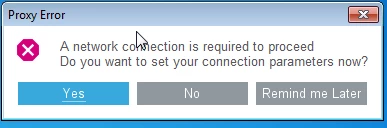
Now with CubeMx version 5 there is always a dialog box "Proxy Error" popping on which prevents the further processing of the batch file so that the code could not be created and tested. Is there a way to get off that dialog box ?
0690X000006DFoXQAW.png

This topic has been closed for replies.

6 replies

APrin
Visitor II
Jun 5, 2019 12:54 PM UTC

Running CubeMX 5.2.0

The same issue over-here, before we could set "Test=0" in the updater.ini file, which doesn't work anymore.

For me less important but to share:

Also the command line argument -i doesn't work anymore and the in CLI mode on linux a X11 display must always be available (GUI needed for splash and error messages)

@Community member​ Did you already find a solution? this makes it impossible for us to upgrade to the latest toolchain!

APrin
Visitor II
Jun 5, 2019 12:56 PM UTC

Actually -i is working, but the GUI is still shown... so a little misleading...

APrin
Visitor II
Mar 13, 2020 9:47 AM UTC

We are still struggling with this proxy popup in our headless builds... we cannot upgrade our toolchain currently; ST can this be solved ASAP so we can upgrade our automated build without GUI and internet connectivity?

RomanK
Associate
Oct 19, 2020 12:57 PM UTC

We have the same problem with our headless builds. Is there now a solution from ST or any workaround?

LaurV
Explorer
May 26, 2022 10:16 AM UTC

Sorry for necroposting, I have the same issue (proxy error, can not connect to internet) with 6.5.0 in both win7 and win10. Reverting back to 6.2.1 works fine. In fact, 6.5.0 seems to have few other bugs too, so if you don't need to use STM32Cxx or STM32Uxx (it seems the only stuff that was added to the upgrade), then you should better stay to 6.2.1 which is stable.