LDoes.1
Associate
June 25, 2020
Solved

CubeMX has no option to set Analog Watchdog 2 & 3 watchdog channels

  • June 25, 2020
  • 4 replies
  • 5792 views

CubeMX shows no option for setting the active channels for analog watchdog 2 and 3 for the STM32G474RBTx.
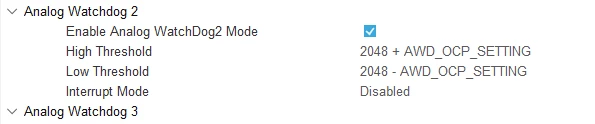

0693W000001rSvuQAE.png

This topic has been closed for replies.
Best answer by Khouloud OTHMAN

Hello LDoes.1,

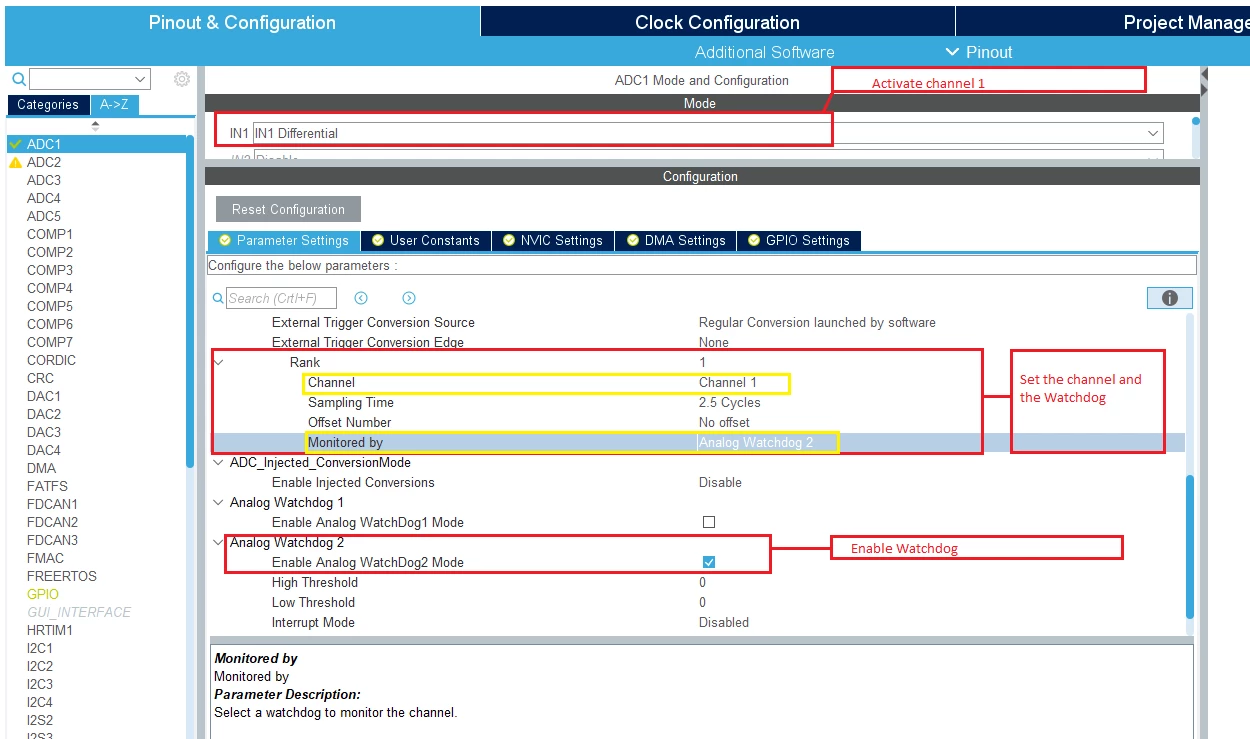
STM32CubeMX has already this option, in fact, in order to select a watchdog (2 or 3) to monitor a channel (e.g., Analog watchdog 2 to monitor channel 1) :

  • Activate channel 1.
  • Enable Analog Watchdog2Mode.
  • Select "ADC_Regular_ConversionMode" >> "Rank", from "channel" list you can select the channel (from those already activated) and with “Monitored by�? you can choose the watchdog to monitor this channel.

You’ll find below a screenshot to clarify more the process (case channel 1 activated and Analog Watchdog2 enabled).

0693W000001rcgyQAA.png

BR,

Khouloud.

4 replies

Khouloud OTHMAN
Associate
June 26, 2020

Hello LDoes.1,

ADC has three Analog watchdogs with different characteristics :

  • One Analog Watchdog can monitor one selected channel or all enabled channels (Analog Watchdog 1).
  • Two analog Watchdogs (2 and 3) more flexible and can guard several selected channels.

Please refer to RM0440 section 21.4.28 (https://www.st.com/resource/en/reference_manual/dm00355726-stm32g4-series-advanced-arm-based-32-bit-mcus-stmicroelectronics.pdf) for further details.

BR,

Khouloud.

LDoes.1
LDoes.1Author
Associate
June 26, 2020
Hi Khouloud,
​
I am aware of the differences between AWD1 and AWD2&3 however my question/bug report is about the fact that CubeMX has no option to set the channels for AWD 2&3 (the thing that makes them more flexible).
​
Of course it is possible to set the register manually in software but in my opinion this defeats the purpose of using CubeMX
Khouloud OTHMAN
Khouloud OTHMANBest answer
Associate
June 26, 2020

Hello LDoes.1,

STM32CubeMX has already this option, in fact, in order to select a watchdog (2 or 3) to monitor a channel (e.g., Analog watchdog 2 to monitor channel 1) :

  • Activate channel 1.
  • Enable Analog Watchdog2Mode.
  • Select "ADC_Regular_ConversionMode" >> "Rank", from "channel" list you can select the channel (from those already activated) and with “Monitored by�? you can choose the watchdog to monitor this channel.

You’ll find below a screenshot to clarify more the process (case channel 1 activated and Analog Watchdog2 enabled).

0693W000001rcgyQAA.png

BR,

Khouloud.