CubeMX generates wrong FLASH_LATENCY after STM32H7 HAL driver migration
Hi,
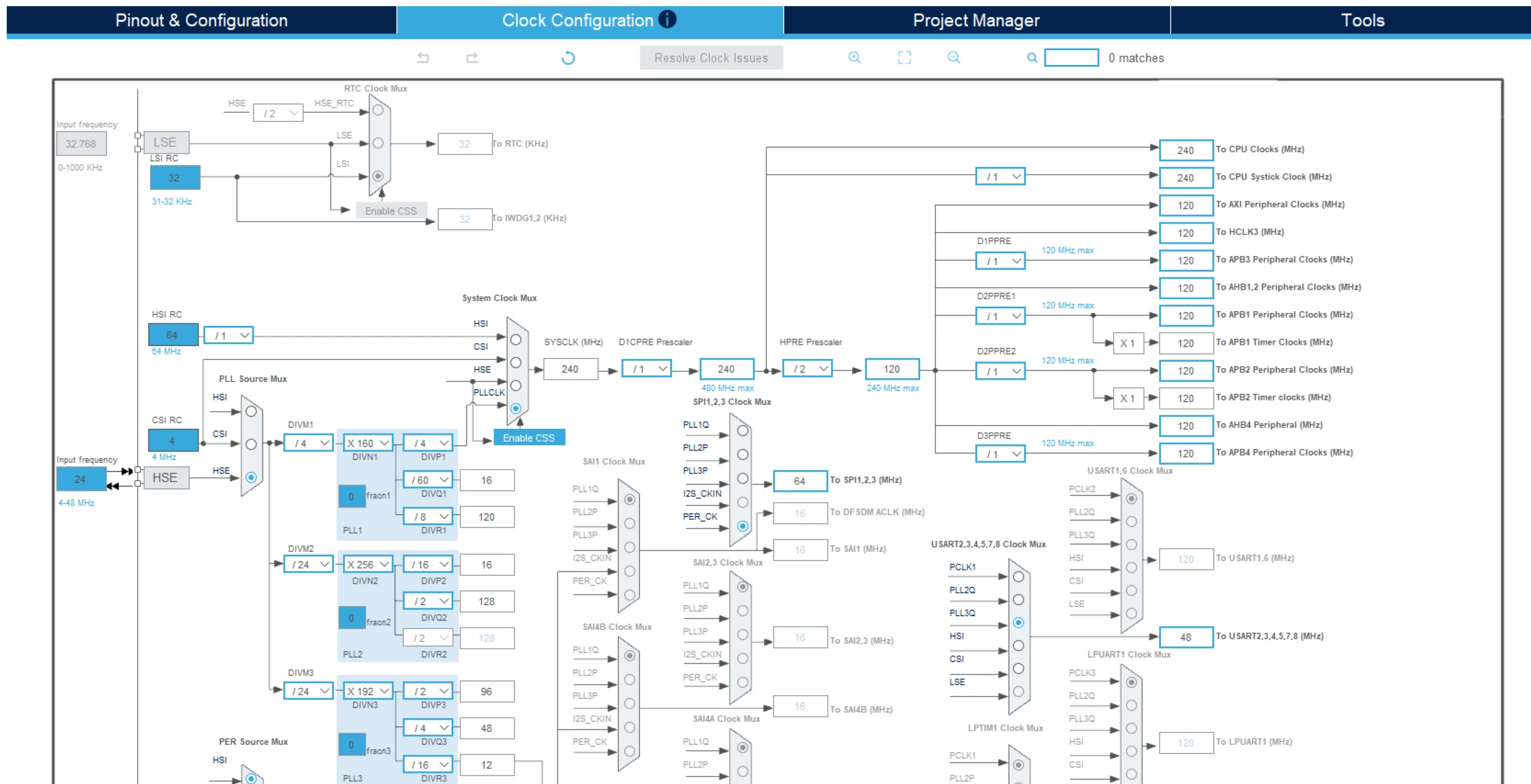
I have a firmware running on an STM32H753 that was working correctly. After updating the STM32H7xx_HAL_Driver (by performing the migration in STM32CubeMX), the MCU gets stuck during the execution of SystemClock_Config().
While debugging, I noticed that before the migration CubeMX generated:
HAL_RCC_ClockConfig(&RCC_ClkInitStruct, FLASH_LATENCY_2)
After the migration, the same function is generated as:
HAL_RCC_ClockConfig(&RCC_ClkInitStruct, FLASH_LATENCY_0)
If I manually change it back to:
HAL_RCC_ClockConfig(&RCC_ClkInitStruct, FLASH_LATENCY_2)
the MCU works correctly again. However, every time I regenerate the code from CubeMX, it goes back to FLASH_LATENCY_0.
I have already tried changing the PLL and clock parameters in the Clock Configuration tab of CubeMX and then restoring the original values, to check whether CubeMX was not correctly updating the clock tree calculation, but the generated code still contains FLASH_LATENCY_0.
Is this a bug introduced in the new HAL driver/CubeMX version, or is there something else that I am missing?
How can I correctly configure CubeMX so that it generates the proper FLASH_LATENCY value automatically, without having to modify the generated code manually after every regeneration?
My hardware configuration:
-
MCU: STM32H753VIT
-
External crystal: 24 MHz HSE
This is my current SystemClock_Config() function:
void SystemClock_Config(void)
{
    RCC_OscInitTypeDef RCC_OscInitStruct = {0};
    RCC_ClkInitTypeDef RCC_ClkInitStruct = {0};

    HAL_PWREx_ConfigSupply(PWR_EXTERNAL_SOURCE_SUPPLY);

    while(!__HAL_PWR_GET_FLAG(PWR_FLAG_VOSRDY)) {}

    RCC_OscInitStruct.OscillatorType = RCC_OSCILLATORTYPE_HSI|RCC_OSCILLATORTYPE_HSE;
    RCC_OscInitStruct.HSEState = RCC_HSE_ON;
    RCC_OscInitStruct.HSIState = RCC_HSI_DIV1;
    RCC_OscInitStruct.HSICalibrationValue = RCC_HSICALIBRATION_DEFAULT;

    RCC_OscInitStruct.PLL.PLLState = RCC_PLL_ON;
    RCC_OscInitStruct.PLL.PLLSource = RCC_PLLSOURCE_HSE;
    RCC_OscInitStruct.PLL.PLLM = 4;
    RCC_OscInitStruct.PLL.PLLN = 160;
    RCC_OscInitStruct.PLL.PLLP = 4;
    RCC_OscInitStruct.PLL.PLLQ = 60;
    RCC_OscInitStruct.PLL.PLLR = 8;
    RCC_OscInitStruct.PLL.PLLRGE = RCC_PLL1VCIRANGE_2;
    RCC_OscInitStruct.PLL.PLLVCOSEL = RCC_PLL1VCOWIDE;
    RCC_OscInitStruct.PLL.PLLFRACN = 0;

    if (HAL_RCC_OscConfig(&RCC_OscInitStruct) != HAL_OK)
    {
        Error_Handler();
    }

    RCC_ClkInitStruct.ClockType = RCC_CLOCKTYPE_HCLK|RCC_CLOCKTYPE_SYSCLK
                                |RCC_CLOCKTYPE_PCLK1|RCC_CLOCKTYPE_PCLK2
                                |RCC_CLOCKTYPE_D3PCLK1|RCC_CLOCKTYPE_D1PCLK1;

    RCC_ClkInitStruct.SYSCLKSource = RCC_SYSCLKSOURCE_PLLCLK;
    RCC_ClkInitStruct.SYSCLKDivider = RCC_SYSCLK_DIV1;
    RCC_ClkInitStruct.AHBCLKDivider = RCC_HCLK_DIV2;
    RCC_ClkInitStruct.APB3CLKDivider = RCC_APB3_DIV1;
    RCC_ClkInitStruct.APB1CLKDivider = RCC_APB1_DIV1;
    RCC_ClkInitStruct.APB2CLKDivider = RCC_APB2_DIV1;
    RCC_ClkInitStruct.APB4CLKDivider = RCC_APB4_DIV1;

    if (HAL_RCC_ClockConfig(&RCC_ClkInitStruct, FLASH_LATENCY_0) != HAL_OK)
    {
        Error_Handler();
    }
}
Thank you for your help.