

ramkumarkoppu
Associate III
October 2, 2019
Solved

CubeMX can't it generate code for peripherals like GPIO, etc for H7.

  • October 2, 2019
  • 7 replies
  • 2215 views

To port the code from STM32F7 to STM32H7, I have got latest version of CubeMX and H7 firmware package. when I configure one of the GPIO pins on F7, CubeMX generates initialization code automatically. but it does not generate initialization code for GPIO on H7. Why is that CubeMX works for F7 but not for H7. Why can't it generate code for peripherals like GPIO, etc for H7?

This topic has been closed for replies.
Best answer by Khouloud ZEMMELI

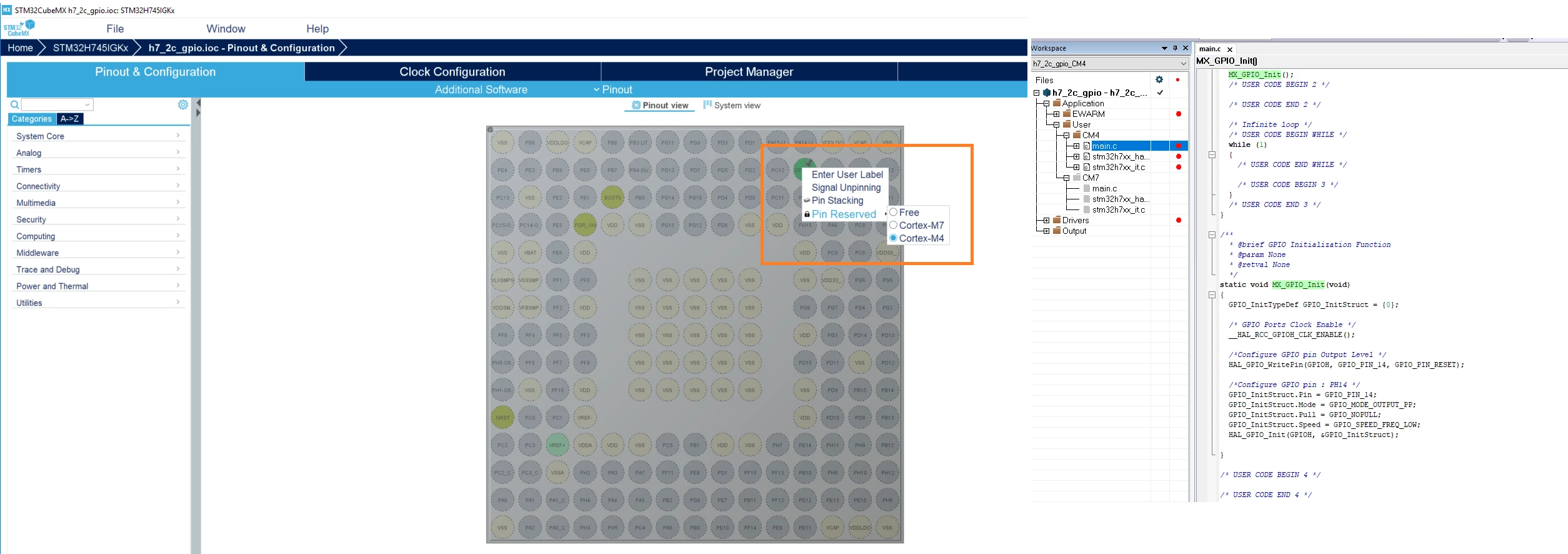
​you need to make a "right" click on pin and you will find the Pin Reserved option as bellow:

0690X00000AQmYhQAL.png

7 replies

Khouloud ZEMMELI
ST Employee
October 2, 2019

​Hello @ramkumarkoppu​ ,

Are you working with H7 dual core ?

Thanks,

Khouloud.

ramkumarkoppu
Associate III
October 2, 2019

Yes, I am.

Khouloud ZEMMELI
ST Employee
October 2, 2019

So you need to specify in which context you need this pin.

Right click on pin then under "Pin Reserved" Choose one of the 2 Cortex.

Best Regards,

Khouloud.

ramkumarkoppu
Associate III
October 2, 2019

I don't see such an option.

In the CubeMX, I choosen, STM3247XIHX, GPIO PI12, when I click on it I have options to choose from Reset_State, LTDC_HSYNC, GPIO_Input, GPIO_Output, GPIO_Analog, EVENTOUT, GPIO_EXTI12. I have selected GPIO_OUTPUT, in the project manager, selected MDK-ARM V5 as the Toolchain, Copy only the necessary library files, In the generated Keil project, There is no initialization code for GPIO output mode for pin PI12.

Khouloud ZEMMELI
Khouloud ZEMMELIBest answer
ST Employee
October 2, 2019

​you need to make a "right" click on pin and you will find the Pin Reserved option as bellow:

0690X00000AQmYhQAL.png

ramkumarkoppu
Associate III
October 2, 2019

Thank you. It worked. Do you have FreeRTOS port or ST library or any recommended method example code for communication between M7 and M4 cores on this SoC?

ramkumarkoppu
Associate III
October 3, 2019

Hi @Khouloud ZEMMELI​ Can you share simple example IAR/Keil project for Only M4 core on STM32H7 to get started with M4 debugging please? I will debug on STM32H747-DISCO board.

Khouloud ZEMMELI
ST Employee
October 4, 2019

​Hello @ramkumarkoppu​ ,

You can find some examples under C:\Users\..\STM32Cube\Repository\STM32Cube_FW_H7_V1.5.0RC6\Projects.

Best Regards,

Khouloud.

Khouloud ZEMMELI
ST Employee
October 4, 2019

​simple expl:

ramkumarkoppu
Associate III
October 6, 2019

Hi @Khouloud ZEMMELI​ : When I try to run your application on STM32H747I-DISC board with the onboard STLINKv3 debugger, Neither Keil nor STM32CubeProgrammer won't recognise the target MCU. Keil says "No target connected". The same board was working with GPIO toggle example before but no more. Do you know how to fix this problem please?

Tesla DeLorean
Guru
October 7, 2019