

simosilva
Senior
June 17, 2021
Question

Conflict between 6.2.1 and 6.2.0 project

  • June 17, 2021
  • 4 replies
  • 2454 views

Step to reproduce:

1) Generate a project in CubeMX v6.2.0 and save it

2) Open and modify the 6.2.0 project with CubeMX v6.2.1 (no migration or wathever), save the project

3) try to reopen the project with v6.2.0, these window will popup:
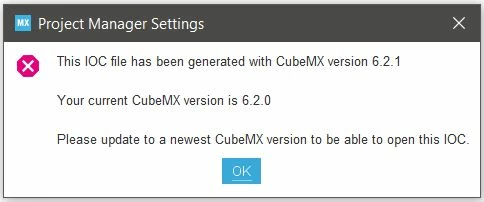
0693W00000BbETyQAN.jpg 

I need to use this project with 6.2.0 version of Cube MX.

looking into the .ioc from text editor, i see these lines:

MxCube.Version=6.2.1

MxDb.Version=DB.6.0.21

Changing these two into:

MxCube.Version=6.2.0

MxDb.Version=DB.6.0.20

with this change I can now re-open the file with previous CubeMX, is this procedure safe? There's something I'm missing that can broke the project?

Thanks

This topic has been closed for replies.

4 replies

Khouloud OTHMAN
Associate
June 17, 2021

Hello @simosilva​ ,

Thank you for having reported. Actually, on project load, STM32CubeMX detects if the project was created with an older version of the tool and if this is the case, it proposes to either migrate to use the latest STM32CubeMX database and STM32Cube firmware version, or to continue

Clicking continue keeps the database used to create the project untouched.

Assuming that you've clicked the Migrate button to use the latest STM32CubeMX version 6.2.1 and save the modification you've done, it will not be possible to use an older STM32CubeMX version.

What I can propose in this case is either to:

  • Change manually through a text editor MxCube.Version=6.2.1 and MxDb.Version=DB.6.0.21 to MxCube.Version=6.2.0 and MxDb.Version=DB.6.0.20 (make sure that the STM32Cube firmware version is remaining the same for both STM32CubeMX version 6.2.0 and 6.2.1)
  • Start a new project based on the MCU you're already working with using STM32CubeMX version 6.2.0 and without doing any changes, select the Import project icon that appears under the File. Normally the project will be ported successfully:

0693W00000BbFq5QAF.jpg For more details about the Import project feature, you can refer to the STM32CubeMX User Manual.

Hope your question is answered. If it is the case, please close this post by clicking the Select as Best button on my reply . This will help other members of the community find this response more quickly :)

Otherwise, do not hesitate to raise any issue/feedback.

khouloud.

simosilva
simosilvaAuthor
Senior
June 18, 2021

Hi khouloud and thanks for the answer.

In fact, I have not clicked Migrate, i just opened the 6.2.0 project with the 6.2.1, and just exporting the code from there (so saved automatically) , the .ioc resulted generated by the 6.2.1 version, a different behaviour from the one described in your message..

So the project is not left untouched at all!

simosilva
simosilvaAuthor
Senior
July 13, 2021

Have you found a correct procedure/workaround to this problem?

Khouloud OTHMAN
Associate
July 13, 2021

Hello @simosilva​ ,

Please excuse the late reply.

Honestly I wasn't able to reproduce the issue following the same steps as you've described in your post. Clicking Continue when opening the project with latest CubeMX version doesn't modify the Data base version in my case (even after doing some modifications and save the project with the 6.2.1 version).

To deblock the situation, please attach your .ioc file for further check.

Otherwise, in my previous comment I've proposed two workarounds, did you try with them ?

Your feedback will be helpful to track the root cause of the misbehavior you've encoutred.

Khouloud.

simosilva
simosilvaAuthor
Senior
July 15, 2021

Hi @Khouloud OTHMAN​  and thanks for the reply.

Unfortunately I'm not able to share the ioc with you at the moment, to be 100% sure nothing's gonna break in the future I created a brand new project from the 6.2.0 version and ported all the settings from the 6.2.1 one.

What I'm sure is that saving the 6.2.0 project with the 6.2.1 Cube left me with a 6.2.1 project, and that in fact looking at the two ioc with winmerge the only things changed are MxCube.Version and MxDb.Version, and this without any consens from the user (me) with some popup window.

Ccdsg.1
Visitor II
November 16, 2021

I'm no longer capable of share the ioc with you in the mean time, to be 100% sure not anything's gonna wreck within the future I created a ultra-modern undertaking from the 6.2.Zero hyperlink version and ported all the settings from the 6.2.1 one.

simosilva
simosilvaAuthor
Senior
November 18, 2021

Why this comment is just a copy-paste of the previous one?? bots??