OERCA.1
Associate
Aug 11, 2021 9:22 AM UTC
Solved

clock configuration problem

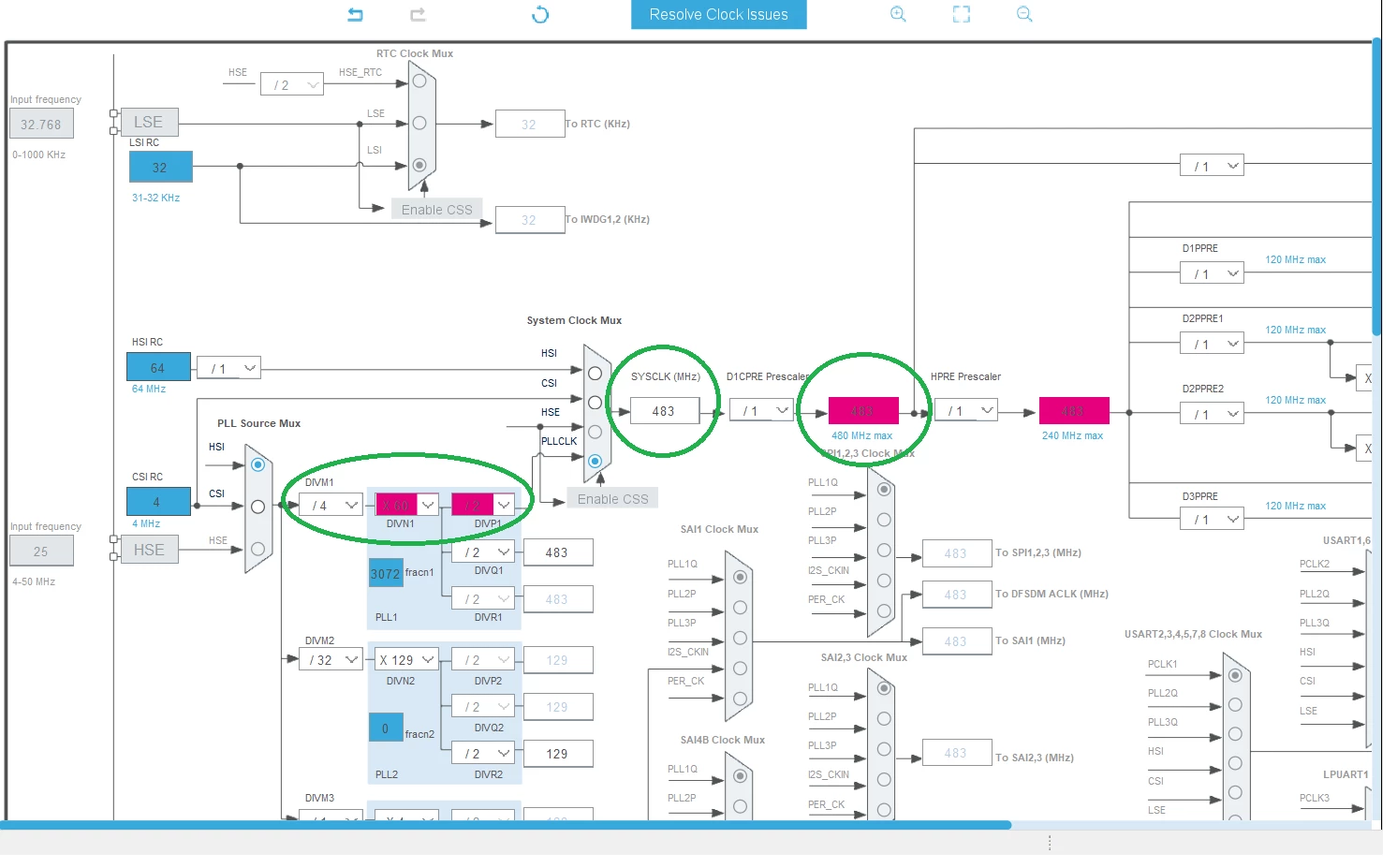
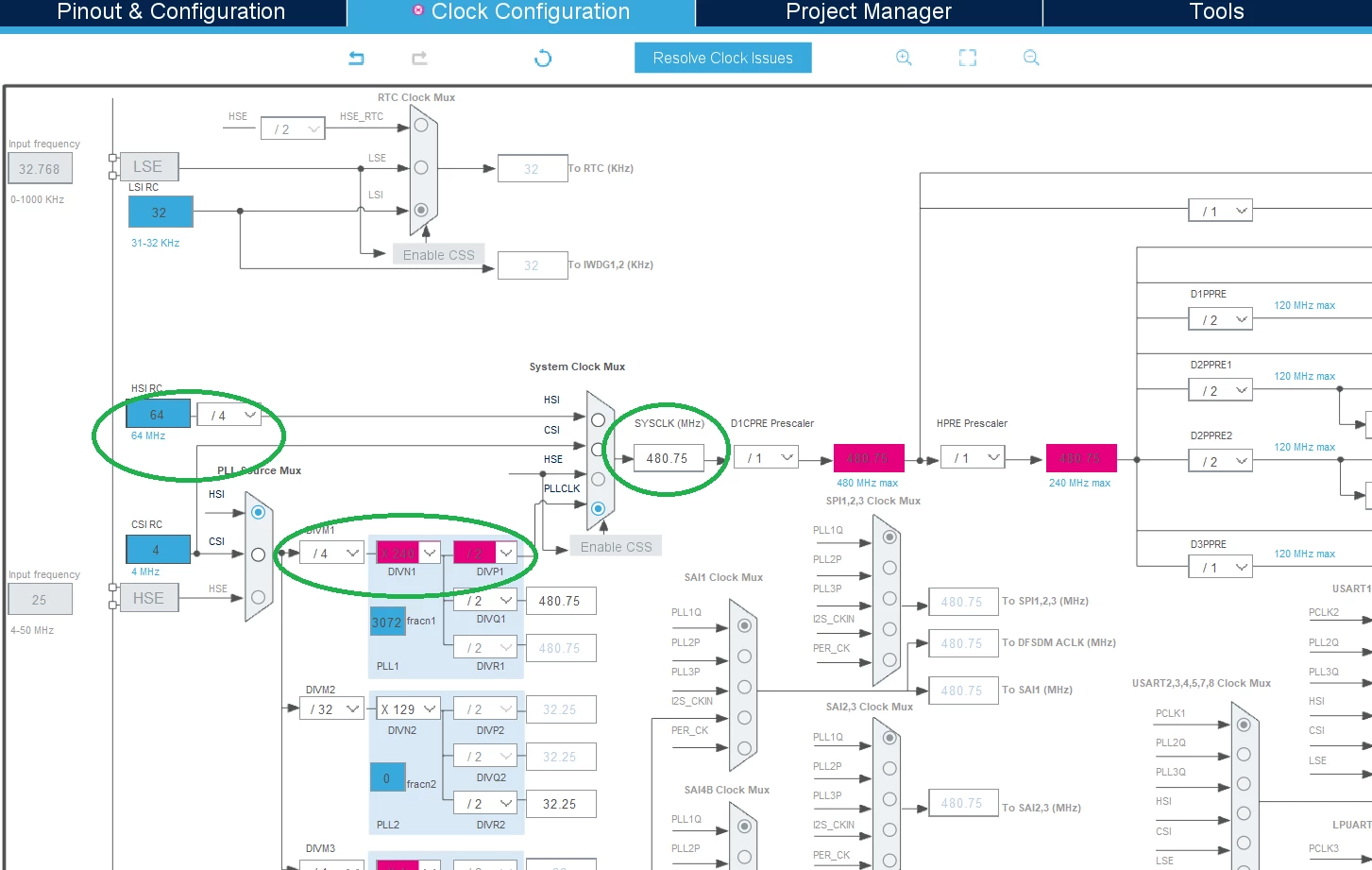
I use STM32H750XB microcontroller for my project. I am able to configure clock for 480Mhz without using "Resolve Clock Issues" help. But if I use "Resolve Clock Issues" even once, then I get problem like the attached image. There is a calculation error right? Output of PLL give consistently 483Mhz and gives such error for different prescale numbers. I am new with STM uCs, I appreciate any help. Thank you.

0693W00000D27nLQAR.png0693W00000D27qeQAB.png

This topic has been closed for replies.
Khouloud OTHMAN
Khouloud OTHMANBest answer
Associate
Aug 11, 2021 12:21 PM UTC

Hello @OERCA.1​ ,

Let me first welcome you to STM32 community and thank you for having reporting :smiling_face_with_smiling_eyes:

If I well understood , your problem is with the calculation of system clock SYSCLK value which is exceeding the maximum allowed frequency (480 MHz).

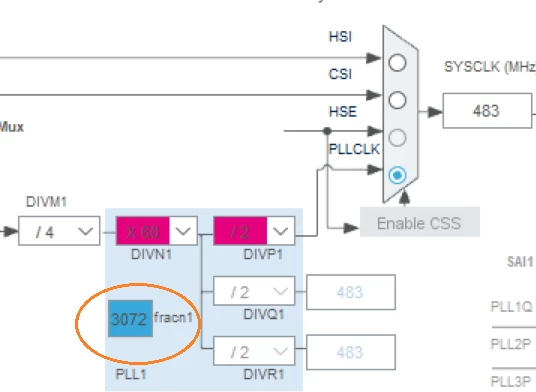
If this the case, and referring to you your attached screenshots, you're setting the fracn1 value to 3072.
0693W00000D2AWwQAN.png 

Backing STM32H750XB Reference manual to the VCO output frequency will be calculated as follow:

VCO output frequency = Fref1_ck x (DIVN1 + (FRACN1 / 2^13)), with

  • DIVN1 shall be between 4 and 512
  • FRACN1 can be between 0 and 2^13 - 1
  • The input frequency Fref1_ck shall be between 1 and 16 MHz.

> But if I use "Resolve Clock Issues" even once, then I get problem like the attached image

From my side trying "Resolve Clock Issues" button have resolved the clock problem by setting fracn1 to 0. It will be helpful if you attach your .ioc for further check.

Hope this answers your question.

Khouloud.

4 replies

TDK
Aug 11, 2021 11:45 AM UTC

It probably says a solution couldn't be found.

Go into RCC and ensure you have VOS level 0 selected.

0693W00000D2AAMQA3.png 

If that doesn't work, please attach your IOC if you can.

"If you feel a post has answered your question, please click ""Accept as Solution""."
OERCA.1
OERCA.1Author
Associate
Aug 11, 2021 12:55 PM UTC

thank you for your answer

Khouloud OTHMAN
Khouloud OTHMANBest answer
Associate
Aug 11, 2021 12:21 PM UTC

Hello @OERCA.1​ ,

Let me first welcome you to STM32 community and thank you for having reporting :smiling_face_with_smiling_eyes:

If I well understood , your problem is with the calculation of system clock SYSCLK value which is exceeding the maximum allowed frequency (480 MHz).

If this the case, and referring to you your attached screenshots, you're setting the fracn1 value to 3072.

0693W00000D2AWwQAN.png 

Backing STM32H750XB Reference manual to the VCO output frequency will be calculated as follow:

VCO output frequency = Fref1_ck x (DIVN1 + (FRACN1 / 2^13)), with

  • DIVN1 shall be between 4 and 512
  • FRACN1 can be between 0 and 2^13 - 1
  • The input frequency Fref1_ck shall be between 1 and 16 MHz.

> But if I use "Resolve Clock Issues" even once, then I get problem like the attached image

From my side trying "Resolve Clock Issues" button have resolved the clock problem by setting fracn1 to 0. It will be helpful if you attach your .ioc for further check.

Hope this answers your question.

Khouloud.

OERCA.1
OERCA.1Author
Associate
Aug 11, 2021 12:59 PM UTC

Thank you:smiling_face_with_smiling_eyes: When I changed frocn1 to 0, I am again able to set it 480 Mhz. Thank you for your answer

Okan,