Hi @sabaRamin ,
You can add the Cryptographic library by following these steps:
1. Right click on « Project » and choose « Add Group… ».
2. Create a new group called, for example, Middlewares/STM32Cryptographic.
3. Right click on « Middlewares/STM32Cryptographic » and Choose ‘Add Existing Files to Group Middlewares/STM32Cryptographic’…
4. Add libSTM32Cryptographic_CM3.a from "STM32CubeExpansion_Crypto_V4.0.1\Middlewares\ST\STM32_Cryptographic\lib"
5. Right click on “libSTM32Cryptographic_CM3.a�? in Keil project and choose “Options for file ‘libSTM32Cryptographic_CM3.a’…�?.
6. Add the path of “libSTM32Cryptographic_CM3.a�? and modify the file Type to Library file as shown in the below figure: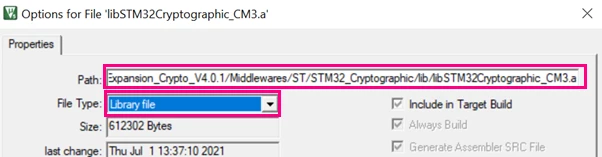 7. Click Ok.
8. Select “Options for Target�?, choose C/C++ (AC6) and add path by following these steps in the below figures:
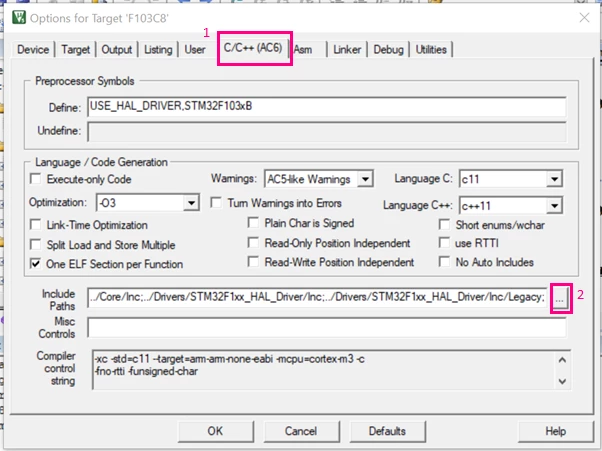
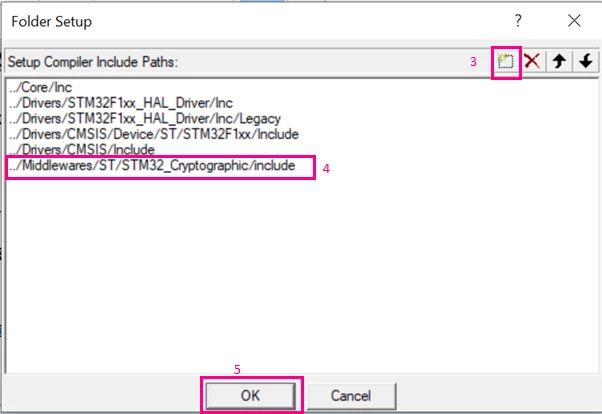 8. Copy the cmox_low_level_template.c file from the interface folder to your project specific source folder and rename it into cmox_low_level.c.
9. Right click on « Application/User » and Choose ‘Add Existing Files to Group Application/User’…
10. Add cmox_low_level.c file and tune this file by including the right STM32 HAL driver “#include "stm32f1xx_hal.h�? instead of the comment: /* #include “stm32<series>xx_hal.h
11. Update main.c by inserting # include “cmox_crypto.h�?
12. Check that no problem happened by rebuilding all files. There must be no error and no warning.
Also, I advise you to check this wiki page on getting started with the Cryptographic Library and precisely Section 2. Creating a project that embeds the Cryptographic Library.
When your question is answered, please close this topic by choosing Select as Best. This will help other users find that answer faster.
Kaouthar
To give better visibility on the answered topics, please click on "Best answer" on the reply which solved your issue or answered your question.