Simon Ibberson
Associate
Mar 9, 2020 5:07 PM UTC
Solved

Application server port already in use

When starting STM32CubeMonitor it displays a dialog reporting "Application server port already in use"; the application then exits when the dialog is closed.

In the details it says that port 1880 is already in use; however netstat doesn't show this port as being used. (Windows 10, 64-bit).

Any suggestions?

Thanks,

Simon

This topic has been closed for replies.
SDEME.2
SDEME.2Best answer
Visitor II
Jan 10, 2021 5:33 PM UTC

Just a quick note to help.

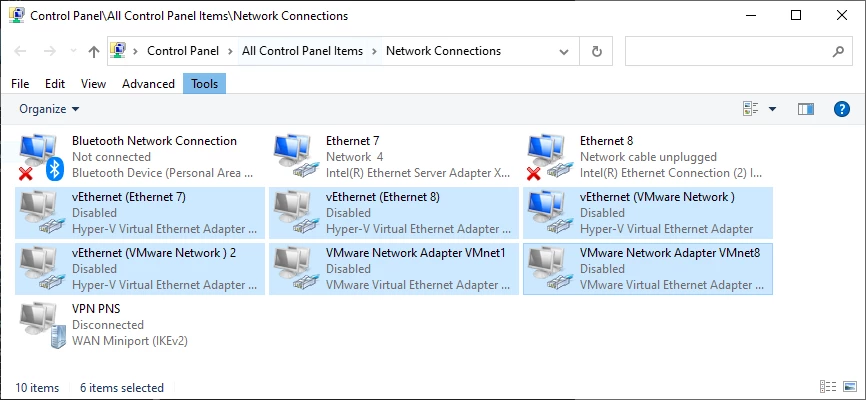
I had exactly the same issue and tracked it down to a bug to STM32CubeMonitor. The ST software basically try to communicate with the wrong network interface. Disabling Hyper-V didn't help here, because I also have VMware installed and it causes the same issue.

To fix it, you have to disable all virtual network interface in Control Panel\All Control Panel Items\Network Connections

0693W000006I7ecQAC.png

5 replies

stephane.legargeant
ST Employee
Mar 9, 2020 5:54 PM UTC

Hello

Usually, this happens when STM32CubeMonitor is already running. As the port 1880 is already busy, the second instance closes after the warning.

Have you tried netstat -a ? (On my PC, netstat does not show locals connections)

Best regards

Stephane

Simon Ibberson
Associate
Mar 9, 2020 7:26 PM UTC

Hi Stephane, thanks for your reply.

STM32CubeMonitor is not already running; it has just been installed, I've not been able to run it even once. The PC has been rebooted; the issue is the same afterwards. I have tried various netstat options (including the '-a' you suggested); there is no indication that port 1880 is in use as far as I can see.

Thanks,

Simon

Simon Ibberson
Associate
Mar 10, 2020 1:39 PM UTC

An update; the following command shows ports which are being excluded:

> netsh int ip show excludedportrange protocol=tcp

Protocol tcp Port Exclusion Ranges

Start Port   End Port

----------   --------

     1827       1926

     1927       2026

     2027       2126

     2180       2279

     2280       2379

     2456       2555

     2869       2869

     3029       3128

     3719       3818

     5357       5357

     5700       5700

     8884       8884

     8888       8888

    50000      50059    *

* - Administered port exclusions.

This was due to 'Hyper-V' - by disabling Hyper-V I have been able to start STM32CubeMonitor sucessfully.

Kind regards,

Simon

stephane.legargeant
ST Employee
Mar 10, 2020 3:51 PM UTC

​Hello Simon

Thanks a lot for your feedback. It is useful information for people using Hyper-V or similar software. 

Stephane

SDEME.2
SDEME.2Best answer
Visitor II
Jan 10, 2021 5:33 PM UTC

Just a quick note to help.

I had exactly the same issue and tracked it down to a bug to STM32CubeMonitor. The ST software basically try to communicate with the wrong network interface. Disabling Hyper-V didn't help here, because I also have VMware installed and it causes the same issue.

To fix it, you have to disable all virtual network interface in Control Panel\All Control Panel Items\Network Connections

0693W000006I7ecQAC.png