DmRozhd
Associate III
November 29, 2021
Solved

Will there be any toolchain updates?

Hi All,

today I have installed new STM32CubeIDE 1.8.0. Despite the current toolchain 9-2020-q2 is very old the new IDE does not update it. Will there be any GNU Tools for STM32 updates, or I should now use GNU Tools for ARM?

Regards,

Dmitry

This topic has been closed for replies.
Stepan Martinek
Stepan MartinekBest answer
Associate II
November 30, 2021

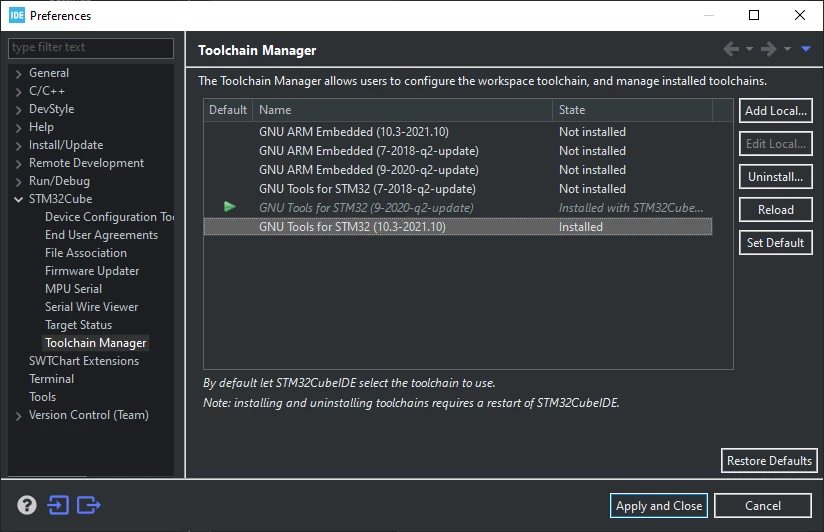
That's strange. I did no extra steps. The toolchain was right there.0693W00000GZQyaQAH.png

10 replies

Andrew Neil
Super User
November 29, 2021

Is there something specific you're missing from later versions?

A complex system that works is invariably found to have evolved from a simple system that worked.A complex system designed from scratch never works and cannot be patched up to make it work.
DmRozhd
DmRozhdAuthor
Associate III
November 29, 2021

Hi Andrew,

at least full C++20 support.

Regards,

Dmitry

Andrew Neil
Super User
November 29, 2021

This thread suggests that C++ 20 is supported:

https://community.st.com/s/question/0D53W00001EDsyiSAD/cubeide-180-and-c17-support

IDE v1.8.0 release:

https://community.st.com/s/question/0D53W00001EDf2rSAD/stm32cubeide-180-released

mentions "GCC 10 available on Eclipse® p2 update site"

A complex system that works is invariably found to have evolved from a simple system that worked.A complex system designed from scratch never works and cannot be patched up to make it work.
DmRozhd
DmRozhdAuthor
Associate III
November 29, 2021

May I please have a link to step-by-step instructions how to reach "Eclipse p2 update site" and update the STM32 toolchain from it?

Andrew Neil
Super User
November 29, 2021

perhaps @mattias norlander​ (author of the release post) can help you there ...

or, maybe, @Stepan Martinek​ (author of the other post)

?

A complex system that works is invariably found to have evolved from a simple system that worked.A complex system designed from scratch never works and cannot be patched up to make it work.
Stepan Martinek
Associate II
November 30, 2021

HI,

I just did the full install because it is recommended by release notes. Then you need to install the 10.3 toolchain manually from within the IDE.

PS: Be aware that GCC 10.3 does not have full C++20 support. There are still some things missing (modules for example) and fully supported in GCC 11. But I would say 90% of C++20 is there.

DmRozhd
DmRozhdAuthor
Associate III
November 30, 2021

Hi Stephan,

Thanks, but I have understood this already. My question is how should I do it? There is no new toolchain in the Toolchain Manager.

Regards,

Dmitry

Stepan Martinek
Stepan MartinekBest answer
Associate II
November 30, 2021

That's strange. I did no extra steps. The toolchain was right there.0693W00000GZQyaQAH.png