davbergar
Associate
January 20, 2023
Solved

Why STM32 add DEBUG preprocessor symbol after code generation with Device Configuration Tool

  • January 20, 2023
  • 2 replies
  • 1962 views

Hi!

I have tested this in all my projects.

I have several compilation flavours with several symbols but you can test this issue only with default flavours: Release and Debug.

  1. Delete DEBUG preprocessor symbol in Debug flavour
  2. Open device configuration tool
  3. Click code generation
  4. After that, DEBUG symbol is again added to Debug flavour.

This symbol is not used and isn't a problem but in my projects and flavours I want not this symbol because may be confused to others developers. I can solve it by creating flavours based in Release but I would like to know if there is any option to avoid this behaviour

Thanks!!

This topic has been closed for replies.
Best answer by Cartu38 OpenDev

No option. Hardcoded behavior if debug type build configuration.

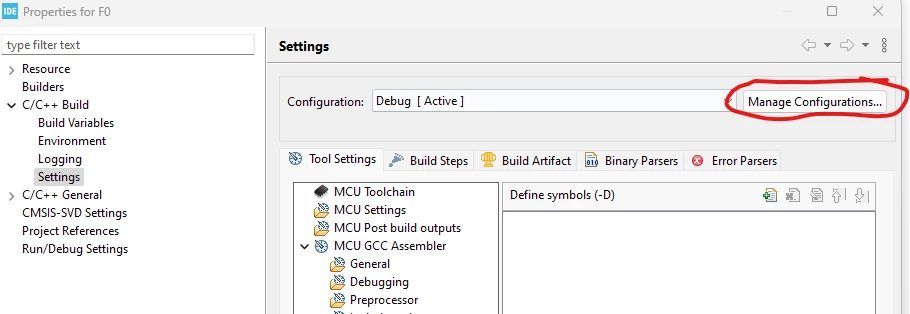
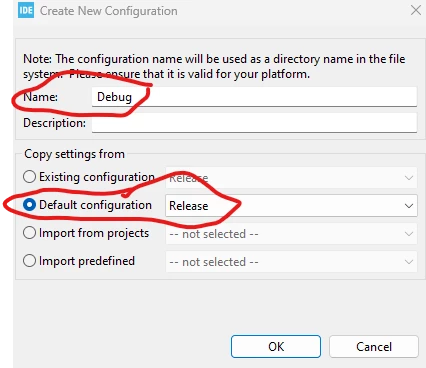
As workaround possibly remove original Debug configuration and create a new one based on Release type

0693W00000Y8n3GQAR.png 

0693W00000Y8n2wQAB.pngTakes care starting from Release type, compiler optimizations are not debug compliant so you will have to set them to proper values

2 replies

Cartu38 OpenDev
Cartu38 OpenDevBest answer
Graduate II
January 20, 2023

No option. Hardcoded behavior if debug type build configuration.

As workaround possibly remove original Debug configuration and create a new one based on Release type

0693W00000Y8n3GQAR.png 

0693W00000Y8n2wQAB.pngTakes care starting from Release type, compiler optimizations are not debug compliant so you will have to set them to proper values

davbergar
davbergarAuthor
Associate
January 20, 2023

Thanks a lot!! I was going crazy... hahah