Associate III
April 1, 2024
Solved

Why does this go to error handler?

  • April 1, 2024
  • 13 replies
  • 6404 views

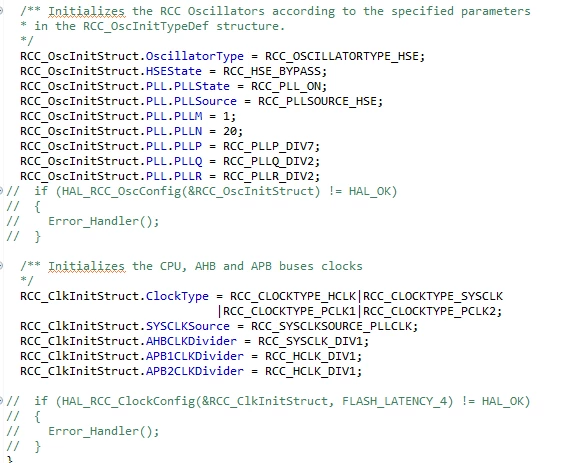
Hi! I have a code that is supposed to develop CAN-bus communication, but these two functions go straight to error handler. Any suggestions why that might be?
Mr4_0-1711961684256.png

for reference I'm using the nucle-l433rc-p board.

 

    This topic has been closed for replies.
    Best answer by mƎALLEm

    Hello,

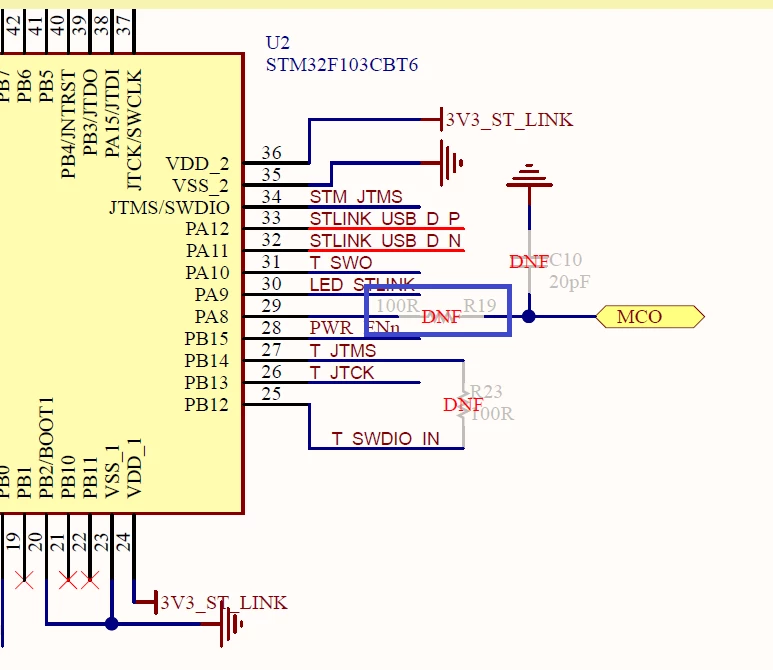
    Reproduced the issue.

    R19 (100ohm) needs to be soldered too to connect MCO output from ST-Link to the HSE OSC_IN of your MCU.

    SofLit_0-1712144975606.png


    13 replies

    Associate III
    April 1, 2024

    Change CubeMx Settings-->RCC-->HSE to 'Crystal/Ceramic Resonator'

    mƎALLEm
    ST Technical Moderator
    April 1, 2024

    Hello,

    You are in HSE bypass mode.

    Are you sure SB64 is soldered?

    SofLit_0-1711963737275.png


    To give better visibility on the answered topics, please click "Best answer" on the reply which solved your issue or answered your question.
    Mr4Author
    Associate III
    April 2, 2024

    pretty sure it is. Any other ideas what may cause the problem?


    Tesla DeLorean
    Guru
    April 2, 2024

    Failing Why? Because HSE clock not present, PLL not running/locking from the selected source.

    Can you observe an 8 MHz clock signal at the pin/solder bridges?

    SB64 isn't bridged in your picture, but SB68 / SB70 are, with a zero ohm. There's solder paste but it's not bridging the two islands. You might need to add more and wet it across the pads.

    You'd need to bridge SB64, and clear the bridging on SB68/SB70, so that the 8 MHz from the ST-LINK is passed.

    You also have ALL the source code, you can inspect what's actually causing the routines to return an error. Do some debugging.

    Tips, Buy me a coffee, or three.. PayPal Venmo (See Profile) Up vote any posts that you find helpful, it shows what's working..