Associate
Feb 13, 2025 12:27 AM UTC
Solved

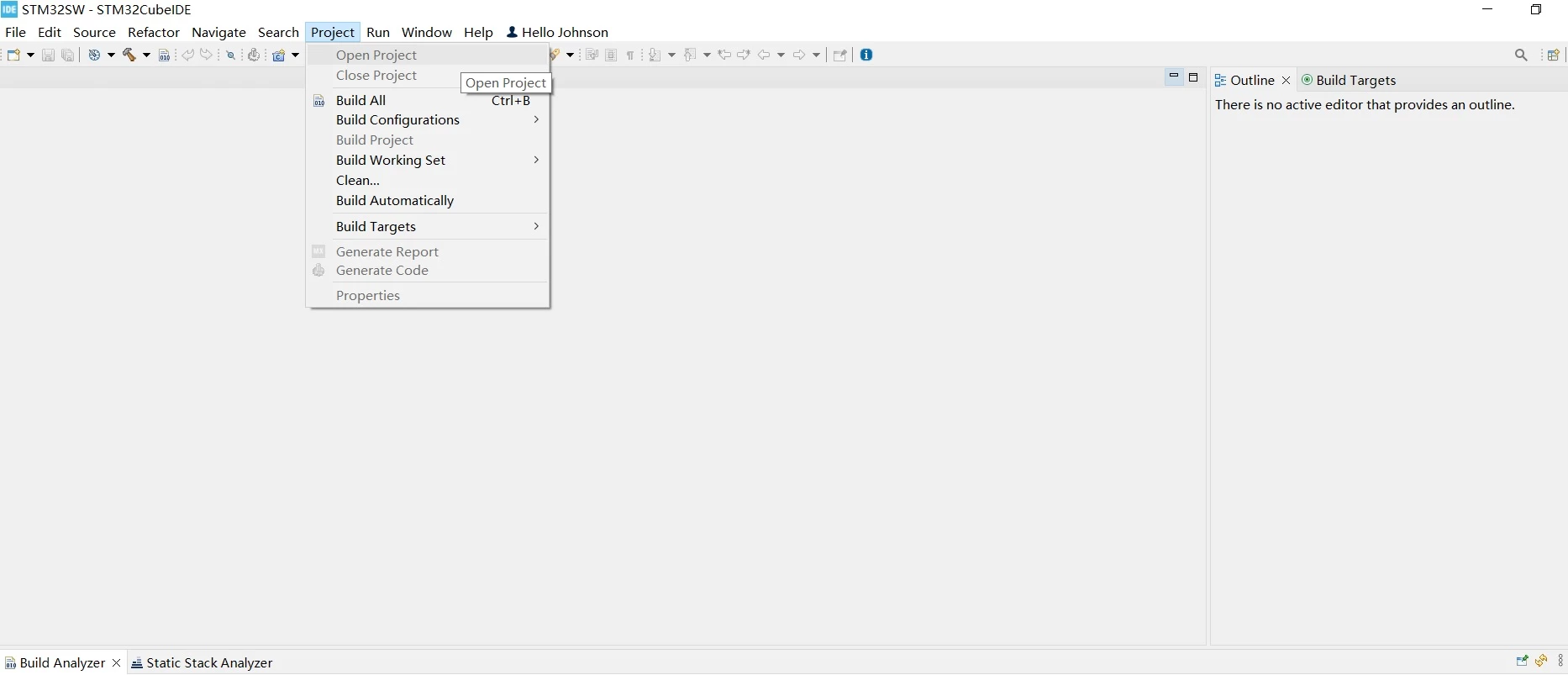
Why cannot use the open project menu?

When I run STM32CubeIDE, the open project menu is disabled (in grey color). How can I active it?issue.jpg
This topic has been closed for replies.
Karl Yamashita
Karl YamashitaBest answer
Principal
Feb 13, 2025 12:38 AM UTC

You need to highlight the unopened project in the project tree. Then you'll be able to open the project. If you want to work with an existing project that isn't in your project tree, then you need to import the project.

If a reply has proven helpful, click on Accept as Solution so that it'll show at top of the post.CAN Jammer an open source CAN bus hacking toolCANableV3 Open Source

2 replies

Karl Yamashita
Karl YamashitaBest answer
Principal
Feb 13, 2025 12:38 AM UTC

You need to highlight the unopened project in the project tree. Then you'll be able to open the project. If you want to work with an existing project that isn't in your project tree, then you need to import the project.

If a reply has proven helpful, click on Accept as Solution so that it'll show at top of the post.CAN Jammer an open source CAN bus hacking toolCANableV3 Open Source
Associate
Feb 13, 2025 1:59 AM UTC

Thank you so much! The issue has been fixed.