


Tom MacDonald
Associate III
December 16, 2022
Question

Why am I getting a hard fault when adding a breakpoint in the IDE while the device is in stop mode

Scenario is that I am debugging my application using ST-Link V2.

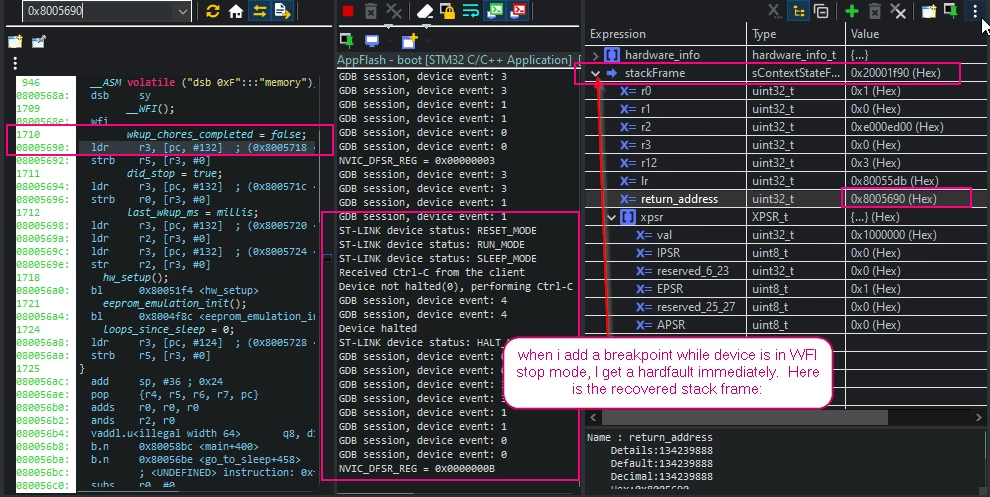
The device enters stop mode (with debugging still enabled). If I then add a breakpoint while the device is in stop mode, I immediately trigger a hard fault ISR.

This is new behaviour that seems to have only began happening recently with this project.

I therefore suspect it is either from some change in my app or from some change in Cube HAL drivers or IDE's debug layer after updating to STM32CubeIDE_v1.11.0

Below is a screenshot showing the recovered stack frame, and the assembly code and debug console output when the hard fault happens.

I am using STM32G030F6
0693W00000WLCFIQA5.png 

This topic has been closed for replies.

7 replies

Associate
February 21, 2024

Hi,
Any update here?
I'm having the same issue on WB55, running using visualGDB 5.6R9 on visual studio.
I've also noticed that adding the following ASSERT definition causes this to happen every time I try to "Break All" (pause) with the debugger:

#define configASSERT( x ) if ((x) == 0) {__asm volatile("BKPT #01"); taskDISABLE_INTERRUPTS(); for( ;; );}

I'm using SEGGER J-LINK.

Andrew Neil
Super User
February 21, 2024

Have you got a HardFault handler, and have you looked at the info that provides?

Perhaps you've disabled clocks that the debugger needs ... ?

A complex system that works is invariably found to have evolved from a simple system that worked.A complex system designed from scratch never works and cannot be patched up to make it work.
Associate
February 21, 2024

Adding more details:

When the configASSERT is define as a breakpoint

#define configASSERT( x ) if ((x) == 0) {__asm volatile("BKPT #01"); taskDISABLE_INTERRUPTS(); for( ;; );}

and I "Break All", the PC is inside the HAL_PWREx_EnterSTOP1Mode function, in the instruction

/* Request Wait For Interrupt */
__WFI();

When I press "Continue" I'm getting:

Received a SIGTRAP: Trace/breakpoint trap


Pavel A.
February 21, 2024

This is likely because the breakpoints are implemented in the flash subsystem of the MCU. In stop mode most of the MCU's guts are not responding. Perhaps a J-Link with its "unlimited breakpoints" feature could help here.

Pavel A.
February 21, 2024

@dagan the SIGTRAP looks like a debug exception, quite expected when debugging. But the debugger gets confused and fails.You're using 3rd party tools: VisualGDB debugger and J-Link. Have you tried to reach their support? 

Andrew Neil
Super User
February 21, 2024

@Pavel A. wrote:

 looks like a debug exception ...using 3rd party tools: VisualGDB debugger and J-Link 


J-Link has been known to do some "clever" stuff with debug exceptions ...

A complex system that works is invariably found to have evolved from a simple system that worked.A complex system designed from scratch never works and cannot be patched up to make it work.