Tiel
Associate III
December 29, 2021
Solved

Where to check final binary size on CubeIDE1.8.0?

  • December 29, 2021
  • 2 replies
  • 2668 views

Hello,

I want to know final binary size after build like IAR.

Currently final output os CubeIDE is Elf file, so I do not know what size it is.

(When I use IAR, It showed final binary size on terminal and could also generate binary file.)

Is there anyone know about how to check final binary size on CubeIDE?

Best Regards,

Tiel

This topic has been closed for replies.
Best answer by TDK

When you successfully build a project, the size is output to the console. This one is 10180 (= 10160 + 20) bytes as the BSS segment doesn't need to be stored in flash.

arm-none-eabi-objcopy -O binary test_f303rct_uart_inversion.elf "test_f303rct_uart_inversion.bin"
 text	 data	 bss	 dec	 hex	filename
 10160	 20	 1572	 11752	 2de8	test_f303rct_uart_inversion.elf

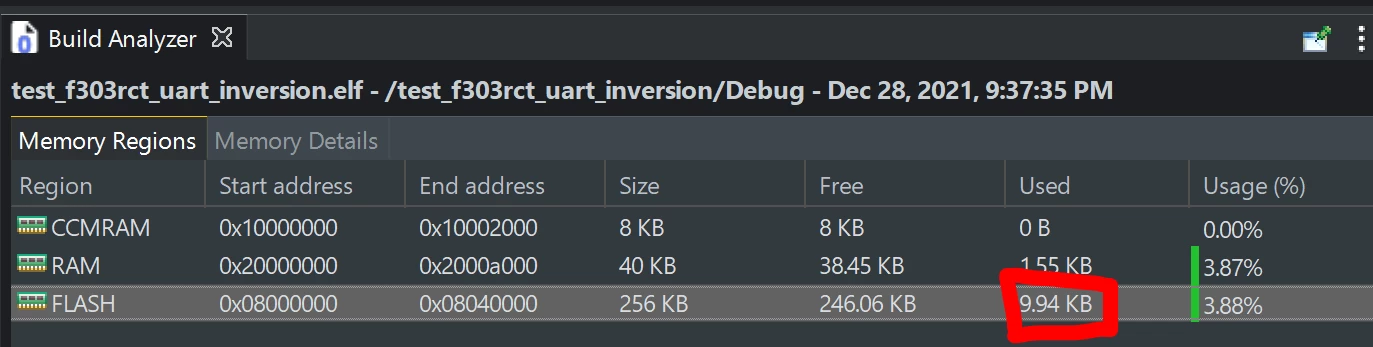
It's also shown in the Build Analyzer:

0693W00000Hq1LRQAZ.png 

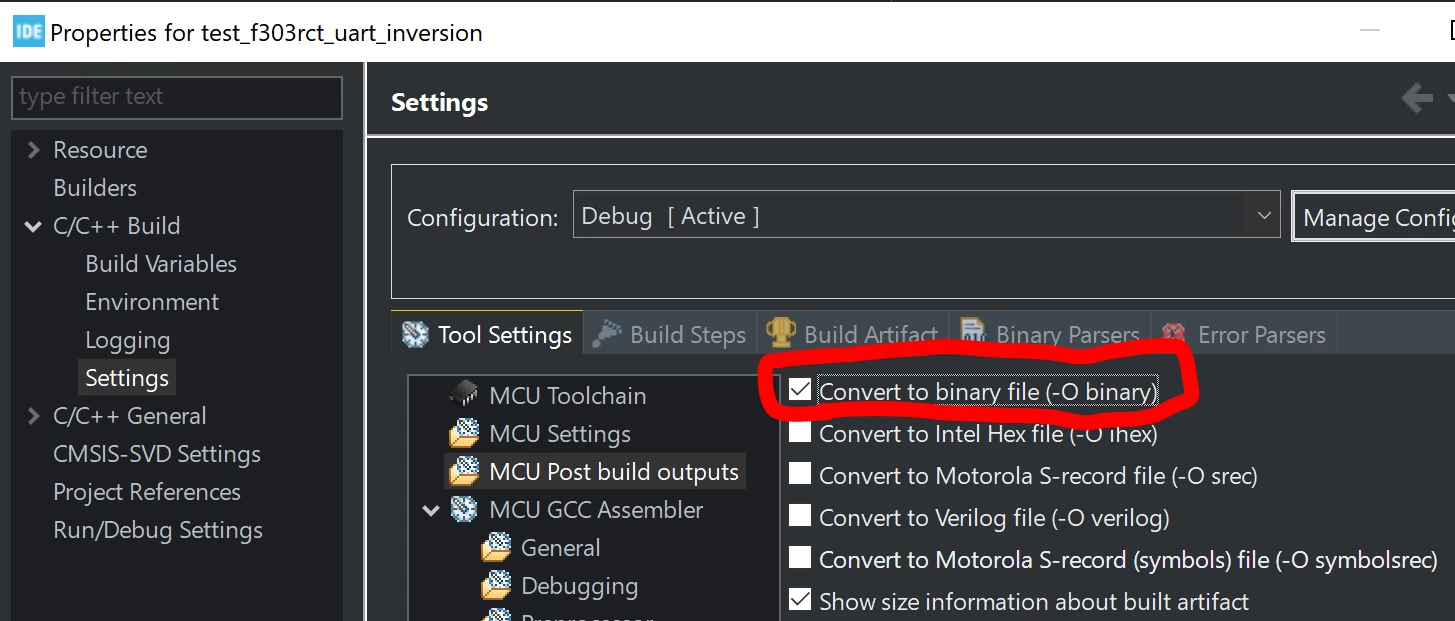
If you want to generate a BIN file, select that option in the project properties:

0693W00000Hq1M5QAJ.png

2 replies

TDK
TDKBest answer
December 29, 2021

When you successfully build a project, the size is output to the console. This one is 10180 (= 10160 + 20) bytes as the BSS segment doesn't need to be stored in flash.

arm-none-eabi-objcopy -O binary test_f303rct_uart_inversion.elf "test_f303rct_uart_inversion.bin"
 text	 data	 bss	 dec	 hex	filename
 10160	 20	 1572	 11752	 2de8	test_f303rct_uart_inversion.elf

It's also shown in the Build Analyzer:

0693W00000Hq1LRQAZ.png 

If you want to generate a BIN file, select that option in the project properties:

0693W00000Hq1M5QAJ.png

"If you feel a post has answered your question, please click ""Accept as Solution""."
Tiel
TielAuthor
Associate III
December 29, 2021

Dear TDK,

Thanks for your kind explanation and pictures.

Best Regards,

Tiel