

ksjfhasiudfhask;dfhas
Associate
May 12, 2022
Solved

Where do I set the include path on STM32CubeIDE?

  • May 12, 2022
  • 3 replies
  • 6374 views

This really seems like a simple thing, but I cannot figure it out. I am getting a linker error "cannot find -l:libtouchgfx-float-abi-hard.a". I can see the file so I know it exists, but it's not finding it. Adding the file manually to the include folder in project explorer does not work.

This topic has been closed for replies.
Best answer by Cartu38 OpenDev

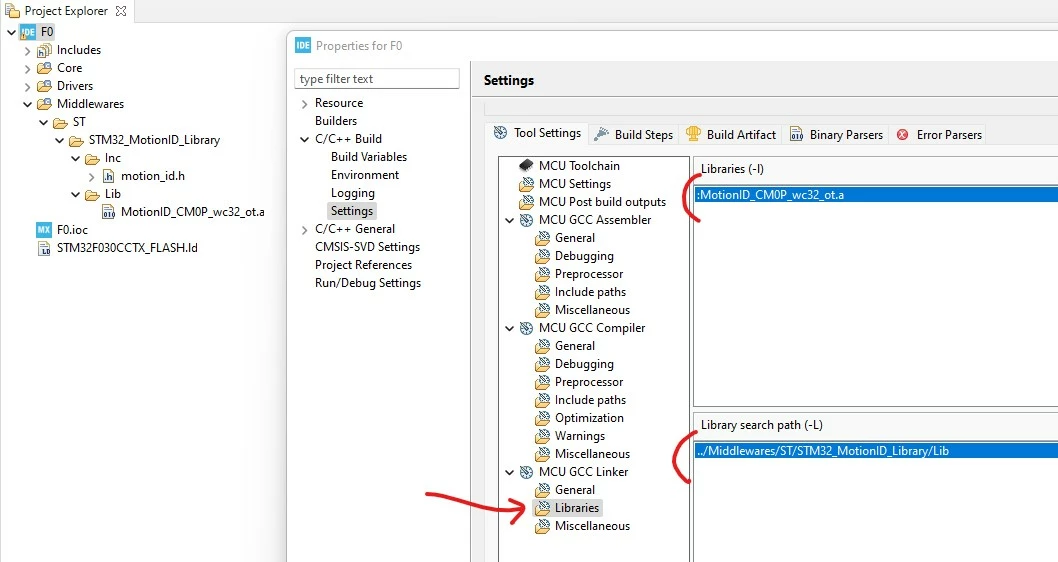
0693W00000Nps7AQAR.jpgPay attention to ':' char added prior file name. Both are reauired library path AND library name

3 replies

Cartu38 OpenDev
Cartu38 OpenDevBest answer
Graduate II
May 12, 2022

0693W00000Nps7AQAR.jpgPay attention to ':' char added prior file name. Both are reauired library path AND library name

Andrew Neil
Super User
May 13, 2022

"Adding the file manually to the include folder in project explorer does not work"

The Include path is for finding Compiler (source code) includes - C header files.

As @Cartu38 OpenDev​ shows, you need the Library path for the Linker to find library files.

A complex system that works is invariably found to have evolved from a simple system that worked.A complex system designed from scratch never works and cannot be patched up to make it work.
ksjfhasiudfhask;dfhas
Associate
May 13, 2022

Thanks.

Cartu38 OpenDev
Graduate II
May 13, 2022

If works fine please tag as answered. It will help community to dig shortly to helpful content. Thanks.

Andrew Neil
Super User
May 13, 2022

@ksjfhasiudfhask;dfhas​ - like this:

0693W000008y9fZQAQ.png 

A complex system that works is invariably found to have evolved from a simple system that worked.A complex system designed from scratch never works and cannot be patched up to make it work.
