I’ve noticced recently that in CubeIDE 2.x, the MXCube program was separated from CubeIDE and is now a standalone app. I’ve also noticed that the extensions download a more recent C standard for STM32 compiler and MCUFinder is now web-only. This to me signifies a pivot in where STM is going with development environment and my guess is that everything will focus on VSCode extensions. Having said that, I’m inclined to port my whole project in VSCode but I want some reassurance that the platform and its MCUs will get future enhanced support for VSCode extensions and better integration.
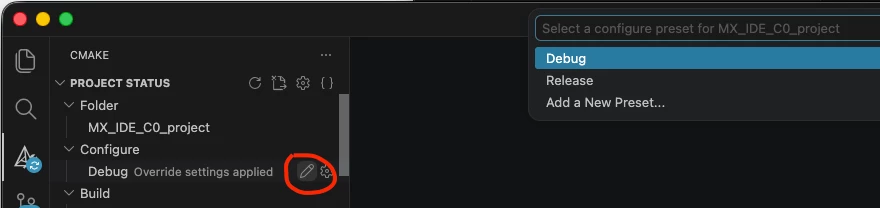
So far, CMake scrips in VSConde aren’t fully fledged, specifically missing out-of-the-box commands and buttons for: - Switching active configuration (Debug or Release) - Flashing the target MCU. - Debugging via line-by-line walkthroughs. - Set debug levels and optimisations. - Set hardware or software floating points. - Output .bin firmware
My question is. Is this the case and is better for me to port everything to VSCode or I should keep using STMCubeIDE as that is where improvements and bug fixes will be the focus?
I don’t understand the question… Both C-line and assembler instruction stepping is possible!
Set debug levels and optimisations.
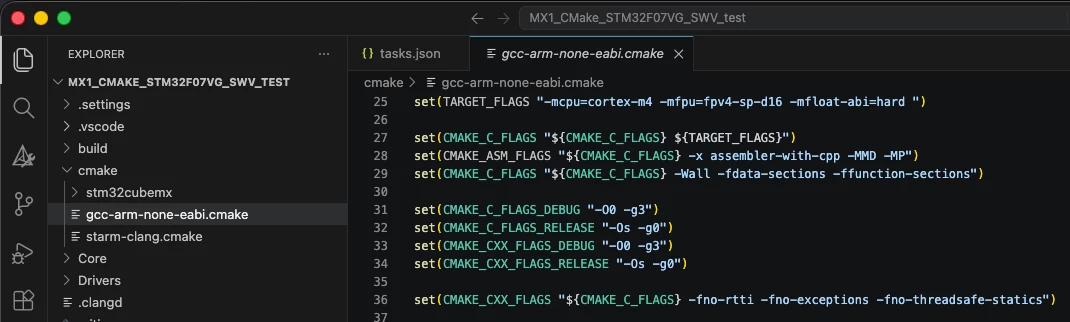
gcc-arm-none-eabi.cmake line 31-34 in this case...
We do not have “build GUI” on top of CMake because CMake is a language of its own and building a GUI on top of it would quickly turn into a problematic mess. instead let CoPilot help you modify build settings!
Set hardware or software floating points.
Look at screenshot above, line 25. Does that help you?
Output .bin firmware
Have a look in the CMakeLists.txt in the project root and at the end add these lines:
# Assuming your target is called "my_app" and produces my_app.elf
add_custom_command(TARGET ${CMAKE_PROJECT_NAME} POST_BUILD
    COMMAND ${CMAKE_OBJCOPY} -O binary $<TARGET_FILE:${CMAKE_PROJECT_NAME}> ${CMAKE_BINARY_DIR}/${CMAKE_PROJECT_NAME}.bin
    COMMENT "Generating BIN file"
    VERBATIM
)
Again, CoPilot (or your preferred AI tool) will probably solve know CMake well enough to solve this for you correctly
In order to give better visibility on the answered topics, please click on 'Best answer' on the reply which solved your issue or answered your question.
The direction of travel is definitely towards VSCode, but it’s still relatively early days yet.
CubeIDE is still the more mature and feature-rich option; still being maintained and supported.
I haven’t tried the VSCode yet but, from some of the posts I’ve seen, I’m not sure it’s quite ready for “prime time” yet?
eg, see:
So I wouldn’t be porting existing stuff yet but, if you’re just starting a new project, it might me worth trying VSCode ...
A complex system that works is invariably found to have evolved from a simple system that worked.A complex system designed from scratch never works and cannot be patched up to make it work.
The thing is that I’ve already tried VSCode with STM32 extensions and is alright but definetly missing stuff and I want to be properly invested if that’s where the focus is going to be.
That’s certainly where it’s going - but it is not there yet.
A complex system that works is invariably found to have evolved from a simple system that worked.A complex system designed from scratch never works and cannot be patched up to make it work.
I’d like to add that switching compilers is also not fully there. It requires generating some files again or manually modifying them. In my opinion the build process should be independent of compilers and should not have hardcoded paths.
Perhaps things are better now.
"Kudo posts if you have the same problem and kudo replies if the solution works.Click ""Accept as Solution"" if a reply solved your problem. If no solution was posted please answer with your own."
$(PROJECT_ROOT)/cmake/gcc-arm-none-eabi.cmake. Your file with build settings if you use GCC
$(PROJECT_ROOT)/cmake/starm-clang.cmake. Your file with build settings if you use CLang
$(PROJECT_ROOT)/cmake/stm32cubemx/CMakeLists.txt. DONT TOUCH! MX managed...
$(PROJECT_ROOT)/cmake/touchgfx/CMakeLists.txt. DONT TOUCH! TGFX managed (if used)...
The compiler description file gcc-arm-none-abie.cmake abstracts the toolchain definition. So far so good! :-)
But switching compiler requires more than only that abstracting the toolchain...
Re-point inside CMakePresets.json to point at CLang instead of GCC if you want that…
… But that does not install CLang on your system. Use the Bundle Manager View to download/install and lock the CLang toolchain to be used inside the project.
And lastly the most complicated part.... We have 3 toolchains… GCC, hybrid Clang and full CLang. CubeIDE only allows moving between GCC and hybrid CLang which are quite similar. Hence we can solve that in CubeIDE/Eclipse with 1-click solution. The full CLang toolchain comes with a new linker and c library… It may lead to a bit of manual porting. A 1-click solution would not help most users. A migration guide would be better.
Hope this shines some light on this topic too. Feel free to ask!
In order to give better visibility on the answered topics, please click on 'Best answer' on the reply which solved your issue or answered your question.
My point is that some users (like me), want to test clang vs gcc. Changing presets is not enough. You need to start TouchGFX designer and have it regenerate cmake/touchgfx/CMakeLists.txt. It also shows up in git, while presets can be excluded. My proposed change in cmake/touchgfx/CMakeLists.txt is using the tool chain definition in the path so it chooses the right libtouchgfx based on the selected toolchain so that the file doesn’t need to be regenerated. TLDR; generating cmake/touchgfx/CMakeLists.txt again can be avoided and would make switching toolchains less costly for users.
"Kudo posts if you have the same problem and kudo replies if the solution works.Click ""Accept as Solution"" if a reply solved your problem. If no solution was posted please answer with your own."
Let me shine some lights on some of your questions. We will continue to develop/maintain both CubeIDEs (Eclipse and VS Code). The Eclipse version will continue to support new STM32 MCUs. In VS Code we will ouf course support all MCUs, but we will also put extra focus on trying to close the gap on debug features.
Some thoughts/recommendations if you want to move from Eclipse to VS Code:
Which IDE to use? Use the one you feel give you the best efficiency!
If you want to move to VS Code there is now a “project converter” from Eclipse to CMake:
project converter
If you are missing any debug feature from CubeIDE/Eclipse, then keep CubeIDE/Eclipse as a stand-alone debugger.
This dual-use means you use CubeIDE for VS Code and CMake for Edit, Compile and simple debug. And CubeIDE/Eclipse for advanced debug.
These recommendations should minimize your porting work (some manual steps may be needed) and if you need advanced debug features you are not stuck waiting for us to add these featues in VS Code. Have a try if you want!
In order to give better visibility on the answered topics, please click on 'Best answer' on the reply which solved your issue or answered your question.
I don’t understand the question… Both C-line and assembler instruction stepping is possible!
Set debug levels and optimisations.
gcc-arm-none-eabi.cmake line 31-34 in this case...
We do not have “build GUI” on top of CMake because CMake is a language of its own and building a GUI on top of it would quickly turn into a problematic mess. instead let CoPilot help you modify build settings!
Set hardware or software floating points.
Look at screenshot above, line 25. Does that help you?
Output .bin firmware
Have a look in the CMakeLists.txt in the project root and at the end add these lines:
# Assuming your target is called "my_app" and produces my_app.elf
add_custom_command(TARGET ${CMAKE_PROJECT_NAME} POST_BUILD
    COMMAND ${CMAKE_OBJCOPY} -O binary $<TARGET_FILE:${CMAKE_PROJECT_NAME}> ${CMAKE_BINARY_DIR}/${CMAKE_PROJECT_NAME}.bin
    COMMENT "Generating BIN file"
    VERBATIM
)
Again, CoPilot (or your preferred AI tool) will probably solve know CMake well enough to solve this for you correctly
In order to give better visibility on the answered topics, please click on 'Best answer' on the reply which solved your issue or answered your question.
Thanks for your reply. So my understanding is that VSCode Extensions isn’t as feature complete as CubeIDE but it will eventually get there. Sweet. In the meantime I will keep using CubeIDE as productivity-wise, it’s the more complete and quick IDE and I’m not really in the mood to create my own CMake scripts just yet. Will leave it to you guys ;) I’m just wondering if CubeIDE will eventually be deprecated and which IDE has the newer compiler versions as new EU CRA regulations mandate that all firmware must be vulnerability free so packages and copiler versions need to be up-to-date.
> “minimise vulnerabilities by keeping everything up-to-date”
Neither CubeIDE nor VS Code has this functionality of managing and checking dependencies by itself - but you can bring your own as external tool or add-on. ST provides SBOMs for their new software components.
As for the future - it is the AI, of course, replacing the whole team with just a few .md skill files. No IDE, compilers and buggy libraries will be needed at all. Binary files will be generated directly from specifications and data sheets, complete with a test suite.