gocchan
Associate III
August 22, 2026
Solved

What is a workspace?

  • August 22, 2026
  • 1 reply
  • 23 views

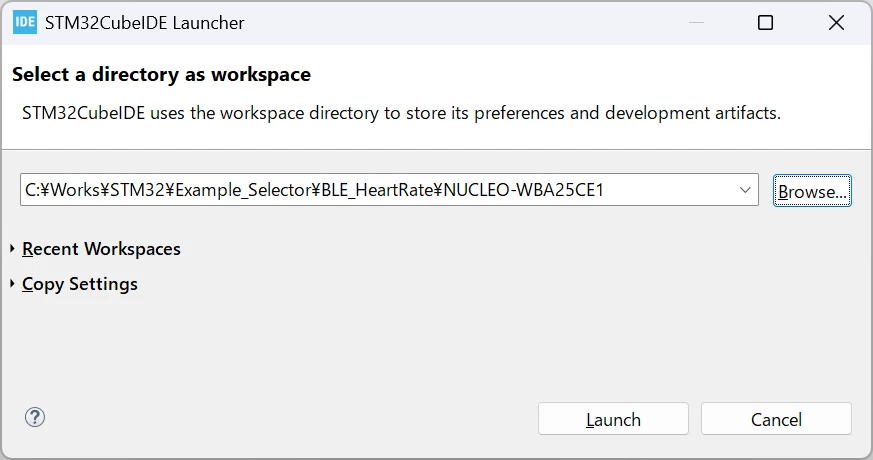
When I specify a workspace in CubeIDE's File > Switch Workspace, the files appear in the Project Explorer, but they don't match the actual directory.

68c523fc-d457-c128-df36-04fcadbf2b86.png

The workspace specified in the IDE is
C:WorksSTM32Example_SelectorBLE_HeartRateNUCLEO-WBA25CE1
but it seems to actually be referencing
C:WorksSTM32CubeIDEHelloWorld

For example, if I modify
Srcmain.c
in the IDE, it actually updates
C:WorksSTM32CubeIDEHelloWorldSrcmain.c

Why does this happen? I don't understand what a workspace is.

Best answer by Pavel A.

Do NOT try to select a project directory as a workspace. If you want a new workspace, make a new empty directory.

The project name shown in the Project explorer pane can differ from its directory name. This can be if you rename the project.

TL;DR

"Workspace" is a concept of Eclipse IDE. Basically workspace is just a directory on your disk where Eclipse stores so called "metadata" about a bunch of projects that you work on. A project, in its turn, can be unit of software that compiles to some binary (executable, library etc.) or a container that groups several projects of the previous type.

The projects themselves live in other directories on your disk, that often are sub-directories of the workspace directory, but can be also outside of it.

Many settings related to projects can be stored "globally" for the whole workspace and inherited by projects in the workspace. You can also disconnect settings for a project from the workspace and keep them local in the project. 

Now, why Eclipse prompts you for a workspace, and doesn't just use the one it created during installation? Because you can have several unrelated tasks which you want to keep separate. When you switch workspaces, Eclipse almost completely switches all its settings. Only few things are really "global". Also you can have several Eclipse versions installed, each should have its own workspace. 

Hope this helps.



1 reply

Pavel A.
Pavel A.Best answer
August 22, 2026

Do NOT try to select a project directory as a workspace. If you want a new workspace, make a new empty directory.

The project name shown in the Project explorer pane can differ from its directory name. This can be if you rename the project.

TL;DR

"Workspace" is a concept of Eclipse IDE. Basically workspace is just a directory on your disk where Eclipse stores so called "metadata" about a bunch of projects that you work on. A project, in its turn, can be unit of software that compiles to some binary (executable, library etc.) or a container that groups several projects of the previous type.

The projects themselves live in other directories on your disk, that often are sub-directories of the workspace directory, but can be also outside of it.

Many settings related to projects can be stored "globally" for the whole workspace and inherited by projects in the workspace. You can also disconnect settings for a project from the workspace and keep them local in the project. 

Now, why Eclipse prompts you for a workspace, and doesn't just use the one it created during installation? Because you can have several unrelated tasks which you want to keep separate. When you switch workspaces, Eclipse almost completely switches all its settings. Only few things are really "global". Also you can have several Eclipse versions installed, each should have its own workspace. 

Hope this helps.