


KlausF01
Associate II
March 6, 2020
Question

USART2 communication no longer works after STM32cubeIDE Update to V1.3.0

  • March 6, 2020
  • 11 replies
  • 6836 views

I have just updated STM32cubeIDE from Version 1.2.0 to 1.3.0.

After uploading a previously running program, I saw that USART communication to the PC is no longer working, after IDE update. I did NOT change anything in my C-sourcecode, just recompiled and uploaded.

This effect occurs in all software, I'm using VCP as a debugging output!

I have no idea, where to search, as the C-sourcecode was not alterd at all!

As you can see in the picture below, there is something received periodically. However I'm not able anymore to set a baudrate (at HTerm) which decodes the transmitted text. I assume that the baudrate, set in USART2, is totally mismatched and anything else than 115200. Unfortunately, in this location I do not have an oscilloscope available to figure out what is reall transmitted there.

Any help is welcom - all my projects are on HALT now :grimacing_face:
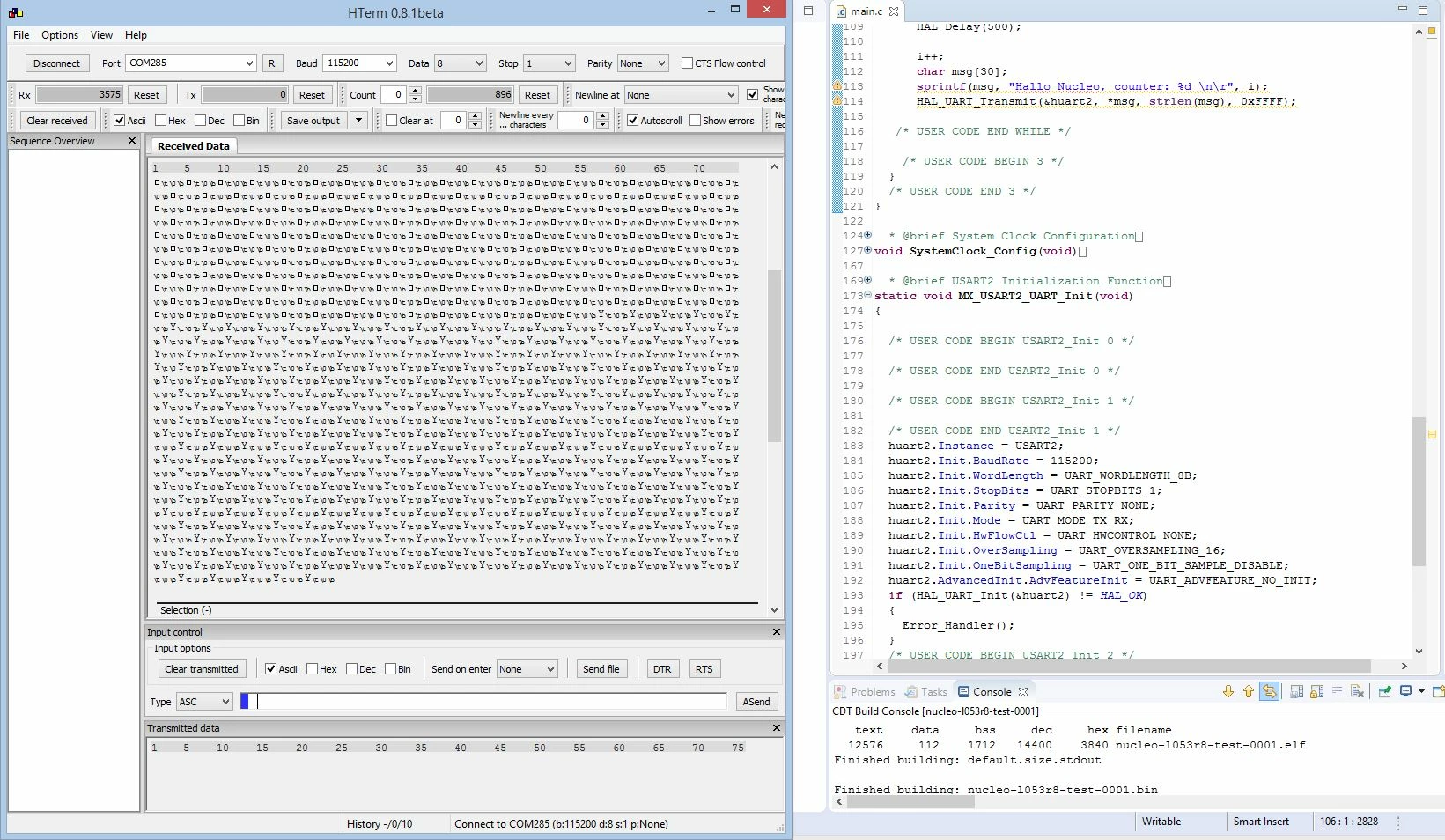
0690X00000DYtouQAD.jpg

BTW: I'm using a nucleo54 STM32L053R8 board.

This topic has been closed for replies.

11 replies

TDK
March 6, 2020

Why not re-download v1.2.0 and start working again?

"If you feel a post has answered your question, please click ""Accept as Solution""."
KlausF01
KlausF01Author
Associate II
March 6, 2020

How do I downgrade? Just install the lower version?

TDK
March 6, 2020
Probably that or uninstall the current one first.
"If you feel a post has answered your question, please click ""Accept as Solution""."
KlausF01
KlausF01Author
Associate II
March 6, 2020

I'm just not confortable with weekly uninstalling and re-installing the IDE, whenever something goes wrong ...

TDK
March 6, 2020
Nor would I. So stay on 1.2. Or pay for a commercial IDE. There are many options.
As you said, probably a clock error. Verify the uart register settings are correct. Verify your system clock is correct. Or find an oscilloscope.
"If you feel a post has answered your question, please click ""Accept as Solution""."
Pavel A.
Super User
March 6, 2020

Recompiling existing code with a different IDE (and updated toolchain?) can cause clock error? Hmm hmm.

If you use ST HAL library, did the new IDE by chance updated that library to the latest?

-- pa

KlausF01
KlausF01Author
Associate II
March 6, 2020

In the meantime, I completely uninstalled version 1.3.0 and re-installed the previous version 1.2.0. Can you guess what happened? Yes, THE ERROR STILL REMAINS!!!

The bitrate of the USART still is completely missconfigured, so I'm no longer able to VCP for debugging!!!

KlausF01
KlausF01Author
Associate II
March 6, 2020

I have checke the USART clock, which is about 2 MHz. Unfortunately I'm not aware if that's the correct value. As what I found here,  the clock should be correct.

0690X00000DYu2DQAT.jpg

Another strange observation: I'm transmitting around 28..30 Bytes. Each loop, HTerm receives exactly 29 Bytes, but can't detect anymore. Without an oscilloscope, I would guess the USART signal could be somehow inverted???

TDK
March 6, 2020

You might have better luck if your UART clock is an even multiple (of at least 16x) of the rate you want to output. Without this, you introduce some error, which the receiver may or may not be okay with.

Why would the signal be inverted? That's a strange conclusion to jump to. Stay objective.

Are you sure this was working before?

"If you feel a post has answered your question, please click ""Accept as Solution""."
KlausF01
KlausF01Author
Associate II
March 6, 2020

Yes of course, it was working before!!!

I did count the bytes, comming in and found that it is correlated with the amount of bytes I do transmitt.

However the Device Configuration Tool allows the USART under Advanced Features to be set to "TX Pin Active Level Inversion" and also "Data Inversion". Why do you think I can exclude the possibility that one of this bits is set wrong, by some misconfiguration or bug?

The pitty is, that without an oscilloscope I just can guess ...

BTW: I does not work with 115200 NOR with 9600 ...

TDK
March 6, 2020
You dont need a scope to debug and look at the relevant register values. Or to calculate the exact baud rate it has set.
"If you feel a post has answered your question, please click ""Accept as Solution""."
S.Ma
Principal
March 7, 2020

Did you restore the user project directory or used the touched by 1.3 and reopened in 1.2

Having access to an oscilloscope (fablab, school electronics lab, rental) is quite needed for embedded programming.

There are also small USB scopes too.

Which STM32 are you using?

KlausF01
KlausF01Author
Associate II
March 7, 2020

Thanks for alle the answers!

To exclude any software issues, I tried to send a static text and surprise - it transmitts correct!

    HAL_UART_Transmit(&huart2, "Test0123456789", 14, 0xFFFF);

So, there must be a compiler issue, handling the pointers to the variable pData {HAL_UART_Transmit(huart, pData, Size, Timeout)} when typecasting probably is not correctly defined. Handling of this issues seems to have changed with the uptade (new version of compiler).

What I saw to be transmitted, was the correct amount of bytes (as mentioned abobe), but some randomly picked data from elswhere in the memory!

BTW: How to set this topic on solved?

It's really strange, that the problem remained persistent after downgrading to IDE 1.2.0 again.

But good to know, it's not a bug in the HAL.

BTW: How to set this topic on SOLVED?

UButt.1
Visitor II
July 6, 2021

Its July 2021 and I find my self in the same situation. Creating a project using STM32CubeIde and then opening STM32CubeMX from it for micro peripheral initialization. After code generation. USART transmits data but raw data uneven.

Creating same thing but first using STM32CubeMX for peripheral initialization and then generating code for STM32CubeIde creates no problem. Usart working properly.

STM32CubeIde has some problem and I cant figure out what. Any one got solution?

Pavel A.
Super User
July 7, 2021

@UButt.1​ So, same questions again: what is your STM32? Have you tried to compare old and new generated code?

Has the Cube library version changed between the old and new version?

Have any build settings changed? (optimization, compiler version etc).

TDK
July 7, 2021
Diff the code to find the difference. Gotta be an answer. No clue what “raw data uneven�? means.
"If you feel a post has answered your question, please click ""Accept as Solution""."