

Unresolved Inclusion for Dual Core Project
Hello there,
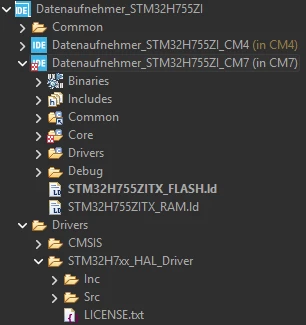
I made a project using the STM32H7A3 controller. I imported the project into my workspace and everything worked fine. The project got recognized as a CubeIDE project and compiling it was no problem. Now I wanted to switch to the STM32H755 controller which is a dual core controller. Mainly because it has an onboard ethernet connector. I wanted to test my old project on the new controller and configured a new project with CubeMX and generated Code. I set the toolchain to STM32CubeIDE and ticked “generate under root”. It generated the following structure:
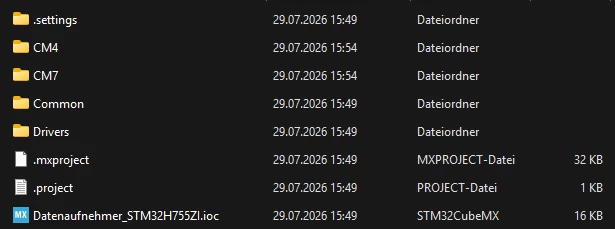
Now, when I import the project into my workspace, only the sub-projects CM7 and CM4 for the two cores can be separately built but the root project does not get recognized as a CubeIDE Project. Additionally, every #include for HAL driver headers has an unresolved inclusion error:
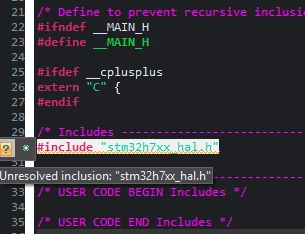
This is the main.h file that got generated inside the CM7 folder. On default files and other files I copied all the includes work except for those HAL headers. They all have the Unresolved inclusion error. That leads to functions not working or rather not being resolved:

The strange thing is, I can compile the separate Cores CM7 and CM4 without any errors:
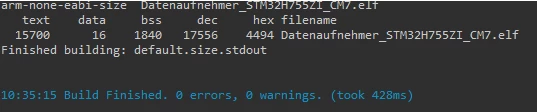
For some reason the compiler can find the symbols, otherwise there would be an error like “undefined reference” or something.
This is a fresh install, so all Settings should be default and Im using version 2.2.0 and the latest CubeMX.
When I check my paths and symbols I see this:
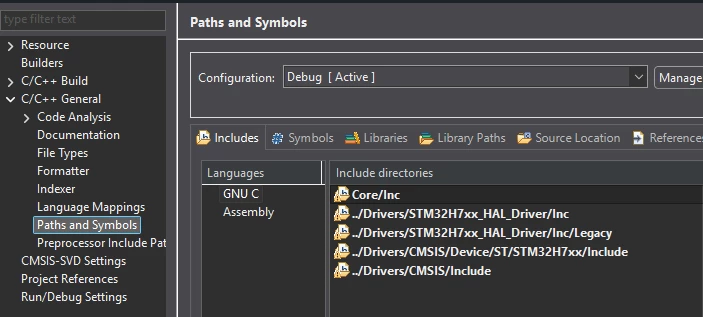
There are already warning symbols. Iirc these appear if the system cant find the paths. I checked all these folders at the bottom:
All the files exist like on my other project that worked for some reason. I suspect it is due to the fact that the IDE doesnt recognize the Root folder of the project as a CubeIDE Project. I tried manually adding the paths but this didnt work. I also checked for build options for the root folder, but there werent any. Hope someone has an idea.
Cheers