SSala.3
Associate III
February 5, 2024
Solved

Unable to build the imported stm32h7 Dual core project

  • February 5, 2024
  • 2 replies
  • 2404 views

Hi All,

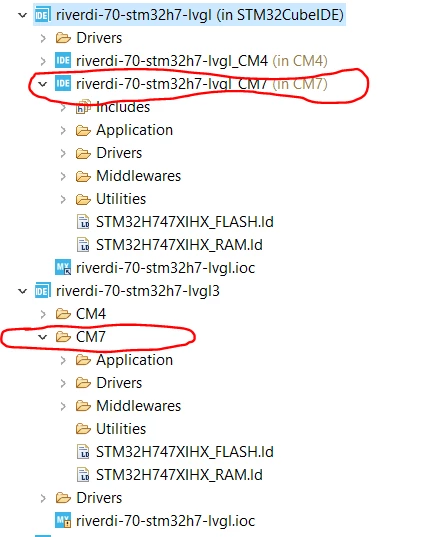
I have created a copy of an existing CubeIDE project "riverdi-70-stm32h7-lvgl" as you see below. The second project doesn't have the active CM7 project feature that allows to build, it just shows CM7 folder. What is the reason for this? 

I tried importing as "Existing Project into Workspace" still the same. Is there anything that need to be taken care while importing multicore MCU projects?  How can I have the same view as the previous version of the project?

Thanks.
SSala3_1-1707125306233.png


    This topic has been closed for replies.
    Best answer by Imen.D

    Hello @SSala.3 ,

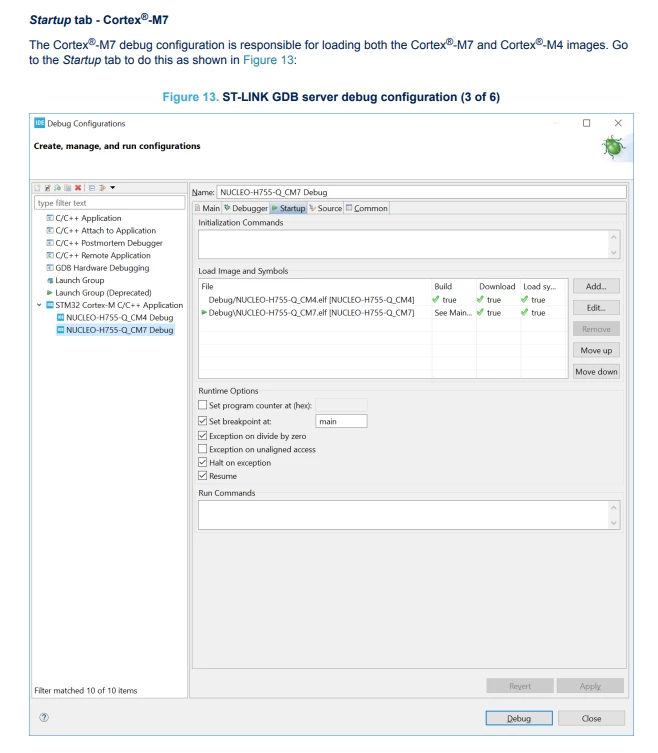
    Make sur to create and configure properly the "Debug Configurations" for both cores and check your setting of 'halt' option.

    For that, I invite you to follow the steps in the AN5361, in "3. Debugging section", this will help you configure your project in the STM32CubeIDE.

    ImenD_0-1707129965085.png


    2 replies

    Imen.DBest answer
    ST Technical Moderator
    February 5, 2024

    Hello @SSala.3 ,

    Make sur to create and configure properly the "Debug Configurations" for both cores and check your setting of 'halt' option.

    For that, I invite you to follow the steps in the AN5361, in "3. Debugging section", this will help you configure your project in the STM32CubeIDE.

    ImenD_0-1707129965085.png


    In order to give better visibility on the answered topics, please click on 'Best answer' on the reply which solved your issue or answered your question. Thanks
    SSala.3
    SSala.3Author
    Associate III
    February 5, 2024

    Thanks @Imen.D  AN5361 was helpful in resolving my problem.