


Tried connecting to Github, now all source files are gone . . .
Hello
I attempted to link my STM32 project with GitHub, following the guide
How to use Github with STM32cubeIDE in 2023 - Shady Electronics
I managed to complete all the steps, but for some reason, I couldn't push my project to the repository.
Initially, I decided to continue without syncing it to GitHub. However, I soon noticed that my entire project has vanished from its folder on my computer.
When I open STM32CubeIDE, I can still access the project, as illustrated here:
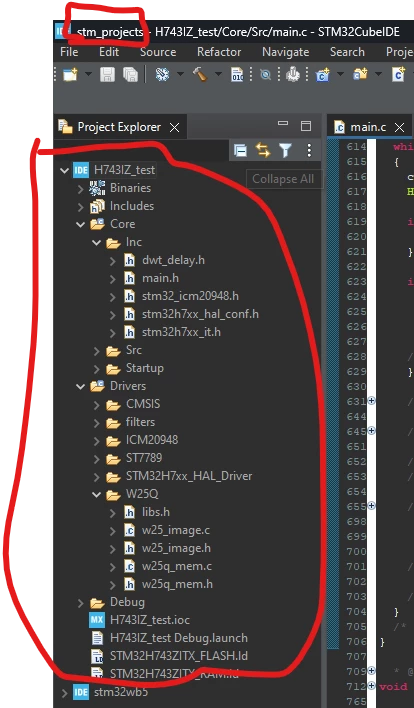
Yet, when I navigate to the 'stm_projects' directory on my PC (where STM32CubeIDE indicates it should be), the project is missing:
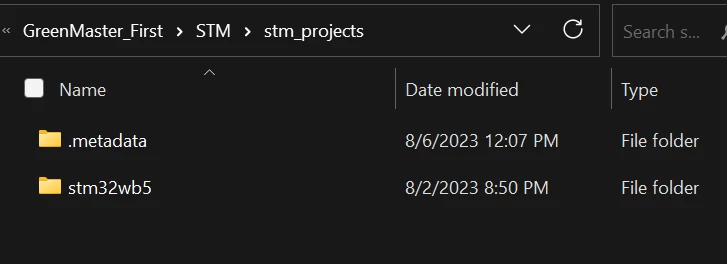
As evident, only the 'stm32wb5' project is present, which is also visible in the previous image.
When I attempt to compile and debug, an error message from Reset_Handler() states "source file not found". Surprisingly, it still compiles and operates without issues.

Moreover, the GitHub repository I intended to push to doesn't show any record of the project.

I even searched my PC for unique files from the project, like "w25_image.c" displayed in the first image. Sadly, I found no trace of it.
It's also missing from my GitHub. I'm growing increasingly concerned about potentially losing the entire project. Does anyone have insights or suggestions on this?
