

JLABO.1
Associate
February 20, 2021
Question

Thumbs2 instruction set only ?

  • February 20, 2021
  • 2 replies
  • 3020 views

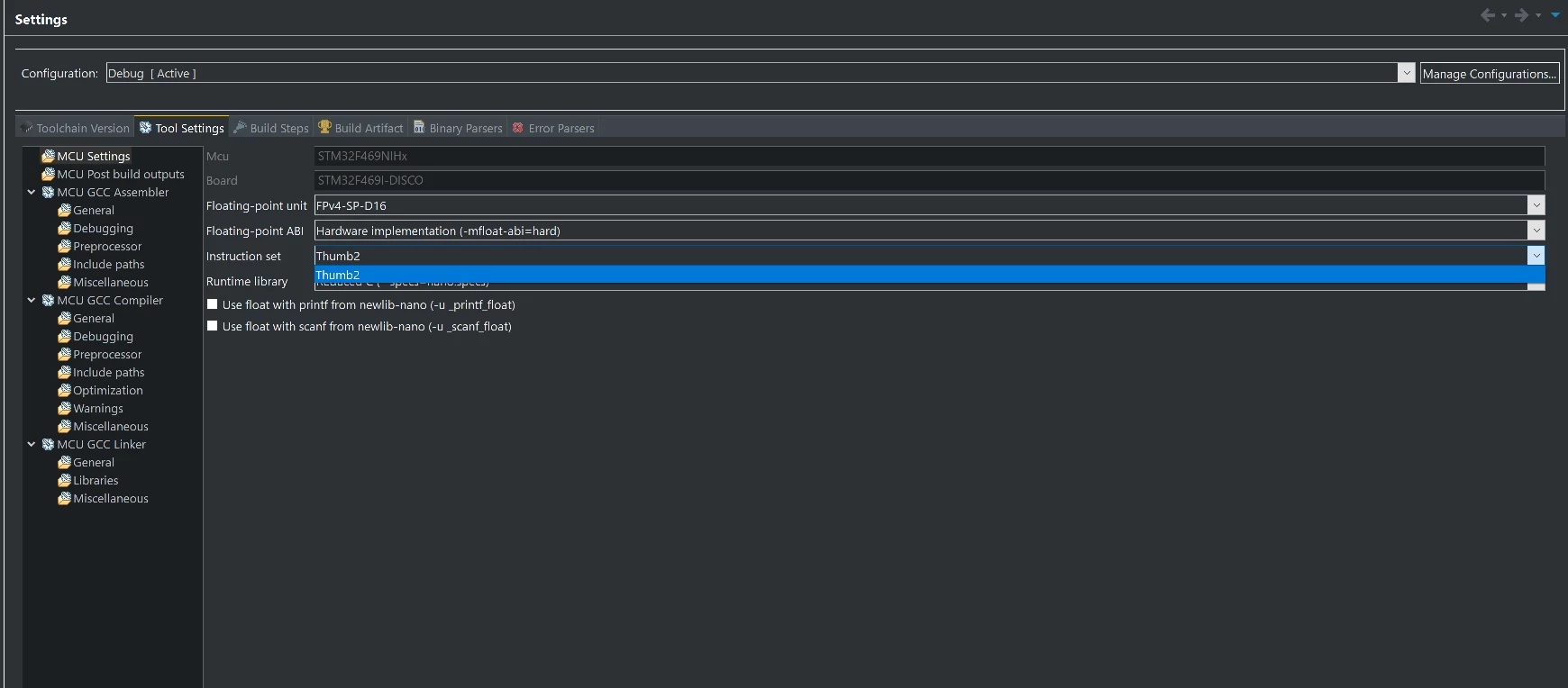
When you go the Tool Settings tab in the Project Properties you are only able to select Thumb2 for the instruction set.

Is it intended or is there a "hidden" way to switch to the ARM instruction set ?
0693W000008GiysQAC.jpg

This topic has been closed for replies.

2 replies

Tesla DeLorean
Guru
February 20, 2021

And the value of doing so in this context would be what?

Does the CM4 support ARM instructions?

Tips, Buy me a coffee, or three.. PayPal VenmoUp vote any posts that you find helpful, it shows what's working..
JLABO.1
JLABO.1Author
Associate
February 22, 2021

It seems CM4 only supports the Thumb instruction set... seems I'm too used to my old ARM7TDMI which supported both ARM and Thumb so I was surprised not to have the option to go for ARM instructions, I thought it was an IDE limitation and not an architecture limitation.

Danish1
Lead III
February 20, 2021

That switch becomes useful if you happen to be programming for a processor that supports the arm (as distinct from the thumb) instruction set (or more correctly, supports both).

ST does make processors like that, for example their STM32MP157 has two processor cores - one is an arm cortex M4 that can only execute thumb. But the other is an arm cortex A7 which can run in either Armv7-A or Thumb2. So you'b be able to use that switch with that processor-core on that mpu.

Hope this helps,

Danish
