Senior III
October 25, 2026
Solved

The macros are not highlighted in STM32Cube Ide

I am observing that some of the #defines are not highlighted in blue color in STM32 Cube IDE, some are highlighted. What is the reason? It is bit inconvenient if it is not highlighted.

Andrew Neil
Andrew NeilBest answer
Super User
October 26, 2026

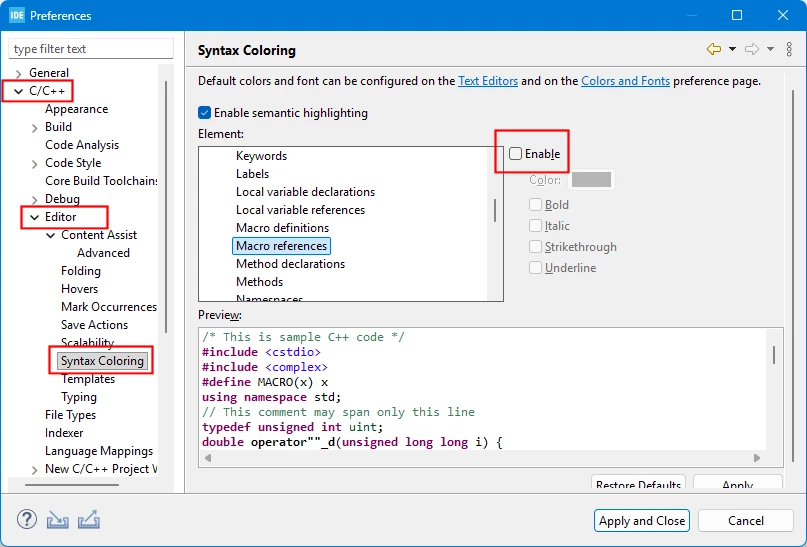
​@STuser2  - The setting is in Window > Preferences:


A complex system that works is invariably found to have evolved from a simple system that worked.A complex system designed from scratch never works and cannot be patched up to make it work.

6 replies

ST Technical Moderator
October 26, 2026

Hello ​@STuser2 

Let me thank you for posting.

Could you please provide screenshots that illustrate the behavior and the STM32CubeIDE version.

Thanks.

Mahmoud

To give better visibility on the answered topics, please click on Accept as Solution on the reply which solved your issue or answered your question.
Andrew Neil
Super User
October 26, 2026

Can you be more specific about which macros don’t get highlighted?

Note that the file containing the definitions must be saved before references get highighted.

Have you tried rebuilding the index?


Which CubeIDE version(s) ?

A complex system that works is invariably found to have evolved from a simple system that worked.A complex system designed from scratch never works and cannot be patched up to make it work.
STuser2Author
Senior III
October 26, 2026

I realized that only enums are getting highlighted.

The below two are macros


The above SOFTWARE_VER  is an enum. Is it possible to highlight the #defines also like above?

Andrew Neil
Super User
October 26, 2026

Yes, #defines should also highlight - subject to notes above.


Are you sure that the necessary header is actually being included ?


Having said that, I see in my own projects:

and it is, indeed, only the enums which are getting highlighted!

CubeIDE Version: 2.1.1; Build: 28236_20260312_0043 (UTC)


PS:

The IDE does recognise that they are macros:


A complex system that works is invariably found to have evolved from a simple system that worked.A complex system designed from scratch never works and cannot be patched up to make it work.
Andrew Neil
Andrew NeilBest answer
Super User
October 26, 2026

​@STuser2  - The setting is in Window > Preferences:


A complex system that works is invariably found to have evolved from a simple system that worked.A complex system designed from scratch never works and cannot be patched up to make it work.
STuser2Author
Senior III
October 26, 2026

Thank you very much.