ksale.1
Senior II
February 18, 2022
Solved

The build button is greyed

  • February 18, 2022
  • 3 replies
  • 11103 views

0693W00000KZkHNQA1.jpg

This topic has been closed for replies.
Best answer by mattias norlander

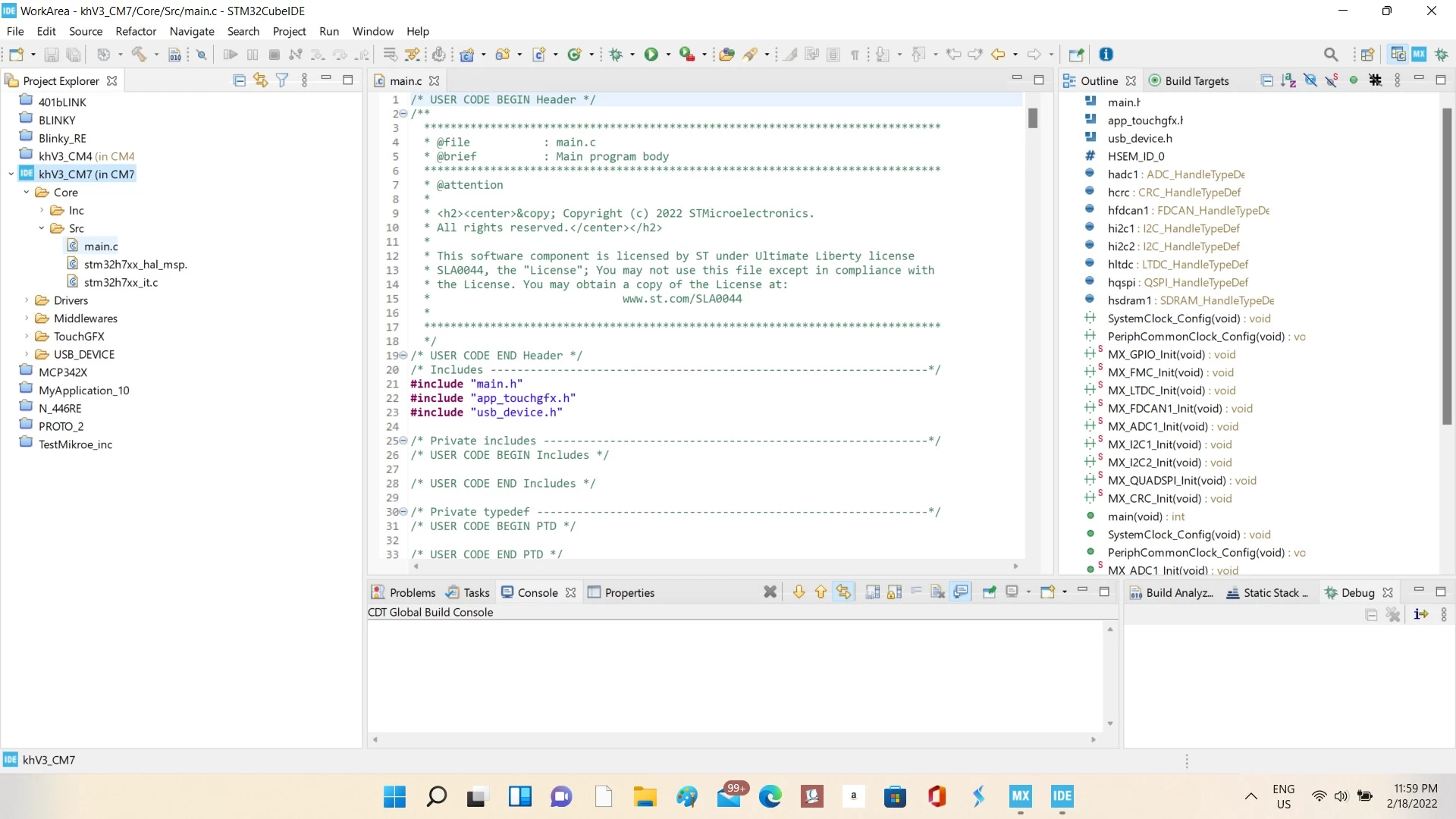
Looking at the screenshot I think this project was incorrectly created or imported.

The Core/Src folders has no "purple c" decoration. Consequently compiler will not look for source code here.

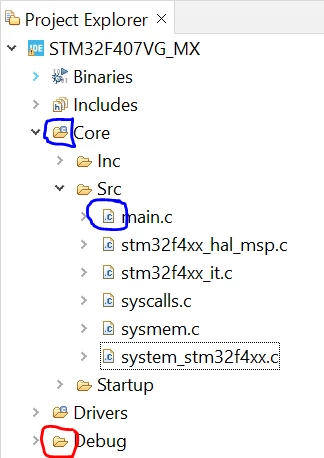
What do I mean with "purple c decoration"? Look at the image below:
0693W00000Ka7ZkQAJ.png

  • Core and Drivers folders are set as source folders. They have purple c in the icon.
    • All sub-folders of a source folder are also included in the build scan.
    • All c-files inside a source folder tree get a different icon vs files that will not be build. Compare the icon for main.c in my screenshot vs yours.
  • Debug is not a configured source folder, since it only contains the artifacts from the build process.

It appears that not a single folder in your project is treated as source folder.

Then there is nothing to build. Why did this happen?

Well the project is either not create or not imported correctly? Maybe the .cproject file is missing in the project root and the project is then not a CDT project, but only a normal Eclipse folder.

It also seem like this is an H7 dual-core project you are playing with. There should be a top-level project called only "khV3". You only seem to have the part for the CM4 and the CM7. Not the top-level one... I recommend you read the app note on H7 dual-core dev in CubeIDE to get started properly:

https://www.st.com/resource/en/application_note/an5361-getting-started-with-projects-based-on-dualcore-stm32h7-microcontrollers-in-stm32cubeide-stmicroelectronics.pdf

3 replies

mattias norlander
ST Employee
February 22, 2022

Looking at the screenshot I think this project was incorrectly created or imported.

The Core/Src folders has no "purple c" decoration. Consequently compiler will not look for source code here.

What do I mean with "purple c decoration"? Look at the image below:

0693W00000Ka7ZkQAJ.png

  • Core and Drivers folders are set as source folders. They have purple c in the icon.
    • All sub-folders of a source folder are also included in the build scan.
    • All c-files inside a source folder tree get a different icon vs files that will not be build. Compare the icon for main.c in my screenshot vs yours.
  • Debug is not a configured source folder, since it only contains the artifacts from the build process.

It appears that not a single folder in your project is treated as source folder.

Then there is nothing to build. Why did this happen?

Well the project is either not create or not imported correctly? Maybe the .cproject file is missing in the project root and the project is then not a CDT project, but only a normal Eclipse folder.

It also seem like this is an H7 dual-core project you are playing with. There should be a top-level project called only "khV3". You only seem to have the part for the CM4 and the CM7. Not the top-level one... I recommend you read the app note on H7 dual-core dev in CubeIDE to get started properly:

https://www.st.com/resource/en/application_note/an5361-getting-started-with-projects-based-on-dualcore-stm32h7-microcontrollers-in-stm32cubeide-stmicroelectronics.pdf

mattias norlander
ST Employee
March 1, 2022

Did this solve your problem?

ksale.1
ksale.1Author
Senior II
March 1, 2022

Thank you @mattias norlander​ well noted. When I started the project from within the CubeIDE (not from CubeMX) things were sorted out and the project tree as described in your answer above.