
Associate
May 29, 2024
Solved

Target USB Comms error

Hello all,

I am programming on the NUCLEO-C031C6 and have some errors debugging the project. I have connected the board with micro-usb as it must. However i get following error message:
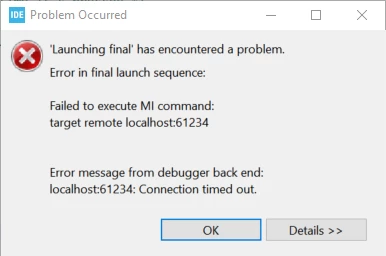

dramanovic_0-1716983503415.png

dramanovic_1-1716983546123.png


Thank you in advance.

    This topic has been closed for replies.
    Imen.DBest answer
    ST Technical Moderator
    May 29, 2024

    Hello @dramanovic 

    Make sure to update the ST-Link Firmware and ST-Link server software.

    Make sure to use the last release of CubeIDE.

    Check the USB cable and connectors.

    In order to give better visibility on the answered topics, please click on 'Best answer' on the reply which solved your issue or answered your question. Thanks

    2 replies

    Imen.DBest answer
    ST Technical Moderator
    May 29, 2024

    Hello @dramanovic 

    Make sure to update the ST-Link Firmware and ST-Link server software.

    Make sure to use the last release of CubeIDE.

    Check the USB cable and connectors.

    In order to give better visibility on the answered topics, please click on 'Best answer' on the reply which solved your issue or answered your question. Thanks
    Associate
    May 29, 2024

    Thank you for your help!
    The error has not been resolved, however i do not know if the st-link server is started since i ran the .bat file from the link you provided. However i should only give administrator rights and did not receive any feedback if successfully installed.
    In my FAIL.txt file from the board itself, it states:The interface firmware FAILED to reset/halt the target MCU.

    After disconnecting and reconnecting the Board, the LD1 is constantly red. However after trying to run a project and when the error occurs, it turns constantly green.
    Is it possible, that the connecting micro-usb cable is the issue or is there another way to possible fix it?

    Thanks,

    David
