


Dave Nadler
Senior III
May 7, 2019
Solved

STMcubeIDE fails to import Atollic project

  • May 7, 2019
  • 3 replies
  • 2011 views

I tried to import an Atollic project into STMcubeIDE (which so far doesn't work at all).

The import appears to succeed, but the ARM toolchain is not set up correctly and shows "orphaned configuration/toolchain":
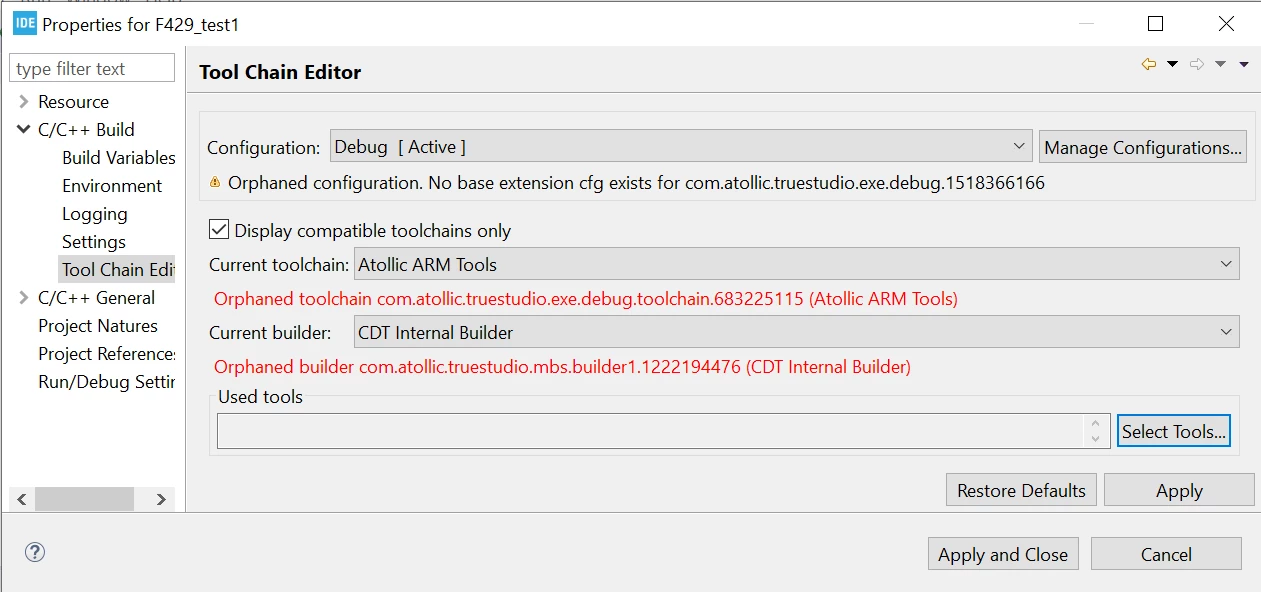
0690X000008BLIkQAO.png

Has anyone been able to get this to work?

Thanks for any tips!

Best Regards, Dave

This topic has been closed for replies.
Best answer by Markus GIRDLAND

It looks like you imported the project as an "existing project into workspace" which does not convert the project properly.

You can follow this guide UM2578 which should solve this problem.

3 replies

Pavel A.
May 8, 2019

I had to re-create project from scratch. Tried to rename the toolchain in .cproject but... it looks like explosion in a spaghetti factory.

A kind request to Atollic folks, or anybody with knowledge in Eclipse CDT - provide a tool/script to migrate projects to a different (GCC based) toolchain?

-- pa

Markus GIRDLAND
Markus GIRDLANDBest answer
ST Employee
May 8, 2019

It looks like you imported the project as an "existing project into workspace" which does not convert the project properly.

You can follow this guide UM2578 which should solve this problem.

Dave Nadler
Senior III
May 10, 2019

@Markus GIRDLAND​ - Thanks, I am able to import, build, and debug this project. Will separately report other bugs...